<?xml version="1.0" encoding="utf-8"?><feed xmlns="http://www.w3.org/2005/Atom" ><generator uri="https://jekyllrb.com/" version="3.10.0">Jekyll</generator><link href="https://rcarrata.com/feed.xml" rel="self" type="application/atom+xml" /><link href="https://rcarrata.com/" rel="alternate" type="text/html" /><updated>2026-05-28T15:17:47+00:00</updated><id>https://rcarrata.com/feed.xml</id><title type="html">Rcarrata’s Blog</title><subtitle>Rcarrata&apos;s Blog</subtitle><author><name>Roberto Carratalá</name></author><entry><title type="html">How to Use Generative AI for Securing Cloud Infrastructures (Part II)</title><link href="https://rcarrata.com/ai/security-genai-public-cloud-2/" rel="alternate" type="text/html" title="How to Use Generative AI for Securing Cloud Infrastructures (Part II)" /><published>2024-01-25T00:00:00+00:00</published><updated>2024-01-25T00:00:00+00:00</updated><id>https://rcarrata.com/ai/security-genai-public-cloud-2</id><content type="html" xml:base="https://rcarrata.com/ai/security-genai-public-cloud-2/"><![CDATA[<p>How does Generative AI enhance detection, response, and adaptation in cloud security? How can cloud security professionals effectively utilize Generative AI models across various domains?
Why embrace Generative AI in Vulnerability Assessment, Threat Intelligence, Security Incident Response, Access Control, and Data Protection?</p>

<h2 id="overview">Overview</h2>

<p>This is the second blog post about how to use Generative AI for Securing Cloud Infrastructures, exploring advanced techniques and innovative solutions to fortify cloud security.</p>

<p>Check the first part in <a href="https://rcarrata.com/ai/security-genai-public-cloud/">How to Use Generative AI for Securing Cloud Infrastructures - Part I</a>.</p>

<p>Let’s continue to deep dive into the rest of the areas where Generative AI secures cloud infrastructure!</p>

<p><a href="https://rcarrata.com/images/genai2.jpeg"><img src="/images/genai2.jpeg" alt="" title="genai" /></a></p>

<h2 id="4-vulnerability-assessment-with-generative-ai">4. Vulnerability Assessment with Generative AI</h2>

<p>In the realm of vulnerability assessment, Gen AI proves invaluable by simulating potential vulnerabilities within our cloud infrastructure. Through synthetic vulnerability generation, it enables proactive identification and mitigation efforts. Gen AI collaborates with machine learning models like rule-based systems, machine learning classifiers, and deep learning models to enhance vulnerability detection.</p>

<h3 id="vulnerability-assessment">Vulnerability Assessment:</h3>
<h4 id="synthetic-vulnerability-generation">Synthetic Vulnerability Generation:</h4>
<ul>
  <li><strong>Description:</strong> Gen AI simulates and generates potential vulnerabilities within the cloud infrastructure, aiding proactive identification and mitigation efforts.</li>
  <li><strong>Gen AI’s Role:</strong> By generating synthetic vulnerabilities, Gen AI provides insights into potential weaknesses, enabling proactive security measures.</li>
</ul>

<h4 id="enhanced-testing-and-analysis">Enhanced Testing and Analysis:</h4>
<ul>
  <li><strong>Description:</strong> Gen AI augments vulnerability testing and analysis efforts by leveraging advanced machine learning techniques.</li>
  <li><strong>Gen AI’s Role:</strong> Through adaptive learning, Gen AI refines vulnerability detection, ensuring early risk mitigation and comprehensive analysis.</li>
</ul>

<h4 id="coverage-of-emerging-threats">Coverage of Emerging Threats:</h4>
<ul>
  <li><strong>Description:</strong> Gen AI models continuously learn from evolving threat intelligence, updating their knowledge of potential vulnerabilities.</li>
  <li><strong>Gen AI’s Role:</strong> By staying updated with emerging threats, Gen AI fortifies our defenses, ensuring resilience against the ever-changing threat landscape.</li>
</ul>

<p>In the domain of threat intelligence, Gen AI analyzes extensive volumes of threat data, identifies patterns, and generates synthetic threat instances, empowering us to uncover hidden vulnerabilities.</p>

<h3 id="41-integration-of-genai-in-vulnerability-assessment">4.1. Integration of GenAI in Vulnerability Assessment</h3>

<p>In the realm of vulnerability assessment, Generative AI (Gen AI) emerges as a powerful ally, enhancing our understanding and identification of potential weaknesses in the cloud infrastructure:</p>

<ul>
  <li><strong>Generative AI’s Role:</strong>
    <ul>
      <li>Gen AI employs various techniques, including rule-based systems, machine learning classifiers, and deep learning models, to enhance vulnerability assessment efforts. Rule-based systems utilize predefined rules to detect known vulnerabilities based on patterns or signatures. Machine learning classifiers, trained on labeled vulnerability data, identify patterns and predict the presence of vulnerabilities in new data. Deep learning models analyze complex data such as code snippets or network traffic to identify vulnerabilities or predict vulnerable code segments.</li>
    </ul>
  </li>
  <li><strong>Utilized Techniques:</strong>
    <ul>
      <li><em>Rule Based Systems:</em> Gen AI utilizes predefined rules to detect known vulnerabilities based on patterns or signatures, ensuring a proactive approach to vulnerability identification.</li>
      <li><em>Machine Learning Classifiers:</em> Gen AI employs machine learning classifiers trained on labeled vulnerability data to identify patterns and predict the presence of vulnerabilities in new data, enabling accurate and efficient vulnerability assessments.</li>
      <li><em>Deep Learning Models:</em> Gen AI leverages deep learning models to analyze complex data, including code snippets and network traffic, enabling the identification of vulnerabilities and prediction of vulnerable code segments, enhancing our understanding of potential weaknesses.</li>
    </ul>
  </li>
</ul>

<p>Gen AI’s contribution to vulnerability assessment strengthens our cloud defenses, enabling us to fortify our protections against potential exploits and security breaches.</p>

<h2 id="5-threat-intelligence-with-generative-ai">5. Threat Intelligence with Generative AI</h2>

<p>Within the realm of threat intelligence, Generative AI can analyze extensive volumes of threat data. Gen AI identifies intricate patterns and generates synthetic threat instances, empowering us to uncover hidden vulnerabilities and anticipate malicious intent.</p>

<h4 id="pattern-recognition-and-analysis">Pattern Recognition and Analysis:</h4>
<ul>
  <li><strong>Description:</strong> Gen AI analyzes large volumes of threat data, identifying patterns and trends for insightful analysis.</li>
  <li><strong>Gen AI’s Role:</strong> By recognizing patterns, Gen AI provides valuable insights into evolving threat landscapes, enabling strategic defense mechanisms.</li>
</ul>

<h4 id="predictive-analytics">Predictive Analytics:</h4>
<ul>
  <li><strong>Description:</strong> Gen AI generates predictions and forecasts based on identified threat patterns, aiding in proactive threat mitigation.</li>
  <li><strong>Gen AI’s Role:</strong> Through predictive analytics, Gen AI foretells potential threats, allowing us to prepare and fortify our defenses in advance.</li>
</ul>

<h4 id="automated-data-processing">Automated Data Processing:</h4>
<ul>
  <li><strong>Description:</strong> Gen AI automates the processing and analysis of vast amounts of threat intelligence data, ensuring efficient utilization.</li>
  <li><strong>Gen AI’s Role:</strong> By automating data processing, Gen AI enhances our analytical capabilities, enabling swift responses to emerging threats.</li>
</ul>

<h4 id="real-time-monitoring">Real-Time Monitoring:</h4>
<ul>
  <li><strong>Description:</strong> Gen AI monitors real-time data feeds, detecting anomalies and indicators of compromise for rapid threat response.</li>
  <li><strong>Gen AI’s Role:</strong> With real-time monitoring, Gen AI ensures vigilance against immediate threats, allowing us to respond swiftly and decisively.</li>
</ul>

<h4 id="contextual-understanding">Contextual Understanding:</h4>
<ul>
  <li><strong>Description:</strong> Gen AI captures contextual information and relationships between various threat data elements for nuanced analysis.</li>
  <li><strong>Gen AI’s Role:</strong> By understanding context, Gen AI enables precise threat assessments, ensuring accurate responses tailored to specific scenarios.</li>
</ul>

<p>In summary, armed with insights from vulnerability assessment and knowledge of impending threats from threat intelligence, we can leverage Gen AI’s enhancements to make strategic decisions.</p>

<h3 id="51-integration-of-genai-in-vulnerability-assessment">5.1. Integration of GenAI in Vulnerability Assessment</h3>

<p>In the realm of vulnerability assessment, Generative AI (Gen AI) emerges as a powerful ally, revolutionizing our ability to identify and mitigate potential weaknesses within our digital fortifications.</p>

<ul>
  <li><strong>Gen AI’s Role:</strong>
    <ul>
      <li>Gen AI employs advanced Natural Language Processing (NLP) techniques to analyze security reports, blogs, and forums, identifying patterns and trends in threat data. This deep contextual understanding enhances our ability to recognize potential risks and vulnerabilities.</li>
    </ul>
  </li>
  <li><strong>Utilized Techniques:</strong>
    <ul>
      <li><em>NLP-based Pattern Recognition and Analysis:</em> Gen AI utilizes NLP algorithms to analyze unstructured threat intelligence data, extracting valuable insights from security reports, blogs, and forums. This analysis helps us identify intricate patterns and anticipate potential vulnerabilities.</li>
      <li><em>Cluster Algorithms:</em> Gen AI employs cluster algorithms, such as K-means or hierarchical clustering, to group similar threat intelligence data together based on common attributes. This clustering enables a more organized and nuanced understanding of potential vulnerabilities, allowing for targeted mitigation efforts.</li>
      <li><em>Generative Models:</em> Gen AI leverages generative models, including variational autoencoders and generative adversarial networks, to create synthetic threat instances. By generating these instances, Gen AI aids in comprehensive threat modeling, enabling us to anticipate and address potential vulnerabilities effectively.</li>
    </ul>
  </li>
</ul>

<p>Gen AI’s integration with NLP, cluster algorithms, and generative models enhances our vulnerability assessment capabilities, ensuring a proactive and robust defense against emerging threats.</p>

<h2 id="6-security-incident-response-with-generative-ai">6. Security Incident Response with Generative AI</h2>

<p>Security incident response involves detecting, investigating, and mitigating security incidents within a cloud infrastructure. Generative AI, with its adaptive learning mechanisms, plays a pivotal role in this domain.</p>

<h4 id="anomaly-detection">Anomaly Detection:</h4>
<ul>
  <li><strong>Description:</strong> Generative AI models learn normal patterns within the cloud infrastructure, identifying anomalies that may indicate potential security incidents.</li>
  <li><strong>Gen AI’s Role:</strong> By recognizing deviations, Gen AI aids in early incident detection, enabling prompt response to potential threats.</li>
</ul>

<h4 id="real-time-monitoring-1">Real-Time Monitoring:</h4>
<ul>
  <li><strong>Description:</strong> Gen AI models continuously monitor network traffic, system logs, and user activities in real time.</li>
  <li><strong>Gen AI’s Role:</strong> Its vigilant real-time monitoring allows immediate response to any deviations from established norms, ensuring swift threat mitigation.</li>
</ul>

<h4 id="automated-alert-generation">Automated Alert Generation:</h4>
<ul>
  <li><strong>Description:</strong> Gen AI automatically generates alerts upon detecting anomalies or potential security incidents, ensuring rapid awareness and response.</li>
  <li><strong>Gen AI’s Role:</strong> Through automated alert generation, Gen AI enhances situational awareness, enabling quick and effective incident response.</li>
</ul>

<h4 id="incident-triage-and-prioritization">Incident Triage and Prioritization:</h4>
<ul>
  <li><strong>Description:</strong> Gen AI assists in triaging and prioritizing security incidents based on severity, impact, or potential risks.</li>
  <li><strong>Gen AI’s Role:</strong> By prioritizing incidents, Gen AI guides efficient response strategies, allowing us to focus resources where they are most needed.</li>
</ul>

<h4 id="root-cause-analysis">Root Cause Analysis:</h4>
<ul>
  <li><strong>Description:</strong> Gen AI analyzes patterns and anomalies associated with security incidents, facilitating in-depth understanding and effective resolution.</li>
  <li><strong>Gen AI’s Role:</strong> Through root cause analysis, Gen AI uncovers the underlying causes of incidents, enabling targeted response and preventing recurrence.</li>
</ul>

<h4 id="threat-hunting">Threat Hunting:</h4>
<ul>
  <li><strong>Description:</strong> Gen AI analyzes historical incident data and generates synthetic instances of potential threats, empowering proactive threat hunting initiatives.</li>
  <li><strong>Gen AI’s Role:</strong> By simulating threats, Gen AI aids in proactive hunting, allowing us to anticipate and mitigate emerging threats before they manifest.</li>
</ul>

<h4 id="decision-support">Decision Support:</h4>
<ul>
  <li><strong>Description:</strong> Gen AI offers insights and recommendations based on learned patterns and historical incident data, guiding informed decision-making during incident response.</li>
  <li><strong>Gen AI’s Role:</strong> By providing decision support, Gen AI assists security professionals in making informed choices, optimizing incident response strategies.</li>
</ul>

<h4 id="continuous-learning-and-adaptation">Continuous Learning and Adaptation:</h4>
<ul>
  <li><strong>Description:</strong> Gen AI continuously learns and adapts to evolving threats and attack techniques, ensuring up-to-date and effective incident response strategies.</li>
  <li><strong>Gen AI’s Role:</strong> Through continuous learning, Gen AI stays ahead of emerging threats, allowing us to adapt and respond effectively to the ever-changing threat landscape.</li>
</ul>

<h3 id="61-integration-of-genai-in-security-incident-response">6.1. Integration of GenAI in Security Incident Response</h3>

<p>In the realm of security incident response, Generative AI (Gen AI) emerges as a powerful ally, enhancing our capabilities to combat cyber threats and safeguard our digital domain.</p>

<ul>
  <li><strong>Gen AI’s Role:</strong>
    <ul>
      <li>Gen AI learns from historical incident data and generates synthetic instances, enabling incident simulation, response planning, and decision-making.</li>
    </ul>
  </li>
  <li><strong>Utilized Techniques:</strong>
    <ul>
      <li><em>Rule-Based Systems:</em> Gen AI utilizes predefined rules and conditions to detect and respond to known security incidents, ensuring rapid response based on established protocols.</li>
      <li><em>Machine Learning Classifiers:</em> Gen AI employs machine learning classifiers trained on labeled incident data, identifying patterns and predicting the likelihood and severity of security incidents.</li>
      <li><em>Natural Language Processing (NLP) Models:</em> Gen AI analyzes unstructured incident reports, security logs, and threat intelligence data, extracting valuable insights using techniques like named entity recognition and sentiment analysis.</li>
      <li><em>Deep Learning Models:</em> Gen AI utilizes deep learning models for image or text-based analysis of incident data, enhancing our understanding of complex incidents and their underlying patterns.</li>
      <li><em>Graph Analytics:</em> Gen AI employs graph-based models, representing incident data as interconnected nodes and edges, facilitating the analysis of relationships, dependencies, and potential attack paths.</li>
      <li><em>Reinforcement Learning:</em> Gen AI models, using reinforcement learning techniques, learn optimal response actions through interactions with simulated incident response environments, guiding automated decision-making during incidents.</li>
      <li><em>Generative AI Models:</em> Gen AI incorporates generative models like autoencoders, variational autoencoders, and generative adversarial networks, enabling the generation of synthetic instances for in-depth incident analysis.</li>
    </ul>
  </li>
</ul>

<p>Gen AI’s profound understanding of incidents, coupled with its adaptive nature, strengthens our incident response capabilities, enabling us to thwart even the most sophisticated cyber adversaries and maintain the security of our digital realm effectively.</p>

<h2 id="7-access-control-with-generative-ai">7. Access Control with Generative AI</h2>

<p>Through its advanced techniques and adaptive learning, Gen AI empowers us to secure our cloud infrastructure against unauthorized access and data breaches.</p>

<h4 id="anomaly-detection-1">Anomaly Detection:</h4>
<ul>
  <li><strong>Description:</strong> Gen AI models learn normal patterns within the cloud infrastructure, identifying anomalies that may indicate potential security incidents.</li>
  <li><strong>Gen AI’s Role:</strong> By recognizing deviations, Gen AI aids in early incident detection, enabling prompt response to potential threats.</li>
</ul>

<h4 id="real-time-monitoring-2">Real-Time Monitoring:</h4>
<ul>
  <li><strong>Description:</strong> Gen AI models continuously monitor network traffic, system logs, and user activities in real time.</li>
  <li><strong>Gen AI’s Role:</strong> Its vigilant real-time monitoring allows immediate response to any deviations from established norms, ensuring swift threat mitigation.</li>
</ul>

<h4 id="adaptive-access-policies">Adaptive Access Policies:</h4>
<ul>
  <li><strong>Description:</strong> Gen AI adapts access control policies based on observed user behaviors and context.</li>
  <li><strong>Gen AI’s Role:</strong> Its adaptive policies ensure dynamic and context-aware access decisions, enhancing the security of our cloud resources.</li>
</ul>

<h3 id="71-integration-of-genai-in-access-control">7.1. Integration of GenAI in Access Control</h3>

<p>In the realm of access control, Generative AI (Gen AI) stands as a stalwart guardian, fortifying our defenses against unauthorized access attempts and ensuring the integrity of our digital kingdom.</p>

<ul>
  <li><strong>Gen AI’s Role:</strong>
    <ul>
      <li>Gen AI plays a pivotal role in access control, ensuring the security of our digital domain through:
        <ul>
          <li>Learning from user attributes, access patterns, and resource properties to dynamically adapt access control policies.</li>
          <li>Detecting anomalous behaviors and making personalized access decisions, enhancing our ability to thwart unauthorized access attempts.</li>
        </ul>
      </li>
    </ul>
  </li>
  <li><strong>Utilized Techniques:</strong>
    <ul>
      <li><em>Rule-Based Systems:</em> Employing predefined rules and conditions, Gen AI ensures swift response to known access patterns, controlling access based on specific attributes and patterns.</li>
      <li><em>Machine Learning Classifiers:</em> Gen AI utilizes machine learning classifiers trained on labeled access data to discern intricate patterns, facilitating precise and adaptive access control decisions.</li>
      <li><em>Neural Networks:</em> Leveraging neural networks, Gen AI comprehends complex patterns, user behaviors, and contextual information, enabling nuanced access control decisions rooted in learned representations.</li>
      <li><em>Reinforcement Learning:</em> Gen AI harnesses reinforcement learning models, dynamically adjusting access control rules and policies based on feedback received during training. This adaptive approach optimizes access decisions, enhancing the flexibility of our access control mechanisms.</li>
    </ul>
  </li>
</ul>

<p>Gen AI’s mastery of rule-based systems, machine learning classifiers, neural networks, and reinforcement learning fortifies our access control mechanisms, ensuring precise and efficient management of access privileges within our digital realm.</p>

<h2 id="8-data-protection-with-generative-ai">8. Data Protection with Generative AI</h2>

<p>In the realm of data protection, Generative AI (Gen AI) serves as a formidable ally, safeguarding our sensitive information from unauthorized access, use, or disclosure.</p>

<h4 id="anomaly-detection-and-data-usage">Anomaly Detection and Data Usage:</h4>
<ul>
  <li><strong>Description:</strong> Gen AI models learn the normal patterns of data access and usage within our cloud infrastructure, identifying anomalous behaviors indicative of unauthorized data access or data leakage attempts.</li>
  <li><strong>Gen AI’s Role:</strong> By detecting deviations, Gen AI enhances our ability to promptly identify and respond to potential data breaches, ensuring the confidentiality of our sensitive data.</li>
</ul>

<h4 id="privacy-preserving-data-sharing">Privacy Preserving Data Sharing:</h4>
<ul>
  <li><strong>Description:</strong> Gen AI techniques such as secure multi-party computation or federated learning enable collaborative analysis and decision-making on sensitive data while preserving privacy.</li>
  <li><strong>Gen AI’s Role:</strong> These techniques facilitate secure data sharing and analysis, allowing for meaningful insights without compromising the privacy of individual data records.</li>
</ul>

<h4 id="synthetic-data-generation">Synthetic Data Generation:</h4>
<ul>
  <li><strong>Description:</strong> Gen AI models generate synthetic data that retains the statistical properties and patterns of the original data, enabling testing, development, or sharing without exposing actual sensitive information.</li>
  <li><strong>Gen AI’s Role:</strong> By providing realistic yet synthetic data, Gen AI minimizes the need to expose actual sensitive data, reducing the risk of data breaches while supporting various applications and analyses.</li>
</ul>

<h4 id="data-loss-prevention">Data Loss Prevention:</h4>
<ul>
  <li><strong>Description:</strong> Gen AI models aid in detecting potential data loss incidents, such as unauthorized data transfers, abnormal data deletion, or unusual data access patterns.</li>
  <li><strong>Gen AI’s Role:</strong> By identifying suspicious data-related activities, Gen AI enhances our capability to prevent data loss, ensuring the integrity and confidentiality of our critical information.</li>
</ul>

<h3 id="81-integration-of-genai-in-data-protection">8.1. Integration of GenAI in Data Protection</h3>

<p>In the realm of data protection, Generative AI (Gen AI) proves invaluable, reinforcing our defenses against potential data breaches and ensuring the secure handling of our digital assets.</p>

<ul>
  <li><strong>Gen AI’s Role:</strong>
    <ul>
      <li>Gen AI plays a crucial role in data protection, utilizing techniques like:
        <ul>
          <li><em>Encryption Algorithms:</em> Gen AI employs cryptographic algorithms to transform data into unreadable formats, ensuring secure data transmission and storage.</li>
          <li><em>Anonymization Models:</em> These models enable secure sharing and analysis of data while preserving individual privacy, safeguarding sensitive information from unauthorized access.</li>
          <li><em>Differential Privacy Models:</em> Gen AI introduces noise to query responses, preventing the identification of individual data records and preserving data privacy.</li>
          <li><em>Generative AI Models:</em> Gen AI generates synthetic data, retaining statistical properties of the original data, enabling safe testing, development, and sharing without exposing actual sensitive information.</li>
        </ul>
      </li>
    </ul>
  </li>
</ul>

<h3 id="81-integration-of-genai-in-data-protection-1">8.1. Integration of GenAI in Data Protection</h3>

<p>In the domain of data protection, Generative AI (Gen AI) plays a pivotal role as a robust safeguard, reinforcing our endeavors to secure sensitive information, prevent unauthorized access, and uphold the confidentiality and integrity of our digital assets.</p>

<ul>
  <li><strong>Gen AI’s Role:</strong>
    <ul>
      <li>Gen AI serves a vital role in data protection through the <strong>Synthetic Data Generation</strong>. Gen AI generates synthetic instances of sensitive data, preserving statistical properties and patterns, enabling secure testing, development, and sharing without exposing actual sensitive information.</li>
    </ul>
  </li>
  <li><strong>Utilized Techniques:</strong>
    <ul>
      <li><em>Encryption Algorithms:</em> Gen AI employs robust cryptographic algorithms, transforming data into unreadable formats, guaranteeing secure data transmission and storage, preventing unauthorized access.</li>
      <li><em>Anonymization Models:</em> These models enable confidential data sharing and analysis while preserving individual privacy, ensuring secure collaborative decision-making without compromising sensitive information.</li>
      <li><em>Differential Privacy Models:</em> Gen AI introduces noise to query responses, safeguarding individual data records and ensuring data privacy, making it challenging to identify specific data points.</li>
    </ul>
  </li>
</ul>

<p>And with that, we conclude our second blog post on “How to Use Generative AI for Securing Cloud Infrastructures.”</p>

<p><em>NOTE: Opinions expressed in this blog are my own and do not necessarily reflect that of the company I work for.</em></p>

<p>Happy AI/MLing!</p>

<script type="text/javascript" src="https://cdnjs.buymeacoffee.com/1.0.0/button.prod.min.js" data-name="bmc-button" data-slug="rcarrata" data-color="#FFDD00" data-emoji="" data-font="Cookie" data-text="Buy me a coffee :)" data-outline-color="#000000" data-font-color="#000000" data-coffee-color="#ffffff"></script>]]></content><author><name>Roberto Carratalá</name></author><category term="AI" /><category term="security" /><category term="AI" /><category term="Cloud" /><summary type="html"><![CDATA[How does Generative AI enhance detection, response, and adaptation in cloud security? How can cloud security professionals effectively utilize Generative AI models across various domains? Why embrace Generative AI in Vulnerability Assessment, Threat Intelligence, Security Incident Response, Access Control, and Data Protection?]]></summary></entry><entry><title type="html">How to Use Generative AI for Securing Cloud Infrastructures</title><link href="https://rcarrata.com/ai/security-genai-public-cloud/" rel="alternate" type="text/html" title="How to Use Generative AI for Securing Cloud Infrastructures" /><published>2023-11-04T00:00:00+00:00</published><updated>2023-11-04T00:00:00+00:00</updated><id>https://rcarrata.com/ai/security-genai-public-cloud</id><content type="html" xml:base="https://rcarrata.com/ai/security-genai-public-cloud/"><![CDATA[<p>Why embrace Generative AI in cloud security strategies? How does Generative AI enhance threat detection and response in cloud environments? What role does Generative AI play in adapting to evolving cyber threats? How can cloud security professionals utilize Generative AI models effectively?</p>

<h2 id="1-what-is-generative-ai">1. What is Generative AI</h2>

<p>Generative Artificial Intelligence (Gen AI) refers to a branch of artificial intelligence focused on generating new and original data based on patterns and examples observed in existing data sets.</p>

<p>Gen AI models use advanced algorithms to learn these patterns and then create synthetic instances of data that resemble the original dataset. This technology is particularly valuable for tasks such as generating realistic images, simulating human-like speech, and enhancing predictive analytics.</p>

<p>In the context of cloud security, Gen AI models can be employed to create simulated threats, predict user behavior, and identify potential vulnerabilities, enhancing overall threat detection and response capabilities within cloud infrastructures.</p>

<p><a href="https://rcarrata.com/images/genai1.jpeg"><img src="/images/genai1.jpeg" alt="" title="genai" /></a></p>

<h2 id="2-areas-where-generative-ai-secures-cloud-infrastructure">2. Areas where Generative AI Secures Cloud Infrastructure</h2>

<p>In our exploration of securing cloud infrastructure with Generative Artificial Intelligence, we delve into five crucial domains:</p>

<h4 id="21-threat-detection">2.1. Threat Detection:</h4>

<ul>
  <li><strong>Overview:</strong> Threat detection involves proactive identification and response to security threats. Generative AI, particularly generative adversary networks, aids by crafting synthetic instances of threats, enabling early risk mitigation.</li>
  <li><strong>Insights:</strong> By analyzing patterns and generating synthetic threat instances, Generative AI enhances the ability to predict, prevent, and respond to diverse cyber threats effectively.</li>
</ul>

<h4 id="22-user-behavior-analysis">2.2. User Behavior Analysis:</h4>

<ul>
  <li><strong>Overview:</strong> User Behavior Analysis focuses on understanding user interactions within the cloud environment. Generative AI, like variational autoencoders, helps decipher user behavior patterns by capturing essential data aspects.</li>
  <li><strong>Insights:</strong> Generative AI assists in distinguishing normal behavior from anomalies, enabling the identification of insider threats and enhancing overall security awareness. It predicts user intentions, contributing to a proactive security posture.</li>
</ul>

<h4 id="23-vulnerability-assessment">2.3. Vulnerability Assessment:</h4>

<ul>
  <li><strong>Overview:</strong> Vulnerability assessment evaluates system weaknesses. Generative AI simulates potential attacks, aiding in the identification and prioritization of vulnerabilities for robust security measures.</li>
  <li><strong>Insights:</strong> By generating synthetic instances of vulnerabilities, Generative AI assists in comprehensive vulnerability assessment. It allows cloud engineers to prioritize remediation efforts effectively, strengthening the defenses.</li>
</ul>

<h4 id="24-threat-intelligence">2.4. Threat Intelligence:</h4>

<ul>
  <li><strong>Overview:</strong> Threat intelligence involves gathering insights to understand cyber threats. Generative AI processes vast data, extracting actionable intelligence, enabling security teams to anticipate and counteract evolving threats.</li>
  <li><strong>Insights:</strong> Generative AI sifts through data, identifying meaningful patterns to enhance threat intelligence. By generating synthetic threat scenarios, it aids in proactive measures, ensuring vigilance against emerging threats.</li>
</ul>

<h4 id="25-security-incident-response">2.5. Security Incident Response:</h4>

<ul>
  <li><strong>Overview:</strong> Security incident response focuses on rapid detection, analysis, and mitigation of security incidents. Generative AI helps prepare security teams by simulating realistic incident scenarios, enhancing incident response preparedness.</li>
  <li><strong>Insights:</strong> Generative AI models create lifelike incident scenarios, allowing security professionals to practice response strategies. It ensures that response teams are well-equipped to handle real-world security incidents swiftly and efficiently.</li>
</ul>

<p>In this strategic approach, Generative AI seamlessly integrates into the cloud security landscape, offering invaluable insights and predictive capabilities. Its contribution, when harmonized with human expertise, fortifies the security measures, ensuring resilience in the face of evolving cyber threats.</p>

<h2 id="3-threat-detection-with-generative-ai">3. Threat Detection with Generative AI</h2>

<p>Within the realm of Threat Detection, Generative AI (Gen AI) plays a pivotal role in deciphering intricate patterns and anomalies in user behavior within the cloud environment.</p>

<p>By employing Gen AI, cloud security professionals gain profound insights into user interactions, elevating their analyses to a comprehensive level. Gen AI’s adaptive learning mechanisms enable the detection of subtle deviations and suspicious activities, ensuring early threat detection.</p>

<p>Its ability to distinguish between normal behaviors and potential threats enhances the precision of threat detection systems. Incorporating Gen AI in Threat Detection not only fortifies cloud security but also empowers security teams to proactively mitigate emerging cyber threats.</p>

<h4 id="anomaly-detection">Anomaly Detection:</h4>
<ul>
  <li><strong>Description:</strong> Anomaly detection identifies deviations or anomalies from normal patterns in cloud infrastructure behavior, indicating potential threats.</li>
  <li><strong>Gen AI’s Role:</strong> Gen AI models are trained on normal cloud system behaviors. By monitoring generated output against real-time data, any deviations can be detected, pointing towards potential threats.</li>
</ul>

<h4 id="intrusion-detection">Intrusion Detection:</h4>
<ul>
  <li><strong>Description:</strong> Intrusion detection focuses on identifying unauthorized access attempts and suspicious activities in network traffic patterns.</li>
  <li><strong>Gen AI’s Role:</strong> Generative AI models analyze network traffic patterns and learn from known attack patterns. By recognizing and flagging similar patterns in real-time traffic, Gen AI helps detect intrusions effectively.</li>
</ul>

<h4 id="malware-detection">Malware Detection:</h4>
<ul>
  <li><strong>Description:</strong> Malware detection targets identifying malicious software instances that aim to disrupt and damage data and infrastructure.</li>
  <li><strong>Gen AI’s Role:</strong> Gen AI models are trained on malware samples or behaviors to generate synthetic malware instances. By comparing real-time data with these synthetic instances, Gen AI helps in identifying and responding to potential malware threats.</li>
</ul>

<h3 id="31-integration-of-genai-in-holistic-threat-detection">3.1. Integration of GenAI in Holistic Threat Detection</h3>

<p>In the domain of holistic threat detection, Generative AI (Gen AI) stands as a cornerstone, bolstering cloud security through advanced techniques and imaginative solutions:</p>

<ul>
  <li><strong>Generative AI’s Role:</strong>
    <ul>
      <li>Gen AI’s adaptive learning refines threat detection by generating simulated threats based on learned patterns and anomalies, ensuring early risk mitigation.</li>
    </ul>
  </li>
  <li><strong>Utilized Techniques:</strong>
    <ul>
      <li><em>Autoencoders:</em> Uncover latent patterns in data, enhancing anomaly detection and providing valuable insights for proactive security measures.</li>
      <li><em>Variational Autoencoders:</em> Capture intricate data distributions, enabling the generation of synthetic threat instances for comprehensive threat modeling.</li>
      <li><em>Generative Adversary Networks:</em> Craft vivid replicas of potential threats, aiding in understanding adversary tactics and strengthening incident response strategies.</li>
    </ul>
  </li>
</ul>

<p>Gen AI’s synergy with autoencoders, variational autoencoders, and generative adversary networks fortifies the cloud infrastructure, ensuring a resilient defense against malicious adversaries.</p>

<h2 id="4-user-behavior-analysis-with-generative-ai">4. <strong>User Behavior Analysis</strong> with Generative AI</h2>

<p>In the domain of User Behavior Analysis, we gain insight into understanding and interpreting user interactions within the cloud environment, employing Generative AI (Gen AI) to elevate these analyses to a comprehensive level:</p>

<h4 id="capturing-intricate-user-behavior">Capturing Intricate User Behavior:</h4>
<ul>
  <li><strong>Description:</strong> User Behavior Analysis focuses on studying how users engage with the cloud system, identifying both normal patterns and deviations that might indicate security risks.</li>
  <li><strong>Gen AI’s Role:</strong> Gen AI models meticulously learn from vast datasets of user interactions, capturing intricate behavioral nuances. By discerning patterns from this data, Gen AI helps in understanding complex user behavior within the cloud infrastructure.</li>
</ul>

<h4 id="anomaly-detection-and-identification">Anomaly Detection and Identification:</h4>
<ul>
  <li><strong>Description:</strong> Anomaly detection involves spotting irregular user actions that deviate from established norms, potentially signifying security threats.</li>
  <li><strong>Gen AI’s Role:</strong> Gen AI models analyze user behavior patterns, distinguishing between normal activities and anomalies. By recognizing deviations, Gen AI aids in the rapid identification of suspicious actions, which is crucial for proactive threat mitigation.</li>
</ul>

<h4 id="adaptability-to-user-specific-patterns">Adaptability to User-Specific Patterns:</h4>
<ul>
  <li><strong>Description:</strong> User-specific behavior patterns are unique and can evolve over time. Understanding these individual patterns is essential for effective security analysis.</li>
  <li><strong>Gen AI’s Role:</strong> Gen AI adapts to user-specific behaviors by continuously learning from individual interactions. This adaptability ensures that security measures remain tailored to each user, enhancing the overall accuracy of threat detection.</li>
</ul>

<h4 id="contextual-understanding-of-user-actions">Contextual Understanding of User Actions:</h4>
<ul>
  <li><strong>Description:</strong> Context plays a vital role in understanding user behavior. Analyzing user actions in specific contexts, such as resource access or network interactions, provides valuable insights.</li>
  <li><strong>Gen AI’s Role:</strong> Gen AI models capture the context and dependencies of user behavior, enabling precise analysis of actions related to cloud resources, access privileges, and network interactions. This contextual understanding enhances the accuracy of detecting abnormal user behavior.</li>
</ul>

<h4 id="early-detection-of-insider-threats">Early Detection of Insider Threats:</h4>
<ul>
  <li><strong>Description:</strong> Insider threats occur when authorized users engage in malicious activities. Detecting these threats early is crucial for preventing data breaches and other security incidents.</li>
  <li><strong>Gen AI’s Role:</strong> Gen AI excels in early detection by identifying subtle changes in user behavior, signaling potential insider threats. Its ability to predict user intentions aids in the proactive identification of security risks originating from within the organization.</li>
</ul>

<h4 id="continuous-learning-and-adaptation">Continuous Learning and Adaptation:</h4>
<ul>
  <li><strong>Description:</strong> User behavior can change over time due to various factors. Continuous adaptation to these changes ensures that security measures remain effective.</li>
  <li><strong>Gen AI’s Role:</strong> Gen AI models continually learn from new user behavior data, updating their understanding of normal behavior and adapting to changes. This continuous learning ensures that the cloud infrastructure’s security remains resilient against evolving user-based threats.</li>
</ul>

<h3 id="41-integration-of-genai-in-the-user-behavior-analysis-domain">4.1. Integration of GenAI in the User Behavior Analysis domain</h3>

<p>In the domain of User Behavior Analysis, the integration of Generative AI (Gen AI) and advanced techniques enhances the understanding of user interactions, fortifying cloud security:</p>

<ul>
  <li><strong>Generative AI Integration:</strong>
    <ul>
      <li>Gen AI’s adaptive learning refines user behavior analysis by processing vast datasets, ensuring nuanced insights into cloud interactions.</li>
    </ul>
  </li>
  <li><strong>Utilized Techniques:</strong>
    <ul>
      <li><em>Hidden Markov Models:</em> Unravel complex sequential patterns in user actions, aiding in behavior prediction.</li>
      <li><em>Recurrent Neural Networks (RNNs):</em> Capture intricate dependencies in user behavior sequences, enhancing predictive accuracy.</li>
      <li><em>Long Short-Term Memory Networks (LSTMs):</em> Effectively handle long-term patterns, ensuring comprehensive analysis of user interactions.</li>
      <li><em>Self-Organized Maps (SOMs):</em> Facilitate clustering and visualization of high-dimensional user data, enabling in-depth understanding.</li>
    </ul>
  </li>
</ul>

<p>This integration empowers the cloud infrastructure with enhanced security measures, safeguarding against potential threats and reinforcing the cloud defenses.</p>

<p>And with that, we conclude our first blog post on “How to Use Generative AI for Securing Cloud Infrastructures.”</p>

<p>In this blog post, we delved into the profound influence of Generative AI on cloud security. 
Our next blog post will unravel the mysteries of Vulnerability Assessment, delve into the depths of Threat Intelligence, and prepare us for the challenges of Security Incident Response.</p>

<p><em>NOTE: Opinions expressed in this blog are my own and do not necessarily reflect that of the company I work for.</em></p>

<p>Happy AI/MLing!</p>

<script type="text/javascript" src="https://cdnjs.buymeacoffee.com/1.0.0/button.prod.min.js" data-name="bmc-button" data-slug="rcarrata" data-color="#FFDD00" data-emoji="" data-font="Cookie" data-text="Buy me a coffee :)" data-outline-color="#000000" data-font-color="#000000" data-coffee-color="#ffffff"></script>]]></content><author><name>Roberto Carratalá</name></author><category term="AI" /><category term="security" /><category term="AI" /><category term="Cloud" /><summary type="html"><![CDATA[Why embrace Generative AI in cloud security strategies? How does Generative AI enhance threat detection and response in cloud environments? What role does Generative AI play in adapting to evolving cyber threats? How can cloud security professionals utilize Generative AI models effectively?]]></summary></entry><entry><title type="html">Deploying an AI ChatBot in Azure Red Hat OpenShift fully integrated with Azure OpenAI</title><link href="https://rcarrata.com/aro/aro-azureopeai/" rel="alternate" type="text/html" title="Deploying an AI ChatBot in Azure Red Hat OpenShift fully integrated with Azure OpenAI" /><published>2023-10-31T00:00:00+00:00</published><updated>2023-10-31T00:00:00+00:00</updated><id>https://rcarrata.com/aro/aro-azureopeai</id><content type="html" xml:base="https://rcarrata.com/aro/aro-azureopeai/"><![CDATA[<p>How can we integrate the power of Azure OpenAI and Azure Red Hat OpenShift in an easy and scalable way? How can we deploy a ChatBot in ARO using Azure OpenAI as a backend for our integrations? How can we leverage ARO as a Turnkey Application Platform to deploy and scale our ChatBot?</p>

<h2 id="1-overview">1. Overview</h2>

<p>In this blog post, the primary focus is on creating a sophisticated ChatBot application with seamless integration into <a href="https://azure.microsoft.com/en-us/products/ai-services/openai-service">Azure OpenAI</a>. The goal is to develop, build, and deploy a ChatBot that serves as a user-friendly FrontEnd, powered by Gradio, a Python library known for simplifying the creation and sharing of applications.</p>

<p>A crucial component enhancing this ChatBot’s capabilities is <a href="https://python.langchain.com/docs/get_started/introduction">LangChain</a>, a versatile framework tailored for building applications driven by language models. LangChain empowers applications to establish contextual awareness by connecting language models to various sources of context, such as prompt instructions, few-shot examples, and relevant content. This contextual understanding ensures the ChatBot’s responses are grounded effectively, enhancing user interaction.</p>

<p>The unique aspect of this ChatBot lies in its backend, where a robust GPT Model is deployed on Azure OpenAI. This integration ensures a smooth user experience, leveraging the capabilities of OpenAI’s cutting-edge technology within Azure’s reliable environment.</p>

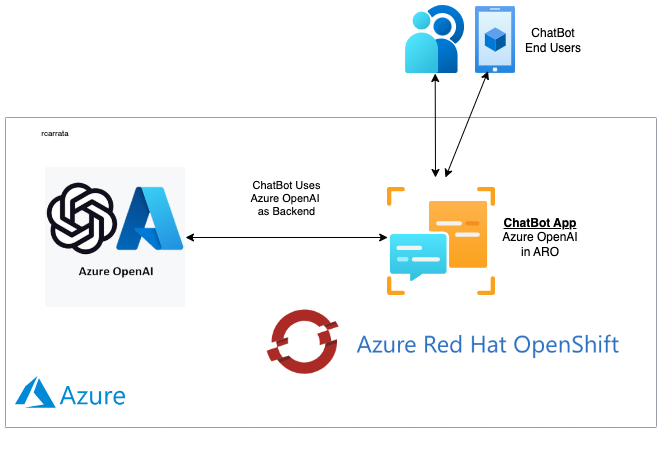
<p>This integration highlights the power of Azure Red Hat OpenShift, which serves as the platform for deploying this ChatBot application. By harnessing the potential of Large Language Models like GPT, this blog demonstrates the innovative possibilities that arise when advanced AI technology meets the secure infrastructure provided by Azure OpenAI and Azure Red Hat OpenShift.</p>

<p><a href="https://rcarrata.com/images/aro-azureopenai-0.png"><img src="/images/aro-azureopenai-0.png" alt="" title="ARO Azure OpenAI" /></a></p>

<p>Throughout the blog, readers will find detailed steps on how to create and deploy such an application, making it a comprehensive guide for developers and enthusiasts eager to explore the synergy between Azure OpenAI and Azure Red Hat OpenShift.</p>

<p>The blog aims to inspire and empower readers to harness the full potential of AI-driven applications while ensuring a seamless integration process, from development to deployment, in the Azure ecosystem.</p>

<h2 id="2-aro-ai-chatbot-azure-openai-components">2. ARO AI ChatBot Azure OpenAI Components</h2>

<h3 id="21-azure-openai-overview">2.1 Azure OpenAI Overview</h3>

<p><a href="https://azure.microsoft.com/en-us/products/ai-services/openai-service">Azure OpenAI Service</a> offers convenient REST API access to OpenAI’s advanced language models, such as GPT-4, GPT-3.5-Turbo, and Embeddings series. The GPT-4 and GPT-3.5-Turbo models are now widely available. These models can be tailored for various tasks like content creation, summarization, semantic search, and translating natural language to code. Users can utilize the service via REST APIs, Python SDK, or the web-based interface in Azure OpenAI Studio.</p>

<p>Azure Red Hat OpenShift delivers on-demand, fully managed OpenShift clusters that are highly available, with joint monitoring and operation by Microsoft and Red Hat. At its core, it utilizes Kubernetes. OpenShift enhances Kubernetes by adding valuable features, transforming it into a turnkey container platform as a service (PaaS) that greatly enhances the experiences of both developers and operators.</p>

<h4 id="211-comparing-azure-openai-vs-openai">2.1.1 Comparing Azure OpenAI vs OpenAI</h4>

<p><a href="https://azure.microsoft.com/en-us/products/ai-services/openai-service">Azure OpenAI Service</a> provides customers access to sophisticated language AI models like OpenAI GPT-4, GPT-3, Codex, DALL-E, and Whisper, all within the secure and reliable environment of Azure. In collaboration with OpenAI, Azure OpenAI co-develops APIs, ensuring seamless compatibility and transition between models.</p>

<p>With Azure OpenAI, customers benefit from the robust security features of Microsoft Azure while utilizing identical models as OpenAI. Azure OpenAI offers private networking, availability in specific regions, and responsible AI content filtering, enhancing the overall user experience and ensuring responsible usage of AI technology.</p>

<h3 id="22-gradio">2.2 Gradio</h3>

<p>A highly effective approach for showcasing your machine learning model, API, or data science workflow to others involves developing an interactive application that enables users or peers to experiment with the demo directly through their web browsers.</p>

<p><a href="https://www.gradio.app/">Gradio</a>, a Python library, offers a streamlined solution for constructing such demos and facilitating easy sharing. In many cases, achieving this only requires a concise snippet of code.</p>

<p>If you want to take a look at other Gradio Apps, check my blog post about <a href="https://rcarrata.com/ai/gradio-k8s/">Deploying and Testing Machine Learning Applications in Kubernetes with Gradio</a>!</p>

<h3 id="23-langchain">2.3 LangChain</h3>

<p>LangChain stands as a versatile framework designed for developing applications driven by language models. Its core functionalities enable applications to:</p>

<ul>
  <li>
    <p><strong>Contextual Awareness</strong>: LangChain facilitates the connection of language models to diverse sources of context, including prompt instructions, few-shot examples, and relevant content. This enables applications to respond in a manner grounded in the provided context, enhancing their overall effectiveness.</p>
  </li>
  <li>
    <p><strong>Intelligent Reasoning</strong>: By leveraging LangChain, applications gain the ability to rely on language models for reasoning. This involves determining appropriate responses and actions based on the provided context, enhancing the application’s decision-making process significantly.</p>
  </li>
</ul>

<p>The key value propositions offered by LangChain include:</p>

<ul>
  <li>
    <p><strong>Modular Components</strong>: LangChain provides abstract structures for interacting with language models, coupled with a variety of implementations for each structure. These components are modular and user-friendly, ensuring ease of use, whether integrated within the LangChain framework or utilized independently.</p>
  </li>
  <li>
    <p><strong>Pre-configured Chains</strong>: LangChain offers pre-built chains, which are structured combinations of components designed to accomplish specific high-level tasks. These ready-to-use chains simplify the application development process, allowing developers to focus on specific functionalities without the hassle of building complex architectures from scratch.</p>
  </li>
</ul>

<p>In essence, LangChain streamlines the development process, offering a flexible and efficient approach to creating context-aware and intelligent applications powered by language models.</p>

<h3 id="24-azure-red-hat-openshift">2.4 Azure Red Hat OpenShift</h3>

<p>The Microsoft Azure Red Hat OpenShift service enables you to deploy fully managed OpenShift clusters.</p>

<p>Azure Red Hat OpenShift is jointly engineered, operated, and supported by Red Hat and Microsoft to provide an integrated support experience. There are no virtual machines to operate, and no patching is required. Master, infrastructure, and application nodes are patched, updated, and monitored on your behalf by Red Hat and Microsoft. Your Azure Red Hat OpenShift clusters are deployed into your Azure subscription and are included on your Azure bill.</p>

<p>When you deploy Azure Red Hat OpenShift 4, the entire cluster is contained within a virtual network. Within this virtual network, your master nodes and worker nodes each live in their own subnet. Each subnet uses an internal load balancer and a public load balancer.</p>

<h2 id="3-aro-ai-chatbot-with-azure-openai-demo-analysis">3. ARO AI ChatBot with Azure OpenAI: Demo Analysis</h2>

<p>Let’s shift our focus from theory to practical application and explore how this ChatBot operates and interacts in real-time.</p>

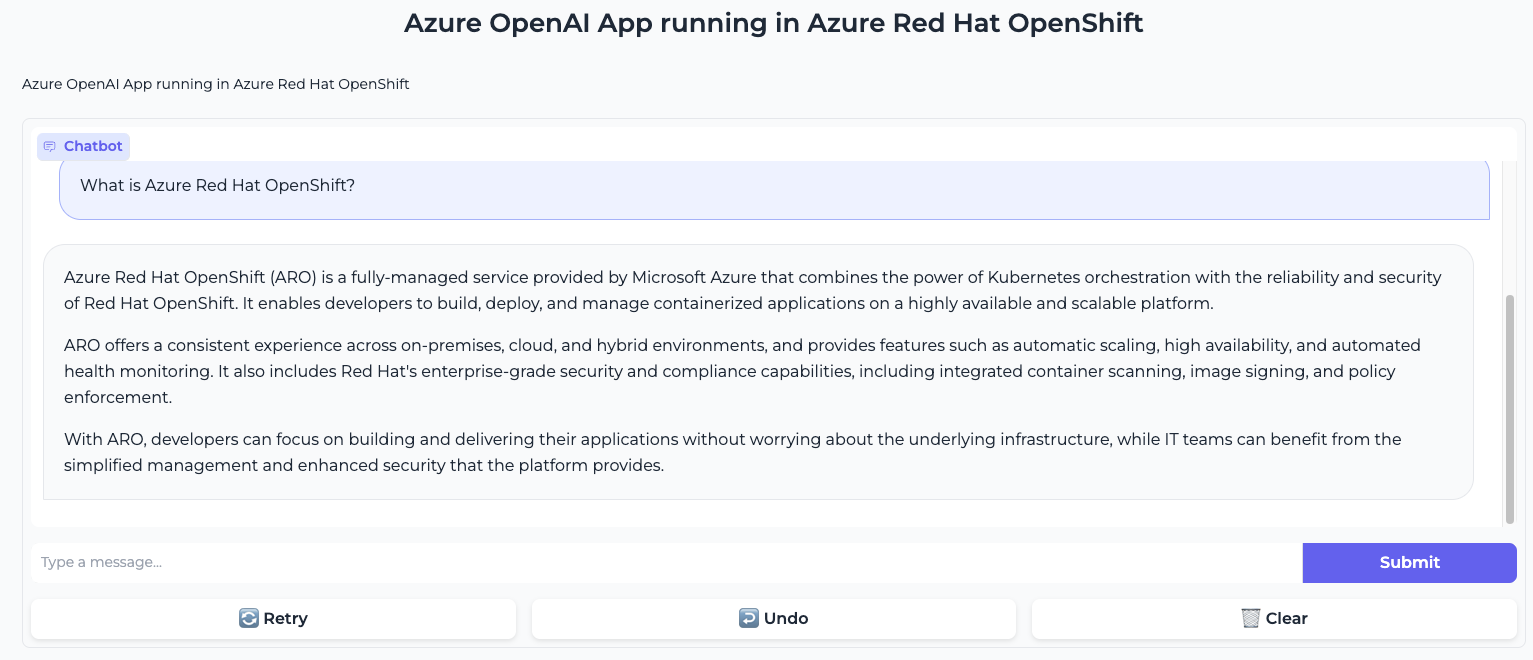
<p>Once deployed within our Azure Red Hat OpenShift cluster, the ARO AI ChatBot application becomes accessible through a specific URL. This application, powered by Azure OpenAI as its backend, offers a user-friendly interface for interaction.</p>

<p><a href="https://rcarrata.com/images/aro-azureopenai.png"><img src="/images/aro-azureopenai.png" alt="" title="ARO Azure OpenAI" /></a></p>

<p>In the provided images, we witness the ChatBot in action. In the first screenshot, we posed a straightforward yet intriguing question: “What is Azure Red Hat OpenShift?”.</p>

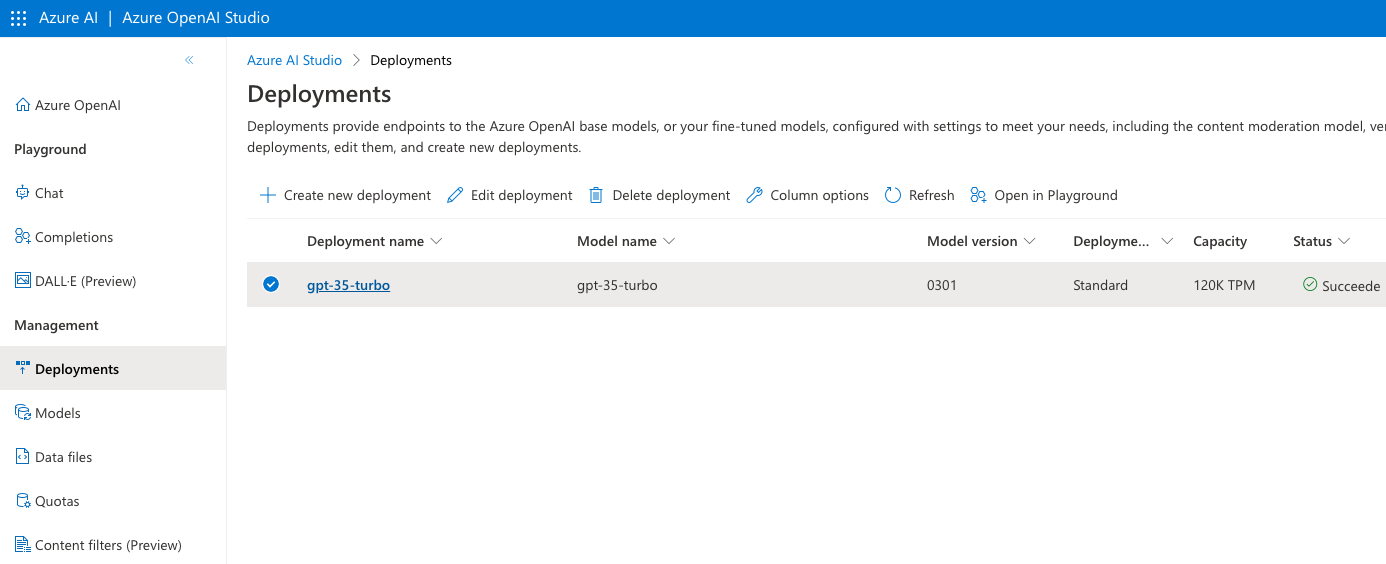
<p>The Gradio App, functioning as the frontend, utilizes LangChain libraries internally to connect with our deployed GPT 3.5 model in Azure OpenAI:</p>

<p><a href="https://rcarrata.com/images/aro-azureopenai-3.png"><img src="/images/aro-azureopenai-3.png" alt="" title="ARO Azure OpenAI" /></a></p>

<p>Specifically, we deployed the gpt-35-turbo model, utilizing the 0301 version, hosted in the Azure France Central region.</p>

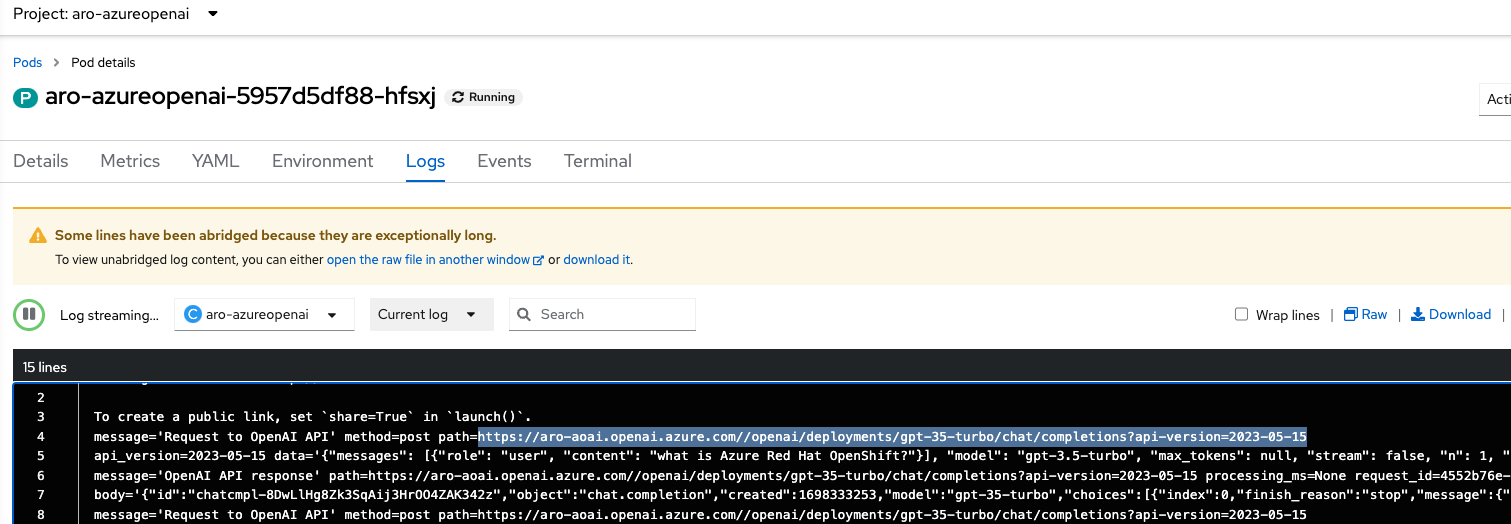
<p>But how can we be certain that our ChatBot is effectively utilizing the Azure OpenAI GPT Model as its backend?</p>

<p>To validate this, we can delve into the ARO Console and inspect the ChatBot’s logs:</p>

<p><a href="https://rcarrata.com/images/aro-azureopenai-2.png"><img src="/images/aro-azureopenai-2.png" alt="" title="ARO Azure OpenAI" /></a></p>

<p>Upon careful observation, the logs reveal the ChatBot’s process: it sends the Human Message using LangChain libraries to the Azure OpenAI URL. The GPT Model in Azure OpenAI generates the response, which is then relayed back to the “human,” completing the ChatBot’s interaction loop.</p>

<p>This seamless integration showcases the synergy between LangChain libraries, Gradio frontend, and Azure OpenAI backend, enabling a dynamic and interactive user experience.</p>

<p>In our upcoming blog post, we will delve deeply into the integration components of the demonstration and provide comprehensive insights into how you can deploy your very own version in your Azure Red Hat OpenShift cluster!</p>

<p>Stay tuned for an in-depth exploration of the deployment process and harness the power of this integration for your projects.</p>

<p><em>NOTE: Opinions expressed in this blog are my own and do not necessarily reflect that of the company I work for.</em></p>

<p>Happy AI/ML-ing!</p>

<script type="text/javascript" src="https://cdnjs.buymeacoffee.com/1.0.0/button.prod.min.js" data-name="bmc-button" data-slug="rcarrata" data-color="#FFDD00" data-emoji="" data-font="Cookie" data-text="Buy me a coffee :)" data-outline-color="#000000" data-font-color="#000000" data-coffee-color="#ffffff"></script>]]></content><author><name>Roberto Carratalá</name></author><category term="aro" /><category term="security" /><category term="Kubernetes" /><category term="Cloud" /><category term="OpenShift" /><category term="Azure" /><summary type="html"><![CDATA[How can we integrate the power of Azure OpenAI and Azure Red Hat OpenShift in an easy and scalable way? How can we deploy a ChatBot in ARO using Azure OpenAI as a backend for our integrations? How can we leverage ARO as a Turnkey Application Platform to deploy and scale our ChatBot?]]></summary></entry><entry><title type="html">Exposing apps using Application Gateway LB in Private ARO clusters</title><link href="https://rcarrata.com/security/aro-expose-agw/" rel="alternate" type="text/html" title="Exposing apps using Application Gateway LB in Private ARO clusters" /><published>2023-09-05T00:00:00+00:00</published><updated>2023-09-05T00:00:00+00:00</updated><id>https://rcarrata.com/security/aro-expose-agw</id><content type="html" xml:base="https://rcarrata.com/security/aro-expose-agw/"><![CDATA[<p>What is the role of Application Gateway in enabling the secure exposure of customer applications within Private Azure Red Hat OpenShift (ARO) clusters?
How does Application Gateway integrate with Private ARO clusters and align with the connectivity strategy of Open Hybrid Cloud?
What are the benefits of using Application Gateway for load balancing customer applications within ARO clusters, especially during high demand scenarios?</p>

<h2 id="overview">Overview</h2>

<p>In the dynamic world of hybrid multi-cloud environments, organizations are constantly seeking robust solutions to expose their customer applications securely. In this blog post, we will focus on the critical topic of exposing customer applications within Private Azure Red Hat OpenShift (ARO) clusters and shed light on the pivotal role played by Application Gateway in enabling this process.</p>

<p>Application Gateway, a versatile component of the Azure ecosystem, serves as a powerful tool for secure application exposure. It seamlessly integrates with Private ARO clusters, aligning with the overarching connectivity strategy of Open Hybrid Cloud.</p>

<p>By leveraging Application Gateway, organizations can unlock a lot of benefits when it comes to exposing customer applications with Private ARO Cluster. Firstly, it acts as a highly efficient load balancer, intelligently distributing incoming traffic across multiple instances of applications running within the ARO cluster. This ensures optimal performance and availability, even during high demand scenarios.</p>

<p>Moreover, Application Gateway provides robust security features, safeguarding customer applications from external threats. It offers comprehensive SSL/TLS termination, enabling end-to-end encryption for enhanced data protection. Additionally, its Web Application Firewall (WAF) functionality protects against common web vulnerabilities, providing an additional layer of defense.</p>

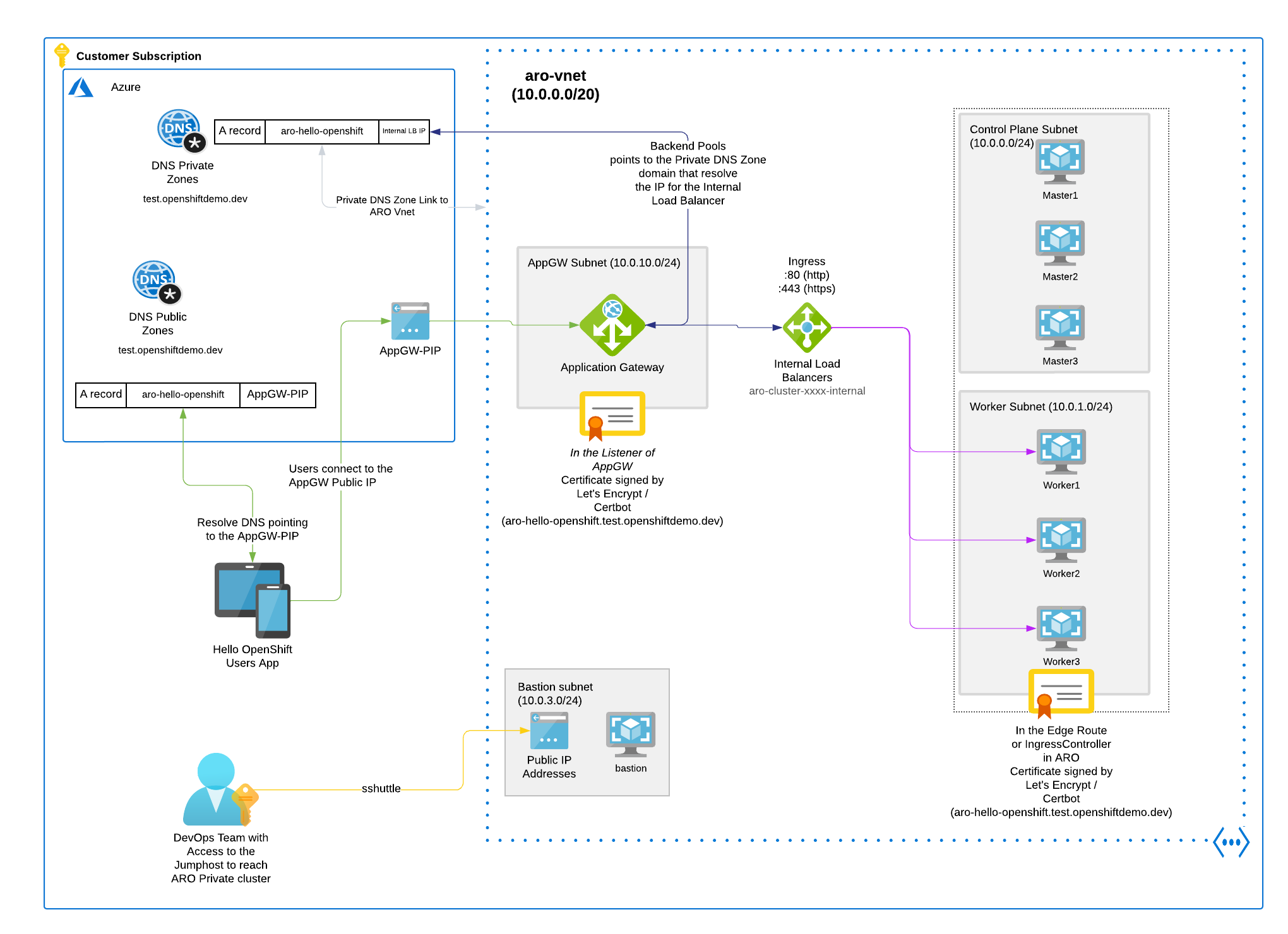
<p>The objective of this blog post is to demonstrate exposing some Customer Applications deployed in a Private ARO cluster, where the requirement is to expose only the Application itself, not the ARO API Kubernetes Ingress or any other *.apps routes.</p>

<p>Also, the certificates need to be taken into consideration, since we will NOT use a Custom Domain for our ARO Cluster. We will be using a Let’s Encrypt certificate with the APP FQDN, and we will place the certificate in the AppGW and in the OpenShift App Route in the ARO cluster.</p>

<p><a href="https://rcarrata.com/images/appgw0.png"><img src="/images/appgw0.png" alt="" title="AppGW" /></a></p>

<h2 id="azure-application-gateway">Azure Application Gateway</h2>

<p><a href="https://learn.microsoft.com/en-us/azure/application-gateway/overview">Azure Application Gateway</a> is a load balancer designed for managing web traffic directed towards your web applications. Unlike traditional load balancers that operate at the transport layer (OSI layer 4 - TCP and UDP) and direct traffic solely based on source IP address and port to a destination IP address and port, Application Gateway goes a step further.</p>

<p>Application Gateway has the capability to make routing decisions based on additional attributes of an HTTP request, such as the URI path or host headers.</p>

<h2 id="prerequisites">Prerequisites</h2>

<ul>
  <li><a href="https://learn.microsoft.com/en-us/azure/openshift/howto-create-private-cluster-4x">ARO Private Cluster</a> (use 10.0.10.0/16 as VNet CIDR)</li>
  <li><a href="https://learn.microsoft.com/en-us/azure/openshift/howto-restrict-egress#create-a-jump-host-vm">Jumphost VM with Public IP</a></li>
</ul>

<h2 id="setting-environment-variables">Setting Environment Variables</h2>

<ul>
  <li>Set some specific environment variables for the ARO environment:</li>
</ul>

<div class="language-md highlighter-rouge"><div class="highlight"><pre class="highlight"><code>export NAMESPACE=aro-app-agw
export AZR_CLUSTER=aro-$USER
export AZR_RESOURCE_LOCATION=eastus
export AZR_RESOURCE_GROUP=aro-$USER-rg
export AppGW_CIDR="10.0.10.0/23"
export AppGW_SUBNET="Ingress-subnet"
export ARO_VNET_NAME="aro-$USER-vnet"
export APP_NAME="aro-hello-openshift"
export DNS_ZONE_NAME="test.openshiftdemo.dev"
export APPGW_DOMAIN="$APP_NAME.$DNS_ZONE_NAME"
export AppGW_PIP="AppGW-pip"
export AZR_DNS_RESOURCE_GROUP="mobb-dns"
export EMAIL=username.taken@gmail.com
</code></pre></div></div>

<p>NOTE: Customize these variables for your own deployment!</p>

<h2 id="appgw-networking-and-private-dns-zones">AppGW Networking and Private DNS Zones</h2>

<ul>
  <li>Create Subnet for AppGW:</li>
</ul>

<div class="language-md highlighter-rouge"><div class="highlight"><pre class="highlight"><code>az network vnet subnet create <span class="err">\</span>
  --resource-group $AZR_RESOURCE_GROUP <span class="err">\</span>
  --vnet-name $ARO_VNET_NAME <span class="err">\</span>
  --name $AppGW_SUBNET <span class="err">\</span>
  --address-prefixes $AppGW_CIDR <span class="err">\</span>
  --service-endpoints Microsoft.ContainerRegistry
</code></pre></div></div>

<p>NOTE: Since the AppGW and ARO subnets share the same VNet, there is no need to add a peering. If you want to split them between two different VNets instead of subnets, please remember to add the VNet peering between them.</p>

<ul>
  <li>Create a static public IP address for the Application Gateway LB:</li>
</ul>

<div class="language-md highlighter-rouge"><div class="highlight"><pre class="highlight"><code>az network public-ip create <span class="err">\</span>
  --resource-group $AZR_RESOURCE_GROUP <span class="err">\</span>
  --name $AppGW_PIP <span class="err">\</span>
  --allocation-method Static <span class="err">\</span>
  --sku Standard
</code></pre></div></div>

<ul>
  <li>Create a Private DNS Zone with the same public DNS_Zone_Name as we will be using in the blog post:</li>
</ul>

<div class="language-md highlighter-rouge"><div class="highlight"><pre class="highlight"><code>az network private-dns zone create <span class="err">\</span>
    --resource-group $AZR_RESOURCE_GROUP <span class="err">\</span>
    --name $DNS_ZONE_NAME
</code></pre></div></div>

<p>This is needed because the AppGW needs to reach the internal ARO LB when the Backend Rule is applied in the AppGW for our Custom Domain Application.</p>

<ul>
  <li>Retrieve the ARO Ingress Internal IP Load Balancer:</li>
</ul>

<div class="language-md highlighter-rouge"><div class="highlight"><pre class="highlight"><code>INGRESS_IP="$(az aro show -n $AZR_CLUSTER -g $AZR_RESOURCE_GROUP --query 'ingressProfiles[0].ip' -o tsv)"
echo $INGRESS_IP
</code></pre></div></div>

<ul>
  <li>Add a record for our FQDN to a private DNS zone pointing to the ARO Ingress Internal IP LB:</li>
</ul>

<div class="language-plaintext highlighter-rouge"><div class="highlight"><pre class="highlight"><code>az network private-dns record-set a add-record \
  --resource-group $AZR_RESOURCE_GROUP \
  --zone-name $DNS_ZONE_NAME \
  --record-set-name "$APP_NAME" \
  --ipv4-address $INGRESS_IP
</code></pre></div></div>

<p>NOTE: We are using the same $APP_NAME (in our case aro-hello-openshift) with the same private DNS zone (test.openshiftdemo.dev), pointing to the Azure Internal LB that will load balance to the Workers where the ARO OpenShift Routers are (OpenShift Ingress Controllers that manage the HAProxy OpenShift Routers).</p>

<ul>
  <li>Link Private DNS Zone to ARO Virtual Network:</li>
</ul>

<div class="language-md highlighter-rouge"><div class="highlight"><pre class="highlight"><code>az network private-dns link vnet create <span class="err">\</span>
    --resource-group $AZR_RESOURCE_GROUP <span class="err">\</span>
    --zone-name $DNS_ZONE_NAME <span class="err">\</span>
    --name private-dnszone-link-$ARO_VNET_NAME <span class="err">\</span>
    --virtual-network $ARO_VNET_NAME <span class="err">\</span>
    --registration-enabled false
</code></pre></div></div>

<h2 id="application-gw-and-waf-policy">Application GW and WAF policy</h2>

<p>Now that we have our Networking and the DNS resolution deployed and configured, let’s create the Application Gateway LB and the WAF Policies.</p>

<h3 id="create-the-application-gateway-load-balancer-and-waf-policies">Create the Application Gateway Load Balancer and WAF policies</h3>

<ul>
  <li>Create a Web Application Firewall (WAF) policy for the Application Gateway:</li>
</ul>

<div class="language-md highlighter-rouge"><div class="highlight"><pre class="highlight"><code>az network application-gateway waf-policy create <span class="err">\</span>
  --resource-group $AZR_RESOURCE_GROUP <span class="err">\</span>
  --name AppGW-WAF-Policy-$USER
</code></pre></div></div>

<ul>
  <li>Creates an Application Gateway with the specified configurations, including the WAF policy, public IP, and subnet:</li>
</ul>

<div class="language-md highlighter-rouge"><div class="highlight"><pre class="highlight"><code>az network application-gateway create <span class="err">\</span>
  --name "AppGW-aro-$USER" <span class="err">\</span>
  --location $AZR_RESOURCE_LOCATION <span class="err">\</span>
  --resource-group $AZR_RESOURCE_GROUP <span class="err">\</span>
  --capacity 1 <span class="err">\</span>
  --priority 1 <span class="err">\</span>
  --sku WAF_v2 <span class="err">\</span>
  --http-settings-cookie-based-affinity Disabled <span class="err">\</span>
  --public-ip-address $AppGW_PIP <span class="err">\</span>
  --vnet-name $ARO_VNET_NAME <span class="err">\</span>
  --subnet $AppGW_SUBNET <span class="err">\</span>
  --waf-policy AppGW-WAF-Policy-$USER
</code></pre></div></div>

<ul>
  <li>The AppGW needs to be deployed and assigned to the proper resource group with the Public IP attached:</li>
</ul>

<p><a href="https://rcarrata.com/images/appgw1.png"><img src="/images/appgw1.png" alt="" title="AppGW" /></a></p>

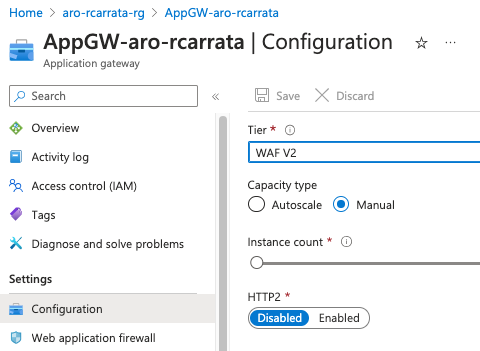
<p>NOTE: The WAF policy needs to be enabled, because by default it’s in Disabled mode.</p>

<p><a href="https://rcarrata.com/images/appgw2.png"><img src="/images/appgw2.png" alt="" title="AppGW" /></a></p>

<h3 id="appgw-load-balancer-application-certificates">AppGW Load Balancer Application Certificates</h3>

<p>The AppGW and our deployed apps will need to have the proper certificates attached, because the AppGW will also check against the backend whether the certificate presented is valid and has the proper FQDN.</p>

<ul>
  <li>Generate SSL certificates using Let’s Encrypt’s Certbot tool:</li>
</ul>

<div class="language-plaintext highlighter-rouge"><div class="highlight"><pre class="highlight"><code>export SCRATCH_DIR=/tmp/scratch
mkdir -p $SCRATCH_DIR

certbot certonly --manual \
  --preferred-challenges=dns \
  --email $EMAIL \
  --server https://acme-v02.api.letsencrypt.org/directory \
  --agree-tos \
  --manual-public-ip-logging-ok \
  -d "$APPGW_DOMAIN" \
  --config-dir "$SCRATCH_DIR/config" \
  --work-dir "$SCRATCH_DIR/work" \
  --logs-dir "$SCRATCH_DIR/logs"
</code></pre></div></div>

<p>NOTE: don’t close or interrupt this process, we will finish after the dns challenge in Azure.</p>

<ul>
  <li>Open a second terminal and paste the DNS_Challenge (and remember to export the variables from the beginning again):</li>
</ul>

<div class="language-plaintext highlighter-rouge"><div class="highlight"><pre class="highlight"><code>export DNS_CHALLENGE="xxxx"
</code></pre></div></div>

<ul>
  <li>Adds a TXT record to the Azure DNS zone for the ACME challenge:</li>
</ul>

<div class="language-plaintext highlighter-rouge"><div class="highlight"><pre class="highlight"><code>az network dns record-set txt add-record \
  --resource-group $AZR_DNS_RESOURCE_GROUP \
  --zone-name $DNS_ZONE_NAME \
  --record-set-name "_acme-challenge.$APP_NAME" \
  --value "$DNS_CHALLENGE"
</code></pre></div></div>

<ul>
  <li>Wait up to 5 mins (maybe more) until the TXT record propagates and check the DNS resolution from the ACME challenge within Azure DNS. Check that the dig output matches the DNS Challenge shown earlier by the certbot command:</li>
</ul>

<div class="language-plaintext highlighter-rouge"><div class="highlight"><pre class="highlight"><code>dig @8.8.8.8 +short TXT _acme-challenge.$APPGW_DOMAIN
</code></pre></div></div>

<p>@8.8.8.8 (not use the local dns cached)</p>

<ul>
  <li>
    <p>Return to the previous terminal and finish the generation of the ACME certificate for our ARO example App</p>
  </li>
  <li>
    <p>Certificate Bundle: Concatenate the generated SSL certificates into a bundle file and export it as a PKCS12 file.</p>
  </li>
</ul>

<div class="language-plaintext highlighter-rouge"><div class="highlight"><pre class="highlight"><code>export PFX_PASS="mypa55w0rd"

cat $SCRATCH_DIR/config/live/$APPGW_DOMAIN/fullchain.pem $SCRATCH_DIR/config/live/$APPGW_DOMAIN/privkey.pem &gt; $SCRATCH_DIR/config/live/$APPGW_DOMAIN/gw-bundle.pem

openssl pkcs12 -export -out $SCRATCH_DIR/config/live/$APPGW_DOMAIN/gw-bundle.pfx -in $SCRATCH_DIR/config/live/$APPGW_DOMAIN/gw-bundle.pem
</code></pre></div></div>

<ul>
  <li>Delete the TXT record created for the ACME challenge:</li>
</ul>

<div class="language-plaintext highlighter-rouge"><div class="highlight"><pre class="highlight"><code>az network dns record-set txt delete \
  --resource-group $AZR_DNS_RESOURCE_GROUP \
  --zone-name $DNS_ZONE_NAME \
  --name "_acme-challenge.$APP_NAME"
</code></pre></div></div>

<h3 id="updating-the-dns-records-for-appgw-and-the-exposed-app">Updating the DNS Records for AppGW and the exposed app</h3>

<p>We need to update the DNS records for AppGW, using the Public IP that was generated in the step before.</p>

<ul>
  <li>Retrieve the public IP address of the Application Gateway:</li>
</ul>

<div class="language-plaintext highlighter-rouge"><div class="highlight"><pre class="highlight"><code>AGW_PIP=$(az network public-ip show -g $AZR_RESOURCE_GROUP --name $AppGW_PIP --query ipAddress -o tsv)
</code></pre></div></div>

<ul>
  <li>Update the DNS record with the Application Gateway’s public IP address:</li>
</ul>

<div class="language-plaintext highlighter-rouge"><div class="highlight"><pre class="highlight"><code>az network dns record-set a add-record \
--resource-group $AZR_DNS_RESOURCE_GROUP \
--zone-name $DNS_ZONE_NAME \
--record-set-name "$(echo $APPGW_DOMAIN | sed 's/\..*//')"  \
--ipv4-address $AGW_PIP
</code></pre></div></div>

<ul>
  <li>Verify the DNS resolution for the updated domain:</li>
</ul>

<div class="language-plaintext highlighter-rouge"><div class="highlight"><pre class="highlight"><code>dig @8.8.8.8 +short $APPGW_DOMAIN
</code></pre></div></div>

<ul>
  <li>Creates an HTTPS listener for the Application Gateway:</li>
</ul>

<div class="language-plaintext highlighter-rouge"><div class="highlight"><pre class="highlight"><code>az network application-gateway ssl-cert create \
  --resource-group $AZR_RESOURCE_GROUP \
  --gateway-name "AppGW-aro-$USER" \
  --name gw-bundle \
  --cert-file $SCRATCH_DIR/config/live/$APPGW_DOMAIN/gw-bundle.pfx \
  --cert-password $PFX_PASS
</code></pre></div></div>

<h2 id="appgw-listeners-and-backends">AppGW Listeners and Backends</h2>

<ul>
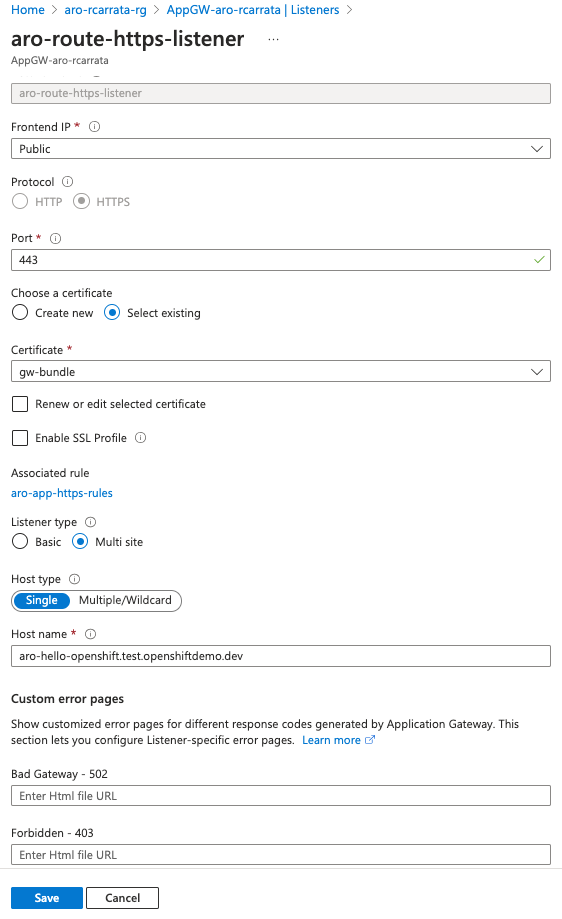
  <li>In the Listeners section, create a new HTTPS listener using the Azure portal:</li>
</ul>

<div class="language-plaintext highlighter-rouge"><div class="highlight"><pre class="highlight"><code>Listener name: aro-route-https-listener
Frontend IP: Public
Port: 443
Protocol: HTTPS
Http Settings - choose to Upload a Certificate (upload the PFX file from earlier)
Cert Name: gw-bundle
PFX certificate file: gw-bundle.pfx
Host Type: single 
Host name: $APPGW_DOMAIN (aro-hello-openshift.test.openshiftdemo.dev)
</code></pre></div></div>

<p>Note: You can also create multiple listeners - one per site - and re-use the certificate and select basic site. We are using the Azure Portal here because the CLI doesn’t support MultiHostnames.</p>

<p><a href="https://rcarrata.com/images/appgw3.png"><img src="/images/appgw3.png" alt="" title="AppGW" /></a></p>

<ul>
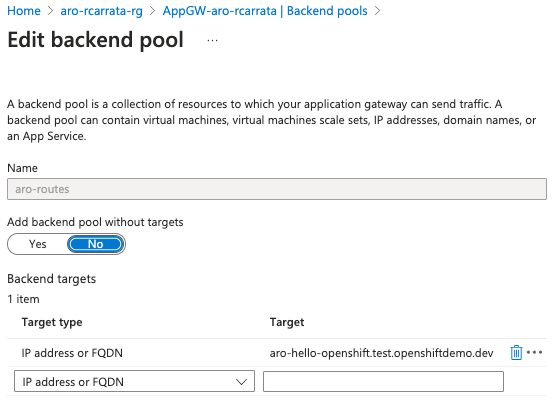
  <li>Create a new backend pool (cli):</li>
</ul>

<div class="language-plaintext highlighter-rouge"><div class="highlight"><pre class="highlight"><code>az network application-gateway address-pool create \
  --gateway-name "AppGW-aro-$USER" \
  --resource-group $AZR_RESOURCE_GROUP \
  --name aro-routes \
  --servers aro-hello-openshift.test.openshiftdemo.dev
</code></pre></div></div>

<p><a href="https://rcarrata.com/images/appgw4.png"><img src="/images/appgw4.png" alt="" title="AppGW" /></a></p>

<ul>
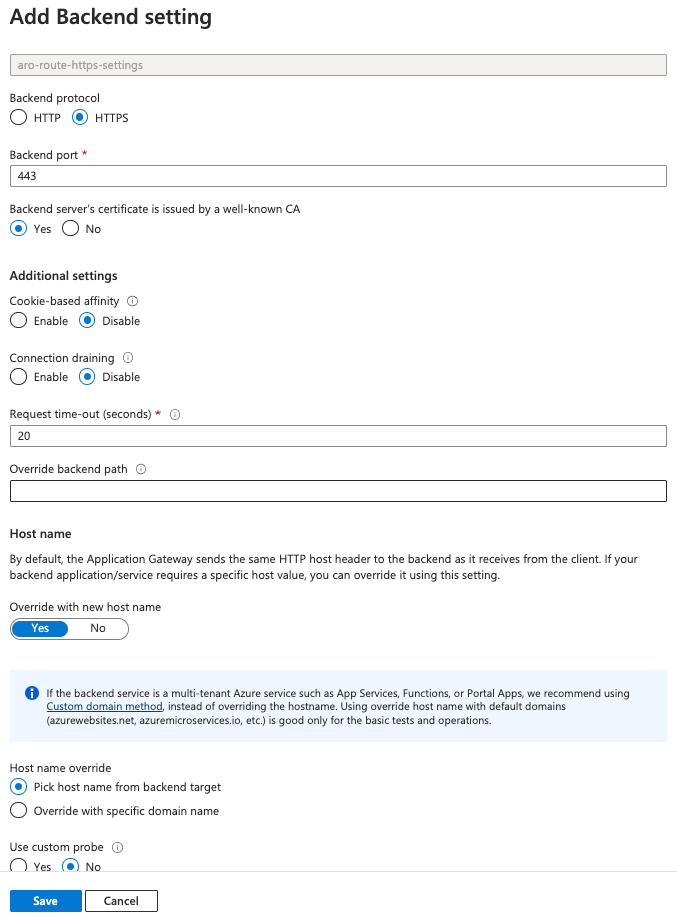
  <li>Create a new backend HTTP setting using the Azure Portal:</li>
</ul>

<div class="language-plaintext highlighter-rouge"><div class="highlight"><pre class="highlight"><code>In the HTTP settings section, create a new HTTP setting:
HTTP settings name: aro-route-https-settings
Backend protocol: HTTPS
Backend port: 443
Use well known CA certificate: Yes (if you used one; otherwise upload your CA cer file)
Override with new host name: Yes
Choose: Override with specific domain name
Host name: $APPGW_DOMAIN
</code></pre></div></div>

<p>NOTE: We are using the Azure Portal because the CLI doesn’t support MultiHostnames.</p>

<p><a href="https://rcarrata.com/images/appgw5.png"><img src="/images/appgw5.png" alt="" title="AppGW" /></a></p>

<ul>
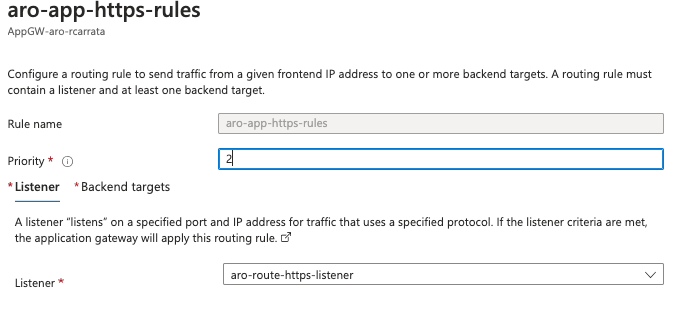
  <li>Define a rule for each website/api (cli):</li>
</ul>

<div class="language-plaintext highlighter-rouge"><div class="highlight"><pre class="highlight"><code>az network application-gateway rule create \
  --gateway-name "AppGW-aro-$USER" \
  --resource-group $AZR_RESOURCE_GROUP \
  --name aro-app-https-rules \
  --http-listener aro-route-https-listener \
  --address-pool aro-routes \
  --http-settings aro-route-https-settings \
  --priority 2
</code></pre></div></div>
<p><a href="https://rcarrata.com/images/appgw6.png"><img src="/images/appgw6.png" alt="" title="AppGW" /></a></p>

<h3 id="exposing-httpd-app">Exposing HTTPD App</h3>

<p>Now it’s time to publish our Hello OpenShift app deployed in the Private Cluster, exposed using the AppGW.</p>

<ul>
  <li>Open an sshuttle connection to the ARO Private Cluster:</li>
</ul>

<div class="language-md highlighter-rouge"><div class="highlight"><pre class="highlight"><code>JUMP_IP=$(az vm list-ip-addresses -g $AZR_RESOURCE_GROUP -n aro-$USER-jumphost -o tsv <span class="err">\</span>
--query '[].virtualMachine.network.publicIpAddresses[0].ipAddress')
echo $JUMP_IP

sshuttle --dns -NHr "aro@${JUMP_IP}"  10.0.0.0/8 --daemon
</code></pre></div></div>

<ul>
  <li>Login to ARO Private Cluster (using sshuttle):</li>
</ul>

<div class="language-plaintext highlighter-rouge"><div class="highlight"><pre class="highlight"><code>ARO_URL=$(az aro show -g $AZR_RESOURCE_GROUP -n $AZR_CLUSTER --query apiserverProfile.url -o tsv)
ARO_PASS=$(az aro list-credentials --name $AZR_CLUSTER --resource-group $AZR_RESOURCE_GROUP -o tsv --query kubeadminPassword)
oc login --username kubeadmin --password $ARO_PASS --server=$ARO_URL
ARO_DOMAIN=$(oc get dns cluster -o jsonpath='{.spec.baseDomain}')
</code></pre></div></div>

<ul>
  <li>Create new project for testing app:</li>
</ul>

<p>oc new-project aro-appgw</p>
<div class="language-plaintext highlighter-rouge"><div class="highlight"><pre class="highlight"><code>
* Deploy an httpd server K8s Deployment and expose it using a K8s Service:

```md
oc create deployment hello-openshift --image=quay.io/openshifttest/hello-openshift:1.2.0 --port 8080
oc expose deployment hello-openshift
</code></pre></div></div>

<ul>
  <li>Add the Edge Route with the hostname as the “aro-httpd.$DOMAIN”</li>
</ul>

<div class="language-md highlighter-rouge"><div class="highlight"><pre class="highlight"><code>oc create route edge --service=hello-openshift --hostname=$APPGW_DOMAIN <span class="err">\</span>
    --key $SCRATCH_DIR/config/live/$APPGW_DOMAIN/privkey.pem <span class="err">\</span>
    --cert $SCRATCH_DIR/config/live/$APPGW_DOMAIN/fullchain.pem
</code></pre></div></div>

<h2 id="testing-that-the-app-works">Testing that the App works</h2>

<p>Now that we’ve deployed the App, let’s test if it works.</p>

<ul>
  <li>Grab the App Route:</li>
</ul>

<div class="language-md highlighter-rouge"><div class="highlight"><pre class="highlight"><code>APP=$(oc get route hello-openshift -o jsonpath='{.spec.host}')
</code></pre></div></div>

<ul>
  <li>Execute a couple of requests, and check the response code:</li>
</ul>

<div class="language-md highlighter-rouge"><div class="highlight"><pre class="highlight"><code>curl https://$APP
Hello OpenShift!

curl https://$APP -I
HTTP/1.1 200 OK
x-request-port: 8080
</code></pre></div></div>

<ul>
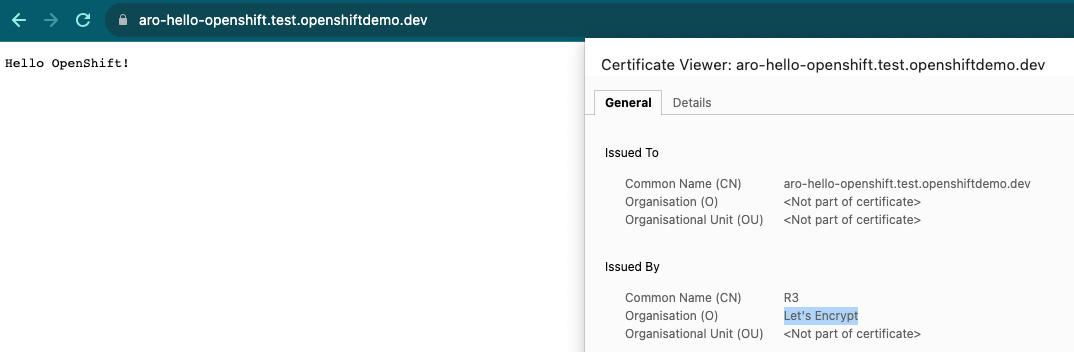
  <li>Check the App exposed using the Custom Domain, and published in the AppGW Listener:</li>
</ul>

<p><a href="https://rcarrata.com/images/appgw7.png"><img src="/images/appgw7.png" alt="" title="AppGW" /></a></p>

<p>And with that, this blog post about exposing Applications using App Gateway Load Balancers in Private ARO clusters comes to a close.</p>

<p><em>NOTE: Opinions expressed in this blog are my own and do not necessarily reflect that of the company I work for.</em></p>

<p>Happy OpenShifting!</p>

<script type="text/javascript" src="https://cdnjs.buymeacoffee.com/1.0.0/button.prod.min.js" data-name="bmc-button" data-slug="rcarrata" data-color="#FFDD00" data-emoji="" data-font="Cookie" data-text="Buy me a coffee :)" data-outline-color="#000000" data-font-color="#000000" data-coffee-color="#ffffff"></script>]]></content><author><name>Roberto Carratalá</name></author><category term="security" /><category term="security" /><category term="Kubernetes" /><category term="Cloud" /><category term="OpenShift" /><category term="Azure" /><summary type="html"><![CDATA[What is the role of Application Gateway in enabling the secure exposure of customer applications within Private Azure Red Hat OpenShift (ARO) clusters? How does Application Gateway integrate with Private ARO clusters and align with the connectivity strategy of Open Hybrid Cloud? What are the benefits of using Application Gateway for load balancing customer applications within ARO clusters, especially during high demand scenarios?]]></summary></entry><entry><title type="html">Deploying and Testing Machine Learning Applications in Kubernetes with Gradio</title><link href="https://rcarrata.com/ai/gradio-k8s/" rel="alternate" type="text/html" title="Deploying and Testing Machine Learning Applications in Kubernetes with Gradio" /><published>2023-08-24T00:00:00+00:00</published><updated>2023-08-24T00:00:00+00:00</updated><id>https://rcarrata.com/ai/gradio-k8s</id><content type="html" xml:base="https://rcarrata.com/ai/gradio-k8s/"><![CDATA[<p>How can Gradio be utilized to facilitate the deployment and testing of Machine Learning Applications within a Kubernetes environment, ensuring user-friendly interaction and efficient utilization of resources?
What benefits does using Gradio in conjunction with Kubernetes offer when deploying and testing diverse Machine Learning Applications, and how does it streamline the process for developers and end-users alike?</p>

<p>NOTE: All the code / examples used in this blog post are <a href="https://github.com/rcarrat-AI/k8s-mlops-gradio">available in a GitHub repository</a>. Check this out!</p>

<h2 id="1-gradio">1. Gradio</h2>

<p>A highly effective approach for showcasing your machine learning model, API, or data science workflow to others involves developing an interactive application that enables users or peers to experiment with the demo directly through their web browsers.</p>

<p>Gradio, a Python library, offers a streamlined solution for constructing such demos and facilitating easy sharing. In many cases, achieving this only requires a concise snippet of code.</p>

<p><a href="https://rcarrata.com/images/gradio1.png"><img src="/images/gradio1.png" alt="" title="GradioApp" /></a></p>

<h2 id="11-gradio-and-kubernetes-the-perfect-match">1.1 Gradio and Kubernetes: the perfect match!</h2>

<p>When coupled with Kubernetes, this approach gains additional advantages. Kubernetes provides a robust orchestration platform that enables seamless deployment, management, and scaling of containerized applications. By combining Gradio’s interactive demos with Kubernetes, you harness the power of containerization, making it easier to package and distribute your machine learning applications consistently across various environments.</p>

<p>The benefits of using Kubernetes alongside Gradio include:</p>

<ul>
  <li><strong>Scalability</strong>: Kubernetes allows your interactive demos built with Gradio to be easily scaled up or down based on demand. This ensures that as more users interact with your demos, the underlying infrastructure can handle the load efficiently.</li>
  <li><strong>Resource Efficiency</strong>: Kubernetes optimizes resource utilization, ensuring that your demos running on Gradio are allocated the right amount of computational resources. This prevents overutilization or underutilization, leading to cost savings and better performance.</li>
  <li><strong>High Availability</strong>: Kubernetes provides features like automatic load balancing and failover, which enhance the availability of your demos. This means that even if one instance fails, others will seamlessly take over, minimizing downtime.</li>
  <li><strong>Monitoring and Management</strong>: Kubernetes offers robust monitoring and management tools. You can easily track the performance of your interactive demos, gather metrics, and troubleshoot any issues that arise.</li>
  <li><strong>Consistency</strong>: Kubernetes ensures consistency across different deployment environments. Your Gradio-based demos will behave consistently whether they are running on your local machine, a development server, or a production cluster.</li>
  <li><strong>Easy Updates and Rollbacks</strong>: Kubernetes facilitates smooth updates and rollbacks of your demos. This is crucial when you want to introduce new features or fixes without disrupting user interactions.</li>
</ul>

<p>In summary, combining Gradio with Kubernetes not only allows you to create engaging interactive demos but also guarantees efficient deployment, scaling, monitoring, and management of these demos across different environments. This synergy empowers you to share your machine learning applications effectively and ensure a positive user experience.</p>

<h2 id="2-install-k8s-cluster-using-kind">2. Install K8s Cluster using KIND</h2>

<p><a href="https://kind.sigs.k8s.io/">Kind (Kubernetes in Docker)</a> is a tool that allows you to create local Kubernetes clusters using Docker containers. It provides an environment to run Kubernetes clusters for development, testing, and experimentation purposes.</p>

<p>The benefits of using Kind include easy setup and teardown of clusters, fast cluster creation, and the ability to simulate multi-node Kubernetes clusters on a single machine. It helps streamline the development and testing workflow by providing a lightweight and isolated environment that closely resembles a production Kubernetes cluster.</p>

<ul>
  <li>Install Docker and ensure that the Docker service is enabled and running:</li>
</ul>

<div class="language-plaintext highlighter-rouge"><div class="highlight"><pre class="highlight"><code>sudo dnf config-manager --add-repo=https://download.docker.com/linux/centos/docker-ce.repo
sudo dnf install docker-ce --nobest 
sudo systemctl enable --now docker
</code></pre></div></div>

<p>NOTE: also Podman can be used, but for certain parts of this blog post, Docker worked out of the box without further tweaks in KIND.</p>

<ul>
  <li>Create a Kind K8s cluster to deploy Seldon Core:</li>
</ul>

<div class="language-plaintext highlighter-rouge"><div class="highlight"><pre class="highlight"><code>CLUSTER_NAME="k8s"
cat &lt;&lt;EOF | kind create cluster --name $CLUSTER_NAME --wait 200s --config=-
kind: Cluster
apiVersion: kind.x-k8s.io/v1alpha4
nodes:
- role: control-plane
  kubeadmConfigPatches:
  - |
    kind: InitConfiguration
    nodeRegistration:
      kubeletExtraArgs:
        node-labels: "ingress-ready=true"
  extraPortMappings:
  - containerPort: 80
    hostPort: 80
    protocol: TCP
  - containerPort: 443
    hostPort: 443
    protocol: TCP
EOF
</code></pre></div></div>

<div class="language-md highlighter-rouge"><div class="highlight"><pre class="highlight"><code>kubectl cluster-info --context kind-k8s
</code></pre></div></div>

<h2 id="3-installing-k8s-ingress-controller">3. Installing K8s Ingress Controller</h2>

<p>Kubernetes Ingress is crucial for managing external access to services within a cluster, providing routing and load balancing capabilities. Nginx Ingress, as a popular Ingress controller, enables seamless traffic distribution, SSL termination, and routing based on hostnames or paths, enhancing scalability and security.</p>

<ul>
  <li>Install the <a href="https://kind.sigs.k8s.io/docs/user/ingress/">Ingress Nginx adapted for Kind</a>:</li>
</ul>

<div class="language-plaintext highlighter-rouge"><div class="highlight"><pre class="highlight"><code>kubectl apply -f https://raw.githubusercontent.com/kubernetes/ingress-nginx/master/deploy/static/provider/kind/deploy.yaml
</code></pre></div></div>

<p>The provided command installs Nginx Ingress, extending Kubernetes functionality by efficiently directing incoming external requests to appropriate services using defined rules and configurations. This optimizes resource utilization and simplifies external connectivity management.</p>

<h2 id="4-visual-recognition-machine-learning-model-using-mobilenetv2">4. Visual Recognition Machine Learning model using MobileNetV2</h2>

<p>MobileNetV2 is a convolutional neural network architecture that seeks to perform well on mobile devices. It is based on an inverted residual structure where the residual connections are between the bottleneck layers. The intermediate expansion layer uses lightweight depthwise convolutions to filter features as a source of non-linearity. As a whole, the architecture of MobileNetV2 contains the initial fully convolution layer with 32 filters, followed by 19 residual bottleneck layers.</p>

<p>You can find more information about MobileNetV2 in the official paper released by <a href="https://arxiv.org/abs/1801.04381v4">Sandler et al</a>.</p>

<ul>
  <li>Let’s deep dive a bit into the <a href="https://github.com/rcarrat-AI/k8s-mlops-gradio/blob/main/main.py">ML App code</a>!</li>
</ul>

<div class="language-python highlighter-rouge"><div class="highlight"><pre class="highlight"><code><span class="kn">import</span> <span class="nn">requests</span>
<span class="kn">import</span> <span class="nn">tensorflow</span> <span class="k">as</span> <span class="n">tf</span>
<span class="kn">import</span> <span class="nn">gradio</span> <span class="k">as</span> <span class="n">gr</span>

<span class="c1"># load the model
</span><span class="n">mobile_net</span> <span class="o">=</span> <span class="n">tf</span><span class="p">.</span><span class="n">keras</span><span class="p">.</span><span class="n">applications</span><span class="p">.</span><span class="n">MobileNetV2</span><span class="p">()</span>  

<span class="c1"># Download human-readable labels for ImageNet.
</span><span class="n">response</span> <span class="o">=</span> <span class="n">requests</span><span class="p">.</span><span class="n">get</span><span class="p">(</span><span class="s">"https://git.io/JJkYN"</span><span class="p">)</span>
<span class="n">labels</span> <span class="o">=</span> <span class="n">response</span><span class="p">.</span><span class="n">text</span><span class="p">.</span><span class="n">split</span><span class="p">(</span><span class="s">"</span><span class="se">\n</span><span class="s">"</span><span class="p">)</span>

<span class="c1"># Define a function classify_image(inp) that preprocesses input image, performs prediction using 
# inception_net, and returns a dictionary of class labels with corresponding probabilities.
</span><span class="k">def</span> <span class="nf">classify_image</span><span class="p">(</span><span class="n">input_images</span><span class="p">):</span>
    <span class="n">input_images</span> <span class="o">=</span> <span class="n">input_images</span><span class="p">.</span><span class="n">reshape</span><span class="p">((</span><span class="o">-</span><span class="mi">1</span><span class="p">,</span> <span class="mi">224</span><span class="p">,</span> <span class="mi">224</span><span class="p">,</span> <span class="mi">3</span><span class="p">))</span>
    <span class="n">input_images</span> <span class="o">=</span> <span class="n">tf</span><span class="p">.</span><span class="n">keras</span><span class="p">.</span><span class="n">applications</span><span class="p">.</span><span class="n">mobilenet_v2</span><span class="p">.</span><span class="n">preprocess_input</span><span class="p">(</span><span class="n">input_images</span><span class="p">)</span>
    <span class="n">prediction</span> <span class="o">=</span> <span class="n">mobile_net</span><span class="p">.</span><span class="n">predict</span><span class="p">(</span><span class="n">input_images</span><span class="p">).</span><span class="n">flatten</span><span class="p">()</span>
    <span class="k">return</span> <span class="p">{</span><span class="n">labels</span><span class="p">[</span><span class="n">i</span><span class="p">]:</span> <span class="nb">float</span><span class="p">(</span><span class="n">prediction</span><span class="p">[</span><span class="n">i</span><span class="p">])</span> <span class="k">for</span> <span class="n">i</span> <span class="ow">in</span> <span class="nb">range</span><span class="p">(</span><span class="mi">1000</span><span class="p">)}</span>
</code></pre></div></div>

<p>This code demonstrates the creation of an image classification system using TensorFlow and Gradio. It starts by importing necessary libraries: requests for HTTP requests, tensorflow for machine learning, and gradio for creating a user interface.</p>

<p>The MobileNetV2 model is loaded from tf.keras.applications and initialized. This model is a deep neural network pre-trained on a large dataset and capable of classifying images into numerous categories.</p>

<p>The code then fetches human-readable class labels for the ImageNet dataset, which contains over a thousand different object categories. These labels will be used to interpret the model’s predictions.</p>

<p>The classify_image function is defined to classify input images. It takes raw image data, reshapes it, and preprocesses using MobileNetV2’s preprocessing function. The model then predicts the class probabilities for each image, and the results are flattened into a list.</p>

<p>The function returns a dictionary containing class labels and their corresponding probabilities, with the keys being the class labels and the values being the prediction probabilities.</p>

<h2 id="5-integrating-gradio-for-deploying-the-machine-learning-app">5. Integrating Gradio for deploying the Machine Learning App</h2>

<ul>
  <li>Let’s integrate the Gradio Python library to deploy our deep learning image classification model in an easy and visual way!</li>
</ul>

<div class="language-python highlighter-rouge"><div class="highlight"><pre class="highlight"><code><span class="c1"># Define a run function that sets up an image and label for classification using the gr.Interface.
</span><span class="k">def</span> <span class="nf">run</span><span class="p">():</span>
  <span class="n">image</span> <span class="o">=</span> <span class="n">gr</span><span class="p">.</span><span class="n">Image</span><span class="p">(</span><span class="n">shape</span><span class="o">=</span><span class="p">(</span><span class="mi">224</span><span class="p">,</span> <span class="mi">224</span><span class="p">))</span>
  <span class="n">label</span> <span class="o">=</span> <span class="n">gr</span><span class="p">.</span><span class="n">Label</span><span class="p">(</span><span class="n">num_top_classes</span><span class="o">=</span><span class="mi">4</span><span class="p">)</span>
  <span class="n">title</span> <span class="o">=</span> <span class="s">"Rcarrata's Image Classification Example"</span>

  <span class="n">demo</span> <span class="o">=</span> <span class="n">gr</span><span class="p">.</span><span class="n">Interface</span><span class="p">(</span>
      <span class="n">fn</span><span class="o">=</span><span class="n">classify_image</span><span class="p">,</span> <span class="n">inputs</span><span class="o">=</span><span class="n">image</span><span class="p">,</span> <span class="n">outputs</span><span class="o">=</span><span class="n">label</span><span class="p">,</span> <span class="n">interpretation</span><span class="o">=</span><span class="s">"default"</span><span class="p">,</span> <span class="n">title</span><span class="o">=</span><span class="n">title</span>
  <span class="p">)</span>

  <span class="n">demo</span><span class="p">.</span><span class="n">launch</span><span class="p">(</span><span class="n">server_name</span><span class="o">=</span><span class="s">"0.0.0.0"</span><span class="p">,</span> <span class="n">server_port</span><span class="o">=</span><span class="mi">7860</span><span class="p">)</span>
</code></pre></div></div>

<p>The Gradio library is utilized to set up a web-based interface for the image classification system. Users can upload images through this interface, and the classify_image function processes them using the MobileNetV2 model.</p>

<p>The uploaded images are fed into the classify_image function, and the predictions are generated. The interface then displays the class labels along with their respective probabilities, allowing users to understand the model’s assessment of the uploaded images.</p>

<p>By integrating Gradio, this code enables easy interaction with the image classification model without requiring users to write code. It provides an accessible way for individuals to explore how the model categorizes different images and assesses its confidence in those classifications.</p>

<h2 id="6-containerizing-the-ml-app">6. Containerizing the ML App</h2>

<p>Now it’s time to containerize our Machine Learning Image Classification into a Container Image in order to deploy it in k8s / OpenShift.</p>

<ul>
  <li>Essentially the <a href="https://github.com/rcarrat-AI/k8s-mlops-gradio/blob/main/Dockerfile">Containerfile</a> is like any other Python app, so it’s quite straightforward:</li>
</ul>

<div class="language-python highlighter-rouge"><div class="highlight"><pre class="highlight"><code><span class="n">FROM</span> <span class="n">python</span><span class="p">:</span><span class="mf">3.9</span>
<span class="n">WORKDIR</span> <span class="o">/</span><span class="n">app</span>
<span class="n">COPY</span> <span class="p">.</span><span class="o">/</span><span class="n">requirements</span><span class="p">.</span><span class="n">txt</span> <span class="o">/</span><span class="n">app</span><span class="o">/</span><span class="n">requirements</span><span class="p">.</span><span class="n">txt</span>
<span class="n">RUN</span> <span class="n">pip</span> <span class="n">install</span> <span class="o">--</span><span class="n">no</span><span class="o">-</span><span class="n">cache</span><span class="o">-</span><span class="nb">dir</span> <span class="o">-</span><span class="n">r</span> <span class="o">/</span><span class="n">app</span><span class="o">/</span><span class="n">requirements</span><span class="p">.</span><span class="n">txt</span>
<span class="n">COPY</span> <span class="n">main</span><span class="p">.</span><span class="n">py</span> <span class="o">/</span><span class="n">app</span>
<span class="n">EXPOSE</span> <span class="mi">7860</span>
<span class="n">CMD</span> <span class="p">[</span><span class="s">"python"</span><span class="p">,</span> <span class="s">"main.py"</span><span class="p">]</span>
</code></pre></div></div>

<ul>
  <li>We will use a Makefile that wraps docker/podman build, tag, and push to Quay.io:</li>
</ul>

<div class="language-plaintext highlighter-rouge"><div class="highlight"><pre class="highlight"><code>make all
</code></pre></div></div>

<p>And voilà, we have our brand new <a href="https://quay.io/repository/rcarrata/gradioapp?tab=tags&amp;tag=latest">ML Visual Classification App container Image stored in Quay.io</a> ready to be deployed!</p>

<p>NOTE: remember that it’s a PoC and this Dockerfile can be improved in several ways! Use best practices!!</p>

<h2 id="7-deploying-our-ml-container-image-into-k8s">7. Deploying our ML Container Image into K8s</h2>

<p>Now that we have our ML App Container Image ready to be deployed, let’s try it!</p>

<p>The app is composed of a standard <a href="https://github.com/rcarrat-AI/k8s-mlops-gradio/blob/main/manifests/base/deployment.yaml">k8s Deployment</a>, a <a href="https://github.com/rcarrat-AI/k8s-mlops-gradio/blob/main/manifests/base/svc.yaml">K8s Service</a>, and the <a href="https://github.com/rcarrat-AI/k8s-mlops-gradio/blob/main/manifests/base/ingress.yaml">K8s Ingress</a>.</p>

<p>To deploy the manifests in our K8s KIND server, we will use kustomize:</p>

<div class="language-md highlighter-rouge"><div class="highlight"><pre class="highlight"><code>kubectl apply -k manifests/overlays/
</code></pre></div></div>

<ul>
  <li>After a while, we can check the pod running:</li>
</ul>

<div class="language-md highlighter-rouge"><div class="highlight"><pre class="highlight"><code>kubectl get pod -n gradioapp
NAME                         READY   STATUS    RESTARTS   AGE
gradioapp-7fcf59fcb8-rw9pg   1/1     Running   0          22s
</code></pre></div></div>

<ul>
  <li>If we check the Ingress, our app is exposed on port 80 using the Nginx Ingress:</li>
</ul>

<div class="language-md highlighter-rouge"><div class="highlight"><pre class="highlight"><code>kubectl get ingress -n gradioapp
NAME                CLASS    HOSTS   ADDRESS     PORTS   AGE
gradioapp-ingress   <span class="nt">&lt;none&gt;</span>   <span class="err">*</span>       localhost   80      110s
</code></pre></div></div>

<h2 id="testing-our-gradio-app-code-with-some-examples">Testing our Gradio App code with some examples</h2>

<p>Now that it’s deployed, let’s have fun with our app!</p>

<ul>
  <li>If we check the web browser localhost:80 app (in my case I deployed the KIND server on an external NUC server), we can see our brand new Gradio App:</li>
</ul>

<p><a href="https://rcarrata.com/images/gradio0.png"><img src="/images/gradio0.png" alt="" title="GradioApp" /></a></p>

<p>Let’s test it with a <a href="https://github.com/rcarrat-AI/k8s-mlops-gradio/tree/main/assets">couple of examples</a>!</p>

<p>First let’s use an image of a German Shepherd (my favourite dog):</p>

<p><a href="https://rcarrata.com/images/gradio1.png"><img src="/images/gradio1.png" alt="" title="GradioApp" /></a></p>

<p>Pretty cool huh? In just a few seconds and with a relatively small Machine Learning model, we identified with 86% accuracy that it is a German Shepherd!</p>

<p>Let’s try another animal such as a Tiger:</p>

<p><a href="https://rcarrata.com/images/gradio2.png"><img src="/images/gradio2.png" alt="" title="GradioApp" /></a></p>

<p>And if we switch to a “thing”, like a fancy car (Ferrari), what will happen?</p>

<p><a href="https://rcarrata.com/images/gradio2.png"><img src="/images/gradio3.png" alt="" title="GradioApp" /></a></p>

<p>Also pretty accurate!</p>

<h2 id="8-interacting-with-our-app-api-using-gradio-client-libraries">8. Interacting with our App Api using Gradio Client libraries</h2>

<p>Another way to interact with our ML App is using Gradio Client, a Python library to handle requests to Gradio Apps.</p>

<p>I’ve written a <a href="https://github.com/rcarrat-AI/k8s-mlops-gradio/blob/main/test_app.py">small Python program</a> to handle requests to the Gradio App deployed in k8s:</p>

<div class="language-bash highlighter-rouge"><div class="highlight"><pre class="highlight"><code>python test_app.py <span class="nt">--url</span> http://192.168.3.3 <span class="nt">--image</span> ./assets/tiger.jpeg
Loaded as API: http://192.168.3.3/ ✔
/var/folders/gc/9v6_6d8s2q51clcgwz747j2m0000gn/T/gradio/tmpcu35x_x8.json
</code></pre></div></div>

<p>We received the result of our requested prediction inference almost instantly from our App. If we check the results stored in JSON, we can see the exact same results as when we interacted with the browser:</p>

<div class="language-bash highlighter-rouge"><div class="highlight"><pre class="highlight"><code><span class="nb">cat</span> /var/folders/gc/9v6_6d8s2q51clcgwz747j2m0000gn/T/gradio/tmpcu35x_x8.json | jq <span class="nt">-r</span> <span class="nb">.</span>
<span class="o">{</span>
  <span class="s2">"label"</span>: <span class="s2">"tiger"</span>,
  <span class="s2">"confidences"</span>: <span class="o">[</span>
    <span class="o">{</span>
      <span class="s2">"label"</span>: <span class="s2">"tiger"</span>,
      <span class="s2">"confidence"</span>: 0.8418528437614441
    <span class="o">}</span>,
    <span class="o">{</span>
      <span class="s2">"label"</span>: <span class="s2">"tiger cat"</span>,
      <span class="s2">"confidence"</span>: 0.08996598422527313
    <span class="o">}</span>,
    <span class="o">{</span>
      <span class="s2">"label"</span>: <span class="s2">"zebra"</span>,
      <span class="s2">"confidence"</span>: 0.003402276895940304
    <span class="o">}</span>,
    <span class="o">{</span>
      <span class="s2">"label"</span>: <span class="s2">"lynx"</span>,
      <span class="s2">"confidence"</span>: 0.0014183077728375793
    <span class="o">}</span>
  <span class="o">]</span>
<span class="o">}</span>
</code></pre></div></div>

<p>And with that, this blog post about deploying and testing Machine Learning Applications in Kubernetes with Gradio comes to a close.</p>

<p><em>NOTE: Opinions expressed in this blog are my own and do not necessarily reflect that of the company I work for.</em></p>

<p>Happy MLOpsing!</p>

<script type="text/javascript" src="https://cdnjs.buymeacoffee.com/1.0.0/button.prod.min.js" data-name="bmc-button" data-slug="rcarrata" data-color="#FFDD00" data-emoji="" data-font="Cookie" data-text="Buy me a coffee :)" data-outline-color="#000000" data-font-color="#000000" data-coffee-color="#ffffff"></script>]]></content><author><name>Roberto Carratalá</name></author><category term="AI" /><category term="AI" /><category term="Kubernetes" /><category term="MLOps" /><summary type="html"><![CDATA[How can Gradio be utilized to facilitate the deployment and testing of Machine Learning Applications within a Kubernetes environment, ensuring user-friendly interaction and efficient utilization of resources? What benefits does using Gradio in conjunction with Kubernetes offer when deploying and testing diverse Machine Learning Applications, and how does it streamline the process for developers and end-users alike?]]></summary></entry><entry><title type="html">Deploying AI/ML Models in Kubernetes using Seldon Core, Istio and MetalLB</title><link href="https://rcarrata.com/ai/seldon-k8s/" rel="alternate" type="text/html" title="Deploying AI/ML Models in Kubernetes using Seldon Core, Istio and MetalLB" /><published>2023-08-15T00:00:00+00:00</published><updated>2023-08-15T00:00:00+00:00</updated><id>https://rcarrata.com/ai/seldon-k8s</id><content type="html" xml:base="https://rcarrata.com/ai/seldon-k8s/"><![CDATA[<p>How can organizations leverage Seldon Core and Kubernetes to deploy, manage, and scale machine learning models effectively and efficiently?
What steps and considerations are necessary for deploying multiple versions of machine learning models, developed in various languages and frameworks, within a Kubernetes environment using Seldon Core?
How can Seldon Core, integrated with Kubernetes, ensure optimal model performance, seamless scalability, and effective monitoring at scale?</p>

<h2 id="1-seldon-core-overview">1. Seldon Core Overview</h2>

<p>Seldon Core is an open-source platform that helps data scientists and engineers deploy, scale, monitor, and manage machine learning models in Kubernetes. It is designed to wrap machine learning models and expose them as services that can be readily consumed by other applications.</p>

<p>Seldon Core offers a set of tools to build a machine learning model pipeline that can include feature extraction, outlier detection, model prediction, and many other components. It also provides the ability to deploy these pipelines in a distributed fashion and manage them using a unified interface. Seldon Core follows the Kubernetes philosophy of declarative definitions for all components.</p>

<p>Key features of Seldon Core include:</p>

<ul>
  <li>Multiple language support: You can deploy models built in Python, R, Java, etc.</li>
  <li>Model versioning: Seldon Core can handle multiple versions of the same model for comparison or rollback purposes.</li>
  <li>Scalability: You can scale your deployments horizontally, as per the demand.</li>
  <li>Monitoring: Seldon Core provides tools to monitor your model’s performance and usage.</li>
  <li>Integration with popular ML libraries and frameworks: Supports various ML libraries including TensorFlow, PyTorch, XGBoost, and many more.</li>
</ul>

<p>NOTE: In this blog post we are using a Baremetal Server with a CentOS 9 Stream OS and 64GB of RAM with 8 vCPUs (no GPU installed).</p>

<h2 id="2-install-k8s-cluster-using-kind">2. Install K8s Cluster using KIND</h2>

<p><a href="https://kind.sigs.k8s.io/">Kind (Kubernetes in Docker)</a> is a tool that allows you to create local Kubernetes clusters using Docker containers. It provides an environment to run Kubernetes clusters for development, testing, and experimentation purposes.</p>

<p>The benefits of using Kind include easy setup and teardown of clusters, fast cluster creation, and the ability to simulate multi-node Kubernetes clusters on a single machine. It helps streamline the development and testing workflow by providing a lightweight and isolated environment that closely resembles a production Kubernetes cluster.</p>

<ul>
  <li>Install Docker and ensure that the Docker service is enabled and running:</li>
</ul>

<div class="language-plaintext highlighter-rouge"><div class="highlight"><pre class="highlight"><code>sudo dnf config-manager --add-repo=https://download.docker.com/linux/centos/docker-ce.repo
sudo dnf install docker-ce --nobest 
sudo systemctl enable --now docker
</code></pre></div></div>

<p>NOTE: also Podman can be used, but for certain parts of this blog post, Docker worked out of the box without further tweaks in KIND.</p>

<ul>
  <li>Create a Kind K8s cluster to deploy Seldon Core:</li>
</ul>

<div class="language-plaintext highlighter-rouge"><div class="highlight"><pre class="highlight"><code>CLUSTER_NAME="seldon"
cat &lt;&lt;EOF | kind create cluster --name $CLUSTER_NAME --wait 200s --config=-
kind: Cluster
apiVersion: kind.x-k8s.io/v1alpha4
nodes:
- role: control-plane
  kubeadmConfigPatches:
  - |
    kind: InitConfiguration
    nodeRegistration:
      kubeletExtraArgs:
        node-labels: "ingress-ready=true"
  extraPortMappings:
  - containerPort: 80
    hostPort: 80
    protocol: TCP
  - containerPort: 443
    hostPort: 443
    protocol: TCP
EOF
</code></pre></div></div>

<div class="language-md highlighter-rouge"><div class="highlight"><pre class="highlight"><code>kubectl cluster-info --context kind-seldon
</code></pre></div></div>

<h2 id="3-installing-k8s-ingress-controller">3. Installing K8s Ingress Controller</h2>

<p>Kubernetes Ingress is crucial for managing external access to services within a cluster, providing routing and load balancing capabilities. Nginx Ingress, as a popular Ingress controller, enables seamless traffic distribution, SSL termination, and routing based on hostnames or paths, enhancing scalability and security.</p>

<ul>
  <li>Install the <a href="https://kind.sigs.k8s.io/docs/user/ingress/">Ingress Nginx adapted for Kind</a>:</li>
</ul>

<div class="language-plaintext highlighter-rouge"><div class="highlight"><pre class="highlight"><code>kubectl apply -f https://raw.githubusercontent.com/kubernetes/ingress-nginx/master/deploy/static/provider/kind/deploy.yaml
</code></pre></div></div>

<p>The provided command installs Nginx Ingress, extending Kubernetes functionality by efficiently directing incoming external requests to appropriate services using defined rules and configurations. This optimizes resource utilization and simplifies external connectivity management.</p>

<h2 id="4-metallb">4. MetalLB</h2>

<p>Kubernetes lacks native support for network load balancers (LoadBalancer-type Services) in bare-metal clusters. The existing load balancer implementations in Kubernetes are essentially connectors to various IaaS platforms (GCP, AWS, Azure…). Because our setup doesn’t match these supported IaaS platforms, newly created LoadBalancers will indefinitely stay in a “pending” state.</p>

<p>Because of that, with our Baremetal K8s clusters we are left with two suboptimal options to direct user traffic to our apps in the K8s clusters: “NodePort” and “externalIPs” services. Both choices have notable drawbacks for production use, relegating Baremetal clusters to a secondary position in the Kubernetes ecosystem.</p>

<p>MetalLB seeks to rectify this situation by providing a network load balancer solution that seamlessly integrates with standard network equipment. This approach ensures that external services function as smoothly as possible on Baremetal clusters, addressing the existing imbalance.</p>

<h3 id="41-install-metallb">4.1 Install MetalLB</h3>

<ul>
  <li>Since version 0.13.0, MetalLB is configured via CRs and the original way of configuring it via a ConfigMap based configuration is not working anymore:</li>
</ul>

<div class="language-md highlighter-rouge"><div class="highlight"><pre class="highlight"><code>kubectl apply -f https://raw.githubusercontent.com/metallb/metallb/v0.13.9/config/manifests/metallb-native.yaml
</code></pre></div></div>

<ul>
  <li>Wait until the MetalLB pods (controller and speakers) are ready:</li>
</ul>

<div class="language-md highlighter-rouge"><div class="highlight"><pre class="highlight"><code>kubectl wait --namespace metallb-system <span class="err">\</span>
                --for=condition=ready pod <span class="err">\</span>
                --selector=app=metallb <span class="err">\</span>
                --timeout=90s
</code></pre></div></div>

<h3 id="42--setup-address-pool-used-by-metallb-load-balancers-in-kind">4.2  Setup address pool used by MetalLB Load Balancers in KIND</h3>

<p>With MetalLB, Layer 2 mode is the simplest for us to configure: in many cases, we don’t require any protocol-specific setup, only IP addresses.</p>

<p>In our Layer 2 mode, we don’t need the IPs to be tied to our worker nodes’ network interfaces. The system operates by directly responding to ARP requests on our local network, furnishing clients with the machine’s MAC address.</p>

<ul>
  <li>To finalize the layer2 setup, we must provide MetalLB with a designated IP address range under its control. Our intention is for this range to be within the Docker Kind network:</li>
</ul>

<div class="language-md highlighter-rouge"><div class="highlight"><pre class="highlight"><code>docker network inspect -f '' kind
</code></pre></div></div>

<p>NOTE: When using Docker on Linux (or KIND), it’s possible to route traffic directly to the external IP of the load balancer, given that the IP range falls within the Docker IP space.</p>

<ul>
  <li>The result will include a CIDR, like 172.19.0.0/16. Our aim is to allocate load balancer IP addresses from this specific subset. We can set up MetalLB, for example, to utilize the range from 172.19.255.200 to 172.19.255.250. This involves establishing an IPAddressPool and the associated L2Advertisement:</li>
</ul>

<div class="language-plaintext highlighter-rouge"><div class="highlight"><pre class="highlight"><code>kubectl apply -f - &lt;&lt; END
apiVersion: metallb.io/v1beta1
kind: IPAddressPool
metadata:
  name: example
  namespace: metallb-system
spec:
  addresses:
  - 172.18.255.200-172.18.255.250
END
</code></pre></div></div>

<ul>
  <li>To promote the IP originating from an IPAddressPool, an L2Advertisement instance needs to be linked with the respective IPAddressPool:</li>
</ul>

<div class="language-plaintext highlighter-rouge"><div class="highlight"><pre class="highlight"><code>kubectl apply -f - &lt;&lt; END
apiVersion: metallb.io/v1beta1
kind: L2Advertisement
metadata:
  name: empty
  namespace: metallb-system
END
</code></pre></div></div>

<p>Setting no IPAddressPool selector in an L2Advertisement instance is interpreted as that instance being associated with all the available IPAddressPools.</p>

<h3 id="43-testing-the-metallb-deployment">4.3 Testing the MetalLB deployment</h3>

<ul>
  <li>To test our setup, we will deploy a dummy app and check if we can use the K8s LoadBalancer powered by MetalLB to access our app:</li>
</ul>

<div class="language-md highlighter-rouge"><div class="highlight"><pre class="highlight"><code>kubectl apply -f https://kind.sigs.k8s.io/examples/loadbalancer/usage.yaml
LB_IP=$(kubectl get svc/foo-service -o=jsonpath='{.status.loadBalancer.ingress[0].ip}')
curl ${LB_IP}:5678
</code></pre></div></div>

<h2 id="5-servicemesh-and-istio">5. ServiceMesh and Istio</h2>

<p>A Service Mesh is an infrastructure layer added to modern distributed microservices applications, enhancing them with transparent capabilities like observability, traffic management, and security. It simplifies complex operational needs such as A/B testing, canary deployments, and access control.</p>

<p>Istio is an open source service mesh solution that seamlessly integrates with existing distributed applications. It provides centralized features like secure communication, load balancing, traffic control, access policies, and automatic metrics. Istio is adaptable, supporting Kubernetes deployments and extending to other clusters or endpoints.</p>

<p>Its control plane offers TLS encryption, strong authentication, load balancing, and fine-grained traffic control. Istio’s ecosystem includes diverse contributors, partners, and integrations, making it versatile for various use cases.</p>

<p>We need Istio in order to deploy Seldon Core because it uses some functionality under the hood to deploy the ML models.</p>

<p>Let’s install Istio in Kind!</p>

<h3 id="51-install-istio-in-kind">5.1 Install Istio in KIND</h3>

<ul>
  <li>Download and install Istioctl latest version:</li>
</ul>

<div class="language-md highlighter-rouge"><div class="highlight"><pre class="highlight"><code>curl -L https://istio.io/downloadIstio | sh -
cd istio-1.17.2
chmod u+x istioctl
cp -pr istioctl /usr/local/bin/
</code></pre></div></div>

<ul>
  <li>Install Istio in our K8s cluster using istioctl:</li>
</ul>

<div class="language-md highlighter-rouge"><div class="highlight"><pre class="highlight"><code>istioctl install --set profile=demo -y

kubectl get service -n istio-system istio-ingressgateway
</code></pre></div></div>

<ul>
  <li>Deploy the Bookinfo application to test the Service Mesh:</li>
</ul>

<div class="language-plaintext highlighter-rouge"><div class="highlight"><pre class="highlight"><code>kubectl apply -f https://raw.githubusercontent.com/istio/istio/release-1.17/samples/bookinfo/platform/kube/bookinfo.yaml

kubectl apply -f https://raw.githubusercontent.com/istio/istio/release-1.17/samples/bookinfo/networking/bookinfo-gateway.yaml
</code></pre></div></div>

<ul>
  <li>Retrieve and export the IP address of the Istio Ingress Gateway and the associated ports for HTTP and HTTPS services from the Kubernetes cluster’s Istio system namespace:</li>
</ul>

<div class="language-plaintext highlighter-rouge"><div class="highlight"><pre class="highlight"><code>export INGRESS_HOST=$(kubectl -n istio-system get service istio-ingressgateway -o jsonpath='{.status.loadBalancer.ingress[0].ip}')
export INGRESS_PORT=$(kubectl -n istio-system get service istio-ingressgateway -o jsonpath='{.spec.ports[?(@.name=="http2")].port}')
export SECURE_INGRESS_PORT=$(kubectl -n istio-system get service istio-ingressgateway -o jsonpath='{.spec.ports[?(@.name=="https")].port}')
</code></pre></div></div>

<ul>
  <li>Test the Bookinfo ProductPage app using the Istio Ingress Gateway:</li>
</ul>

<div class="language-plaintext highlighter-rouge"><div class="highlight"><pre class="highlight"><code>export GATEWAY_URL=$INGRESS_HOST:$INGRESS_PORT
curl -I http://$GATEWAY_URL/productpage
</code></pre></div></div>

<h2 id="6-seldon-core">6. Seldon Core</h2>

<p>Seldon Core converts your machine learning models (like TensorFlow, PyTorch, H2O, etc.) or language wrappers (Python, Java, etc.) into operational microservices for production, which use REST/gRPC.</p>

<p>Seldon takes care of expanding to numerous production-level machine learning models and offers advanced machine learning features right from the start. This includes advanced metrics, keeping track of requests, explanation tools, spotting outliers, A/B testing, canary deployments, and more.</p>

<h3 id="61-seldon-core-install">6.1 Seldon Core install</h3>

<ul>
  <li>Install the Seldon Controller using Helm to manage your Seldon Deployment graphs:</li>
</ul>

<div class="language-md highlighter-rouge"><div class="highlight"><pre class="highlight"><code>kubectl create namespace seldon-system
helm install seldon-core seldon-core-operator <span class="err">\</span>
    --repo https://storage.googleapis.com/seldon-charts <span class="err">\</span>
    --set usageMetrics.enabled=true <span class="err">\</span>
    --set istio.enabled=true <span class="err">\</span>
    --namespace seldon-system
</code></pre></div></div>

<p>NOTE: seldon-system namespace is preferred and we are using the istio enabled because we will use Istio alongside Seldon to expose our models to the final users.</p>

<ul>
  <li>Define the <a href="https://docs.seldon.io/projects/seldon-core/en/latest/ingress/istio.html">Istio Ingress Gateway for Seldon Core</a>:</li>
</ul>

<div class="language-md highlighter-rouge"><div class="highlight"><pre class="highlight"><code>kubectl apply -f - &lt;&lt; END
apiVersion: networking.istio.io/v1alpha3
kind: Gateway
metadata:
  name: seldon-gateway
  namespace: istio-system
spec:
  selector:
    istio: ingressgateway # use istio default controller
  servers:
<span class="p">  -</span> port:
      number: 80
      name: http
      protocol: HTTP
    hosts:
<span class="p">    -</span> "<span class="err">*</span>"
END
</code></pre></div></div>

<p>NOTE: this is just for a PoC, in production please use HTTPS/TLS instead of plain HTTP!</p>

<h3 id="62-seldon-core-workflow">6.2 Seldon Core Workflow</h3>

<p>Once we have installed Seldon Core, we can productize our model with the following three steps:</p>

<ul>
  <li>Wrap our model using our prepackaged inference servers or language wrappers</li>
  <li>Define and deploy the Seldon Core inference graph</li>
  <li>Send predictions and monitor performance</li>
</ul>

<p><a href="https://rcarrata.com/images/seldon1.png"><img src="/images/seldon1.png" alt="" title="SeldonCore" /></a>
Source - <a href="https://docs.seldon.io/projects/seldon-core/en/latest/workflow/graph.png">Seldon Core Inference Pipeline Documentation</a></p>

<h4 id="621-wrap-our-model-using-our-prepackaged-inference-servers-or-language-wrappers">6.2.1 Wrap our model using our prepackaged inference servers or language wrappers</h4>

<p>To prepare components for production, we need to package them as Linux containers following the <a href="https://docs.seldon.io/projects/seldon-core/en/latest/reference/apis/internal-api.html">Seldon microservice API guidelines</a>. These encompass prediction-serving models, decision-making routers like A-B Tests, response-combining Combiners, and versatile transformers for request/response modification.</p>

<p>To simplify the integration of machine learning components developed in diverse languages and toolkits, Seldon Core offers wrappers. These enable effortless creation of Docker containers from our code, suitable for execution within Seldon Core. The presently recommended tool for this purpose is <a href="https://docs.openshift.com/container-platform/4.13/openshift_images/using_images/using-s21-images.html">Red Hat’s Source-to-Image</a>.</p>

<h4 id="622-define-and-deploy-the-seldon-core-inference-graph">6.2.2 Define and deploy the Seldon Core inference graph</h4>

<p>Deploying our models using Seldon Core is simplified through Seldon pre-packaged inference servers and language wrappers, or by building our own <a href="https://docs.seldon.io/projects/seldon-core/en/latest/graph/inference-graph.html">Seldon Inference Graphs</a>.</p>

<p>In this case we will use the Seldon prebuilt <a href="https://docs.seldon.io/projects/seldon-core/en/latest/servers/sklearn.html">Sklearn Server</a>, but there are many more <a href="https://docs.seldon.io/projects/seldon-core/en/latest/nav/config/servers.html">prebuilt servers</a> such as TensorFlow, Hugging Face, and other Seldon Inference Servers.</p>

<p>We can deploy our model by loading the binaries/artifacts using the pre-packaged model server of our choice. We can also build complex inference graphs that use multiple components for inference if needed.</p>

<p>To run our machine learning graph on Kubernetes we need to define how the components we created in the last step fit together to represent a service graph. This is defined inside a <strong>SeldonDeployment Kubernetes Custom resource</strong>.</p>

<ul>
  <li>Let’s generate a SeldonDeployment in our Kubernetes cluster to deploy an example of the <a href="https://scikit-learn.org/stable/modules/generated/sklearn.datasets.load_iris.html">Sklearn Iris Model</a> example, using the SKlearn Inference Server:</li>
</ul>

<div class="language-plaintext highlighter-rouge"><div class="highlight"><pre class="highlight"><code>kubectl create namespace seldon

kubectl apply -f - &lt;&lt; END
apiVersion: machinelearning.seldon.io/v1
kind: SeldonDeployment
metadata:
  name: iris-model
  namespace: seldon
spec:
  name: iris
  predictors:
  - graph:
      implementation: SKLEARN_SERVER
      modelUri: gs://seldon-models/v1.17.0-dev/sklearn/iris
      name: classifier
    name: default
    replicas: 1
END
</code></pre></div></div>

<h4 id="623-send-a-request-to-our-machine-learning-model-deployed-using-seldondeployment">6.2.3 Send a request to our Machine Learning model deployed using SeldonDeployment</h4>

<p>Every deployed model exposes a standardized User Interface to send requests using the OpenAPI schema.</p>

<ul>
  <li>Let’s send a request to our ML model deployed:</li>
</ul>

<div class="language-plaintext highlighter-rouge"><div class="highlight"><pre class="highlight"><code>curl -X POST http://$GATEWAY_URL/seldon/seldon/iris-model/api/v1.0/predictions \
    -H 'Content-Type: application/json' \
    -d '{ "data": { "ndarray": [[5.964, 4.006, 2.081, 1.031]] } }'
</code></pre></div></div>

<p>The data includes a “data” field containing an array (ndarray) of inputs. In this case, a single set of input values is provided: [5.964, 4.006, 2.081, 1.031], representing features for making a prediction.</p>

<ul>
  <li>We receive a response from our model inference API with the generated predictions:</li>
</ul>

<div class="language-plaintext highlighter-rouge"><div class="highlight"><pre class="highlight"><code>{
   "meta" : {},
   "data" : {
      "names" : [
         "t:0",
         "t:1",
         "t:2"
      ],
      "ndarray" : [
         [
            0.000698519453116284,
            0.00366803903943576,
            0.995633441507448
         ]
      ]
   }
}
</code></pre></div></div>

<p>Now that we know how to use SeldonDeployment to deploy our Machine Learning models using Seldon’s prebuilt Inference Servers, we can test other Inference Servers such as TensorFlow Server.</p>

<h2 id="7-seldon-tensorflow-mnist-model">7. Seldon TensorFlow MNIST Model</h2>

<p>If we have a trained TensorFlow model, we can deploy it directly via REST or gRPC servers.</p>

<ul>
  <li>Let’s deploy the <a href="https://www.tensorflow.org/datasets/keras_example">Tensorflow MNIST Keras</a> example with Tensorflow Server:</li>
</ul>

<div class="language-md highlighter-rouge"><div class="highlight"><pre class="highlight"><code>kubectl apply -f - &lt;&lt; END
apiVersion: machinelearning.seldon.io/v1alpha2
kind: SeldonDeployment
metadata:
  name: tfserving
spec:
  name: mnist
  predictors:
<span class="p">  -</span> graph:
      children: []
      implementation: TENSORFLOW_SERVER
      modelUri: gs://seldon-models/tfserving/mnist-model
      name: mnist-model
      parameters:
<span class="p">        -</span> name: signature_name
          type: STRING
          value: predict_images
<span class="p">        -</span> name: model_name
          type: STRING
          value: mnist-model
<span class="p">        -</span> name: model_input
          type: STRING
          value: images
<span class="p">        -</span> name: model_output
          type: STRING
          value: scores
    name: default
    replicas: 1
END
</code></pre></div></div>

<ul>
  <li>We wait until the SeldonDeployment is up and running and ready to serve prediction requests:</li>
</ul>

<div class="language-md highlighter-rouge"><div class="highlight"><pre class="highlight"><code>kubectl rollout status deploy/$(kubectl get deploy -l seldon-deployment-id=tfserving -o jsonpath='{.items[0].metadata.name}')
</code></pre></div></div>

<ul>
  <li>In this case, to test our deployed ML model, we will use the Seldon-Core Python libraries to request predictions. Let’s install the Python libraries on our system:</li>
</ul>

<div class="language-md highlighter-rouge"><div class="highlight"><pre class="highlight"><code>pip3 install setuptools-rust
pip3 install --upgrade pip
pip3 install seldon-core --ignore-installed PyYAML
</code></pre></div></div>

<ul>
  <li>Once the libraries are installed, we can use the SeldonClient class to request a prediction from our deployed ML model Inference Server (exposed using the Istio Ingress Gateway):</li>
</ul>

<div class="language-md highlighter-rouge"><div class="highlight"><pre class="highlight"><code>from seldon_core.seldon_client import SeldonClient
sc = SeldonClient(deployment_name="tfserving", namespace="seldon")
r = sc.predict(gateway="istio", transport="rest", shape=(1, 784))
print(r)
assert r.success == True
</code></pre></div></div>

<ul>
  <li>After that, our MNIST ML model Inference server answers with the predictions:</li>
</ul>

<div class="language-md highlighter-rouge"><div class="highlight"><pre class="highlight"><code>Success:True message:
Request:
meta {
}
data {
  tensor {
    shape: 1
    shape: 784
    values: 0.4689572966007861
    values: 0.9660213976358323
    values: 0.2439077409486442
    values: 0.8575884865204007
    values: 0.27970466773693103
...
</code></pre></div></div>

<p>And with that, this blog post about how to deploy Machine Learning Models using Seldon Core, MetalLB, and Istio in our KIND K8s clusters deployed on a Baremetal server comes to a close.</p>

<p>In upcoming blog posts we will analyze how we can deploy our ML models in an easy and scalable way in the cloud, using Seldon-Core, OpenShift, and OpenDataHub!</p>

<p><em>NOTE: Opinions expressed in this blog are my own and do not necessarily reflect that of the company I work for.</em></p>

<p>Happy MLOpsing!</p>

<script type="text/javascript" src="https://cdnjs.buymeacoffee.com/1.0.0/button.prod.min.js" data-name="bmc-button" data-slug="rcarrata" data-color="#FFDD00" data-emoji="" data-font="Cookie" data-text="Buy me a coffee :)" data-outline-color="#000000" data-font-color="#000000" data-coffee-color="#ffffff"></script>]]></content><author><name>Roberto Carratalá</name></author><category term="AI" /><category term="AI" /><category term="Kubernetes" /><category term="MLOps" /><summary type="html"><![CDATA[How can organizations leverage Seldon Core and Kubernetes to deploy, manage, and scale machine learning models effectively and efficiently? What steps and considerations are necessary for deploying multiple versions of machine learning models, developed in various languages and frameworks, within a Kubernetes environment using Seldon Core? How can Seldon Core, integrated with Kubernetes, ensure optimal model performance, seamless scalability, and effective monitoring at scale?]]></summary></entry><entry><title type="html">Deploying Private ARO clusters with Custom Domains</title><link href="https://rcarrata.com/aro/kubernetes/cloud/openshift/azure/aro-custom-domain/" rel="alternate" type="text/html" title="Deploying Private ARO clusters with Custom Domains" /><published>2023-07-17T00:00:00+00:00</published><updated>2023-07-17T00:00:00+00:00</updated><id>https://rcarrata.com/aro/kubernetes/cloud/openshift/azure/aro-custom-domain</id><content type="html" xml:base="https://rcarrata.com/aro/kubernetes/cloud/openshift/azure/aro-custom-domain/"><![CDATA[<p>How can Private Azure Red Hat OpenShift (ARO) clusters be deployed with custom domains, allowing organizations to bring their own domain?
What are the key considerations and steps involved in deploying Private ARO clusters with custom domains for seamless integration with existing organizational domains? 
What is the process for replacing certificates in Azure Red Hat OpenShift (ARO) clusters, specifically for the API and Ingress Controller, to ensure secure communication and maintain proper SSL/TLS configuration?</p>

<p>Let’s dig in!</p>

<h2 id="overview">Overview</h2>

<p>By default Azure Red Hat OpenShift uses self-signed certificates for all of the routes created on “*.apps.$random.$location.aroapp.io.”</p>

<p>Many companies also seek to leverage the capabilities of Azure Red Hat OpenShift (ARO) to deploy their applications while using their own custom domain. ARO offers the flexibility to integrate custom domains seamlessly, allowing organizations to align their cloud-based applications with their existing domain structure.</p>

<p>By utilizing ARO’s custom domain feature, companies can ensure a consistent branding experience by hosting their applications under their own domain name. This enables them to maintain brand recognition and create a cohesive user experience across various online touchpoints.</p>

<p>If we choose to specify a custom domain, for example aro.myorg.com, the OpenShift console will be available at a URL such as “https://console-openshift-console.apps.aro.myorg.com”, instead of the built-in domain “https://console-openshift-console.apps.$random.$location.aroapp.io.”</p>

<p>Furthermore, if we choose Custom DNS, after connecting to the cluster, we will need to configure a custom certificate for our ARO ingress controller and custom certificate of our API server.</p>

<h2 id="1-deploying-aro-prerequisites">1. Deploying ARO Prerequisites</h2>

<p>Before deploying Azure Red Hat OpenShift (ARO), there are certain prerequisites that need to be fulfilled.</p>

<h3 id="11-variables-and-resource-group">1.1 Variables and Resource Group</h3>

<ul>
  <li>Set the following environment variables:</li>
</ul>

<div class="language-plaintext highlighter-rouge"><div class="highlight"><pre class="highlight"><code>export AZR_PULL_SECRET=~/Downloads/pull-secret.txt
export NETWORK_SUBNET=10.0.0.0/20
export CONTROL_SUBNET=10.0.0.0/24
export MACHINE_SUBNET=10.0.1.0/24
export JUMPHOST_SUBNET=10.0.3.0/24
export NAMESPACE=aro-custom-domain
export AZR_CLUSTER=aro-$USER
export AZR_RESOURCE_LOCATION=eastus
export AZR_RESOURCE_GROUP=aro-$USER-rg
export DOMAIN="aroplay.openshiftdemo.dev"
export AZR_DNS_RESOURCE_GROUP="mobb-dns"
export EMAIL=username.taken@gmail.com
</code></pre></div></div>

<ul>
  <li>Create an Azure resource group:</li>
</ul>

<div class="language-plaintext highlighter-rouge"><div class="highlight"><pre class="highlight"><code>az group create                \
  --name $AZR_RESOURCE_GROUP   \
  --location $AZR_RESOURCE_LOCATION
</code></pre></div></div>

<p>A resource group in Azure serves as a logical container for deploying and managing Azure resources. When creating a resource group, a specific location is required to store its metadata and determine the default region for resource deployment, unless otherwise specified during resource creation. Additionally, this chosen location defines the region in which the resources within the resource group will run in Azure.</p>

<h3 id="12-aro-networking-prerequisites">1.2 ARO Networking prerequisites</h3>

<p>To successfully run Azure Red Hat OpenShift clusters on OpenShift 4, it is necessary to have a virtual network with two empty subnets specifically designated for the master and worker nodes.</p>

<p>Within the resource group you previously established, we need to create a new virtual network that will accommodate these requirements.</p>

<ul>
  <li>Create virtual network:</li>
</ul>

<div class="language-plaintext highlighter-rouge"><div class="highlight"><pre class="highlight"><code>az network vnet create                                    \
  --address-prefixes $NETWORK_SUBNET                      \
  --name "$AZR_CLUSTER-aro-vnet-$AZR_RESOURCE_LOCATION"   \
  --resource-group $AZR_RESOURCE_GROUP
</code></pre></div></div>

<ul>
  <li>Create control plane subnet:</li>
</ul>

<div class="language-plaintext highlighter-rouge"><div class="highlight"><pre class="highlight"><code>az network vnet subnet create                                     \
  --resource-group $AZR_RESOURCE_GROUP                            \
  --vnet-name "$AZR_CLUSTER-aro-vnet-$AZR_RESOURCE_LOCATION"      \
  --name "$AZR_CLUSTER-aro-control-subnet-$AZR_RESOURCE_LOCATION" \
  --address-prefixes $CONTROL_SUBNET                              \
  --service-endpoints Microsoft.ContainerRegistry
</code></pre></div></div>

<ul>
  <li>Create machine subnet:</li>
</ul>

<div class="language-plaintext highlighter-rouge"><div class="highlight"><pre class="highlight"><code>az network vnet subnet create                                       \
  --resource-group $AZR_RESOURCE_GROUP                              \
  --vnet-name "$AZR_CLUSTER-aro-vnet-$AZR_RESOURCE_LOCATION"        \
  --name "$AZR_CLUSTER-aro-machine-subnet-$AZR_RESOURCE_LOCATION"   \
  --address-prefixes $MACHINE_SUBNET                                \
  --service-endpoints Microsoft.ContainerRegistry
</code></pre></div></div>

<ul>
  <li><a href="https://learn.microsoft.com/en-us/azure/private-link/disable-private-endpoint-network-policy?tabs=network-policy-portal">Disable network policies</a> for Private Link Service on the control plane subnet:</li>
</ul>

<div class="language-plaintext highlighter-rouge"><div class="highlight"><pre class="highlight"><code>az network vnet subnet update                                       \
  --name "$AZR_CLUSTER-aro-control-subnet-$AZR_RESOURCE_LOCATION"   \
  --resource-group $AZR_RESOURCE_GROUP                              \
  --vnet-name "$AZR_CLUSTER-aro-vnet-$AZR_RESOURCE_LOCATION"        \
  --disable-private-link-service-network-policies true
</code></pre></div></div>

<h3 id="13-creating-private-aro-clusters-with-custom-domain">1.3 Creating Private ARO Clusters with Custom Domain:</h3>

<p>Creating Private Azure Red Hat OpenShift (ARO) clusters with a custom domain offers organizations the ability to establish a fully private environment for their applications. By configuring the cluster with private visibility for the API server and ingress, organizations ensure that all communication and access to the cluster remains within their private network, enhancing security and control over their infrastructure.</p>

<p>This enables organizations to create an isolated and customized environment for their applications, providing an elevated level of privacy and data protection.</p>

<ul>
  <li>Create private ARO Cluster with Custom Domain:</li>
</ul>

<div class="language-plaintext highlighter-rouge"><div class="highlight"><pre class="highlight"><code>az aro create \
--resource-group $AZR_RESOURCE_GROUP \
--name $AZR_CLUSTER \
--vnet "$AZR_CLUSTER-aro-vnet-$AZR_RESOURCE_LOCATION" \
--master-subnet "$AZR_CLUSTER-aro-control-subnet-$AZR_RESOURCE_LOCATION" \
--worker-subnet "$AZR_CLUSTER-aro-machine-subnet-$AZR_RESOURCE_LOCATION" \
--apiserver-visibility Private \
--ingress-visibility Private \
--pull-secret @$AZR_PULL_SECRET \
--domain $DOMAIN
</code></pre></div></div>

<p>When the –domain flag with an FQDN (e.g. my.domain.com) is used to create your cluster, we will need to configure DNS and a certificate authority for your API server and apps ingress.</p>

<h3 id="14-jumphost">1.4 Jumphost</h3>

<p>As the cluster operates within a private network, it is possible to create a Jump host during the cluster creation process. This Jump host serves as a secure gateway that allows authorized users to connect to the private cluster environment.</p>

<ul>
  <li>Create Jumphost subnet:</li>
</ul>

<div class="language-plaintext highlighter-rouge"><div class="highlight"><pre class="highlight"><code>az network vnet subnet create                                \
  --resource-group $AZR_RESOURCE_GROUP                       \
  --vnet-name "$AZR_CLUSTER-aro-vnet-$AZR_RESOURCE_LOCATION" \
  --name JumpSubnet                                          \
  --address-prefixes $JUMPHOST_SUBNET                        \
  --service-endpoints Microsoft.ContainerRegistry
</code></pre></div></div>

<ul>
  <li>Create a JumpHost:</li>
</ul>

<div class="language-plaintext highlighter-rouge"><div class="highlight"><pre class="highlight"><code>az vm create --name jumphost                 \
    --resource-group $AZR_RESOURCE_GROUP     \
    --ssh-key-values $HOME/.ssh/id_rsa.pub   \
    --admin-username aro                     \
    --image "RedHat:RHEL:9_1:9.1.2022112113" \
    --subnet JumpSubnet                      \
    --public-ip-address jumphost-ip          \
    --public-ip-sku Standard                 \
    --vnet-name "$AZR_CLUSTER-aro-vnet-$AZR_RESOURCE_LOCATION"
</code></pre></div></div>

<ul>
  <li>Save the jump host public IP address:</li>
</ul>

<div class="language-plaintext highlighter-rouge"><div class="highlight"><pre class="highlight"><code>JUMP_IP=$(az vm list-ip-addresses -g $AZR_RESOURCE_GROUP -n jumphost -o tsv \
--query '[].virtualMachine.network.publicIpAddresses[0].ipAddress')
echo $JUMP_IP
</code></pre></div></div>

<ul>
  <li>Use sshuttle to create an SSH VPN via the jump host as a daemon:</li>
</ul>

<div class="language-plaintext highlighter-rouge"><div class="highlight"><pre class="highlight"><code>sshuttle --dns -NHr "aro@${JUMP_IP}"  10.0.0.0/8 --daemon
</code></pre></div></div>

<p>NOTE: While creating a Jump host during cluster creation provides a means for secure remote access, it is recommended to utilize a VPN (Virtual Private Network) or ExpressRoute for even stronger network connectivity and enhanced security. These solutions establish a secure and private connection between the on-premises network or other trusted networks and the private Azure Red Hat OpenShift (ARO) cluster, ensuring a robust and reliable communication channel.</p>

<h2 id="2-configure-dns-for-the-private-aro-cluster-ingress-router-and-api">2. Configure DNS for the Private ARO Cluster (Ingress Router and API)</h2>

<p>Properly configuring DNS for the default ingress router, API server endpoint, and associated routes such as the console and *.apps is of utmost importance.</p>

<p>These DNS configurations ensure easy access to the cluster’s console, application routes, and APIs, facilitating smooth administration and interaction with the OpenShift/Kubernetes environment.</p>

<h3 id="21-configure-dns-for-default-ingress-router">2.1 Configure DNS for default ingress router</h3>

<p>We need to configure the DNS for the Default Ingress Router (*.apps) to be able to access the ARO Console, among other things.</p>

<ul>
  <li>Retrieve the Ingress IP for Azure DNS records:</li>
</ul>

<div class="language-plaintext highlighter-rouge"><div class="highlight"><pre class="highlight"><code>INGRESS_IP="$(az aro show -n $AZR_CLUSTER -g $AZR_RESOURCE_GROUP --query 'ingressProfiles[0].ip' -o tsv)"

echo $INGRESS_IP
</code></pre></div></div>

<h4 id="211-appsconsole-public-zone-ingress-configuration">2.1.1 Apps/Console Public Zone Ingress Configuration</h4>

<ul>
  <li>Create your Azure DNS zone for $DOMAIN:</li>
</ul>

<div class="language-plaintext highlighter-rouge"><div class="highlight"><pre class="highlight"><code>az network dns zone create -g $RESOURCEGROUP -n $DOMAIN

az network dns zone create --parent-name $DOMAIN -g $AZR_DNS_RESOURCE_GROUP -n $DOMAIN
</code></pre></div></div>

<p>NOTE: Or use an existing zone if it exists. You need to have configured your domain name registrar to point to this zone.</p>

<ul>
  <li>Add a record type A pointing the “*.apps.DOMAIN” to the Ingress LB IP, that is the Azure LB that balances the ARO/OpenShift Routers (Haproxies):</li>
</ul>

<div class="language-plaintext highlighter-rouge"><div class="highlight"><pre class="highlight"><code>az network dns record-set a add-record \
  -g $AZR_DNS_RESOURCE_GROUP \
  -z $DOMAIN \
  -n '*.apps' \
  -a $INGRESS_IP
</code></pre></div></div>

<ul>
  <li>Adjust default TTL from 1 hour (choose an appropriate value, here 5 mins is used):</li>
</ul>

<div class="language-plaintext highlighter-rouge"><div class="highlight"><pre class="highlight"><code>az network dns record-set a update -g $AZR_DNS_RESOURCE_GROUP -z $DOMAIN -n '*.apps' --set ttl=300
</code></pre></div></div>

<ul>
  <li>Test the *.apps domain:</li>
</ul>

<div class="language-plaintext highlighter-rouge"><div class="highlight"><pre class="highlight"><code>dig +short test.apps.$DOMAIN
</code></pre></div></div>

<h3 id="22-configure-dns-for-api-server-endpoint">2.2 Configure DNS for API server endpoint</h3>

<p>We need to configure the DNS for the Kubernetes / OpenShift API of the ARO cluster to be able to access the ARO API.</p>

<ul>
  <li>Retrieve the API Server IP for Azure DNS records:</li>
</ul>

<div class="language-md highlighter-rouge"><div class="highlight"><pre class="highlight"><code>API_SERVER_IP="$(az aro show -n $AZR_CLUSTER -g $AZR_RESOURCE_GROUP --query 'apiserverProfile.ip' -o tsv)"
echo $API_SERVER_IP
</code></pre></div></div>

<ul>
  <li>Create an <code class="language-plaintext highlighter-rouge">api</code> A record to point to the Ingress Load Balancer IP:</li>
</ul>

<div class="language-md highlighter-rouge"><div class="highlight"><pre class="highlight"><code>az network dns record-set a add-record <span class="err">\</span>
  -g $AZR_DNS_RESOURCE_GROUP <span class="err">\</span>
  -z $DOMAIN <span class="err">\</span>
  -n 'api' <span class="err">\</span>
  -a $API_SERVER_IP
</code></pre></div></div>

<ul>
  <li>Optional (good for initial testing): Adjust default TTL from 1 hour (choose an appropriate value, here 5 mins is used):</li>
</ul>

<div class="language-plaintext highlighter-rouge"><div class="highlight"><pre class="highlight"><code>az network dns record-set a update \
  -g $AZR_DNS_RESOURCE_GROUP \
  -z $DOMAIN \
  -n 'api' \
  --set ttl=300
</code></pre></div></div>

<ul>
  <li>Test the api domain:</li>
</ul>

<div class="language-plaintext highlighter-rouge"><div class="highlight"><pre class="highlight"><code>dig +short api.$DOMAIN
</code></pre></div></div>

<p>NOTE: In our scenario, the Jumphost will be used for connecting to the cluster via both console and API. Since we are utilizing various subnets within the same VNet, there’s no need to generate a Private Zone to resolve DNS entries from the Jumphost.</p>

<p>However, if you are dividing the Bastion/Jumphost across different VNets, you may need to create an Azure Private Zone and the Private Link.</p>

<h2 id="3-generate-lets-encrypt-certificates-for-api-server-and-default-ingress-router">3. Generate Let’s Encrypt Certificates for API Server and default Ingress Router</h2>

<p>The following example employs manually created Let’s Encrypt certificates. However, it’s important to note that this is not recommended for production environments unless an automated process has been established for the generation and renewal of these certificates (for instance, through the use of the Cert-Manager operator).</p>

<p>Keep in mind that these certificates are subject to expiry after 90 days.</p>

<p>NOTE: this method relies on public DNS for the issuance of certificates since it uses a DNS challenge. Once the certificates have been issued, if desired, the public records can be removed (this could be the case if you’ve created a private ARO cluster and plan to use Azure DNS private record sets).</p>

<h3 id="31-generate-le-certs-for-default-ingress-router-appsconsole">3.1 Generate LE Certs for default Ingress Router (*.apps/console)</h3>

<ul>
  <li>Create TLS Key Pair for the apps/console domain using certbot:</li>
</ul>

<div class="language-plaintext highlighter-rouge"><div class="highlight"><pre class="highlight"><code>export SCRATCH_DIR=/tmp/scratch

certbot certonly --manual \
  --preferred-challenges=dns \
  --email $EMAIL \
  --server https://acme-v02.api.letsencrypt.org/directory \
  --agree-tos \
  --config-dir "$SCRATCH_DIR/config" \
  --work-dir "$SCRATCH_DIR/work" \
  --logs-dir "$SCRATCH_DIR/logs" \
  -d "*.apps.$DOMAIN"
</code></pre></div></div>

<ul>
  <li>Take note of the Domain and TXT value fields as these are required for Let’s Encrypt to validate that you own the domain and can therefore issue you the certificates.</li>
</ul>

<p>NOTE: don’t close or interrupt this process, we will finish after the dns challenge with.</p>

<ul>
  <li>Open a second terminal and paste the DNS_Challenge (and remember to export again the variables from the beginning):</li>
</ul>

<div class="language-plaintext highlighter-rouge"><div class="highlight"><pre class="highlight"><code>export APPS_TXT_RECORD="xxxx"
</code></pre></div></div>

<ul>
  <li>You can add the necessary records to validate ownership of the apps domain:</li>
</ul>

<div class="language-plaintext highlighter-rouge"><div class="highlight"><pre class="highlight"><code>az network dns record-set txt add-record \
  -g $AZR_DNS_RESOURCE_GROUP \
  -z $DOMAIN \
  -n "_acme-challenge.apps" \
  -v $APPS_TXT_RECORD
</code></pre></div></div>

<ul>
  <li>Update the TTL for the records from 1h to 5 minutes for testing purposes:</li>
</ul>

<div class="language-plaintext highlighter-rouge"><div class="highlight"><pre class="highlight"><code>az network dns record-set txt update \
  -g $AZR_DNS_RESOURCE_GROUP \
  -z $DOMAIN \
  -n "_acme-challenge.apps" \
  --set ttl=300
</code></pre></div></div>

<ul>
  <li>Make sure that the TXT record from the Azure domain challenge is registered and propagated properly:</li>
</ul>

<div class="language-plaintext highlighter-rouge"><div class="highlight"><pre class="highlight"><code>dig +short TXT _acme-challenge.apps.$DOMAIN
</code></pre></div></div>

<ul>
  <li>Return to the first terminal (where the certbot is), and finish the generation of the apps certificate PKIs for the ARO cluster.</li>
</ul>

<h3 id="32-generate-le-certs-for-the-api">3.2 Generate LE Certs for the api</h3>

<ul>
  <li>Create TLS Key Pair for the api domain using certbot:</li>
</ul>

<div class="language-plaintext highlighter-rouge"><div class="highlight"><pre class="highlight"><code>export SCRATCH_DIR=/tmp/scratch

certbot certonly --manual \
  --preferred-challenges=dns \
  --email $EMAIL \
  --server https://acme-v02.api.letsencrypt.org/directory \
  --agree-tos \
  --config-dir "$SCRATCH_DIR/config" \
  --work-dir "$SCRATCH_DIR/work" \
  --logs-dir "$SCRATCH_DIR/logs" \
  -d "api.$DOMAIN"
</code></pre></div></div>

<p>NOTE: don’t close or interrupt this process, we will finish after the dns challenge with the certbot.</p>

<ul>
  <li>Open a second terminal and paste the DNS_Challenge (and remember to export again the variables from the beginning):</li>
</ul>

<div class="language-plaintext highlighter-rouge"><div class="highlight"><pre class="highlight"><code>export API_TXT_RECORD="xxxx"
</code></pre></div></div>

<ul>
  <li>You can add the necessary records to validate ownership of the api domain:</li>
</ul>

<div class="language-plaintext highlighter-rouge"><div class="highlight"><pre class="highlight"><code>az network dns record-set txt add-record \
  -g $AZR_DNS_RESOURCE_GROUP \
  -z $DOMAIN \
  -n "_acme-challenge.api" \
  -v $API_TXT_RECORD
</code></pre></div></div>

<ul>
  <li>Adjust default TTL from 1 hour (choose an appropriate value, here 5 mins is used):</li>
</ul>

<div class="language-plaintext highlighter-rouge"><div class="highlight"><pre class="highlight"><code>az network dns record-set txt update \
  -g $AZR_DNS_RESOURCE_GROUP \
  -z $DOMAIN \
  -n "_acme-challenge.api" \
  --set ttl=300
</code></pre></div></div>

<ul>
  <li>Make sure that the TXT record from the Azure domain challenge is registered and propagated properly:</li>
</ul>

<div class="language-md highlighter-rouge"><div class="highlight"><pre class="highlight"><code>dig +short TXT _acme-challenge.api.$DOMAIN
</code></pre></div></div>

<ul>
  <li>Return to the first terminal (where the certbot is), and finish the generation of the API certificate PKIs for the ARO cluster.</li>
</ul>

<h3 id="41-configure-the-ingress-router-with-custom-certificates">4.1 Configure the Ingress Router with custom certificates</h3>

<p>By default, the OpenShift Container Platform uses the Ingress Operator to generate an internal Certificate Authority (CA) and issue a wildcard certificate, which is valid for applications under the .apps sub-domain. This certificate is used by both the web console and CLI.</p>

<p>You can <a href="https://docs.openshift.com/container-platform/4.11/security/certificates/replacing-default-ingress-certificate.html">replace the default ingress certificate</a> for all applications under the .apps subdomain. After you replace the certificate, all applications, including the web console and CLI, will have encryption provided by specified certificate.</p>

<ul>
  <li>Configure the API server with custom certificates:</li>
</ul>

<div class="language-plaintext highlighter-rouge"><div class="highlight"><pre class="highlight"><code>AROPASS=$(az aro list-credentials --name $AZR_CLUSTER --resource-group $AZR_RESOURCE_GROUP -o tsv --query kubeadminPassword)
AROURL=$(az aro show -g $AZR_RESOURCE_GROUP -n $AZR_CLUSTER --query apiserverProfile.url -o tsv)
</code></pre></div></div>

<ul>
  <li>Login to the ARO cluster with oc CLI:</li>
</ul>

<div class="language-md highlighter-rouge"><div class="highlight"><pre class="highlight"><code>oc login -u kubeadmin -p $AROPASS --server=$AROURL --insecure-skip-tls-verify=true
</code></pre></div></div>

<p>Please note that we are currently utilizing the “–insecure-skip-tls-verify=true” flag due to the presence of self-signed certificates in both the API and the default ingress controller (*.apps).</p>

<ul>
  <li>Create a config map that includes only the root CA certificate used to sign the wildcard certificate:</li>
</ul>

<div class="language-md highlighter-rouge"><div class="highlight"><pre class="highlight"><code>oc create configmap custom-ca <span class="err">\</span>
     --from-file=$SCRATCH_DIR/config/live/apps.$DOMAIN/fullchain.pem <span class="err">\</span>
     -n openshift-config
</code></pre></div></div>

<ul>
  <li>Update the cluster-wide proxy configuration with the newly created config map:</li>
</ul>

<div class="language-plaintext highlighter-rouge"><div class="highlight"><pre class="highlight"><code>oc patch proxy/cluster \
     --type=merge \
     --patch='{"spec":{"trustedCA":{"name":"custom-ca"}}}'
</code></pre></div></div>

<ul>
  <li>Create a secret that contains the wildcard certificate chain and key:</li>
</ul>

<div class="language-plaintext highlighter-rouge"><div class="highlight"><pre class="highlight"><code>oc create secret tls apps-custom-domain \
     --cert=$SCRATCH_DIR/config/live/apps.$DOMAIN/fullchain.pem \
     --key=$SCRATCH_DIR/config/live/apps.$DOMAIN/privkey.pem \
     -n openshift-ingress
</code></pre></div></div>

<ul>
  <li>Update the Ingress Controller configuration with the newly created secret:</li>
</ul>

<div class="language-plaintext highlighter-rouge"><div class="highlight"><pre class="highlight"><code>oc patch ingresscontroller.operator default \
--type=merge -p \
'{"spec":{"defaultCertificate":{"name":"apps-custom-domain"}}}' \
-n openshift-ingress-operator
</code></pre></div></div>

<ul>
  <li>Check the OpenShift Ingress pods:
    <div class="language-plaintext highlighter-rouge"><div class="highlight"><pre class="highlight"><code>oc get pod -n openshift-ingress
</code></pre></div>    </div>
  </li>
  <li>Verify that your certificate is correctly applied:</li>
</ul>

<div class="language-plaintext highlighter-rouge"><div class="highlight"><pre class="highlight"><code>echo | openssl s_client -connect console-openshift-console.apps.$DOMAIN:443 | openssl x509 -noout -text | grep Issuer
</code></pre></div></div>

<ul>
  <li>Check that the certificate when you access the Console is the one issued by Let’s Encrypt using Certbot:</li>
</ul>

<p><a href="https://rcarrata.com/images//aro-custom-domain.png"><img src="/images/aro-custom-domain.png" alt="" title="/aro-custom-domain" /></a></p>

<h3 id="42-configure-the-api-server-with-custom-certificates">4.2 Configure the API server with custom certificates</h3>

<ul>
  <li>Create a secret that contains the certificate chain and private key in the openshift-config namespace:</li>
</ul>

<div class="language-md highlighter-rouge"><div class="highlight"><pre class="highlight"><code>oc create secret tls api-custom-domain-cert <span class="err">\</span>
     --cert=$SCRATCH_DIR/config/live/api.$DOMAIN/fullchain.pem <span class="err">\</span>
     --key=$SCRATCH_DIR/config/live/api.$DOMAIN/privkey.pem <span class="err">\</span>
     -n openshift-config
</code></pre></div></div>

<ul>
  <li>Update the <a href="https://docs.openshift.com/container-platform/4.11/security/certificates/api-server.html">API server certificate</a> to reference the created secret. Patch the cluster’s API server and **replace <DOMAIN> with your customer domain**:</DOMAIN></li>
</ul>

<div class="language-plaintext highlighter-rouge"><div class="highlight"><pre class="highlight"><code>oc patch apiserver cluster \
--type=merge -p \
'{"spec":{"servingCerts":{"namedCertificates":
[{"names":["api.&lt;DOMAIN&gt;"],
"servingCertificate":{"name":"api-custom-domain-cert"}}]}}}'
</code></pre></div></div>

<ul>
  <li>Check the apiserver cluster CRD to check if the patch worked properly:</li>
</ul>

<div class="language-md highlighter-rouge"><div class="highlight"><pre class="highlight"><code>oc get apiserver cluster -o yaml
</code></pre></div></div>

<ul>
  <li>After a couple of minutes, check the certificate exposed:</li>
</ul>

<div class="language-md highlighter-rouge"><div class="highlight"><pre class="highlight"><code>echo | openssl s_client -connect api.$DOMAIN:6443 | openssl x509 -noout -text | grep Issuer
</code></pre></div></div>

<ul>
  <li>Logout and login without the “–insecure-skip-tls-verify=true”:</li>
</ul>

<div class="language-md highlighter-rouge"><div class="highlight"><pre class="highlight"><code>oc logout
oc login -u kubeadmin -p $AROPASS --server=$AROURL
</code></pre></div></div>

<p>And with that, this blog post about how to create Private ARO clusters with Custom Domain comes to a close.</p>

<p><em>NOTE: Opinions expressed in this blog are my own and do not necessarily reflect that of the company I work for.</em></p>

<p>Happy DNSing!</p>

<script type="text/javascript" src="https://cdnjs.buymeacoffee.com/1.0.0/button.prod.min.js" data-name="bmc-button" data-slug="rcarrata" data-color="#FFDD00" data-emoji="" data-font="Cookie" data-text="Buy me a coffee :)" data-outline-color="#000000" data-font-color="#000000" data-coffee-color="#ffffff"></script>]]></content><author><name>Roberto Carratalá</name></author><category term="ARO" /><category term="Kubernetes" /><category term="Cloud" /><category term="OpenShift" /><category term="Azure" /><summary type="html"><![CDATA[How can Private Azure Red Hat OpenShift (ARO) clusters be deployed with custom domains, allowing organizations to bring their own domain? What are the key considerations and steps involved in deploying Private ARO clusters with custom domains for seamless integration with existing organizational domains? What is the process for replacing certificates in Azure Red Hat OpenShift (ARO) clusters, specifically for the API and Ingress Controller, to ensure secure communication and maintain proper SSL/TLS configuration?]]></summary></entry><entry><title type="html">Building Trust in the Software Supply Chain</title><link href="https://rcarrata.com/security/kubernetes/devsecops/supply-chain-2/" rel="alternate" type="text/html" title="Building Trust in the Software Supply Chain" /><published>2023-05-24T00:00:00+00:00</published><updated>2023-05-24T00:00:00+00:00</updated><id>https://rcarrata.com/security/kubernetes/devsecops/supply-chain-2</id><content type="html" xml:base="https://rcarrata.com/security/kubernetes/devsecops/supply-chain-2/"><![CDATA[<p>What steps can we take to establish trust in our Software Supply Chain and ensure that our software can be traced back to its origin without malicious code or dependencies being introduced? Moreover, how can we integrate Open Source tools to enhance the security of our Software Supply Chain’s lifecycle?</p>

<p>As we explained in our <a href="https://rcarrata.com/kubernetes/security/supply-chain-1/">first blog post</a>, software supply chain is the series of steps performed when writing, testing, packaging, and distributing application software to end consumers.</p>

<p>Establishing trust in the software supply chain has become essential to ensuring the security and reliability of software components. With the majority of software being open-source and the growing demand for supply chain management, it’s crucial to have robust processes to prevent malicious code or dependencies from being introduced; integrating open-source tools can enhance the software supply chain’s lifecycle security.</p>

<p>In this blog post that my friend and colleague <a href="https://www.linkedin.com/in/ralvares/">Rodrigo Alvares</a> prepared, we will discuss the actions you can take to establish trust in the software supply chain and the critical role that open-source tools can play in verifying the reliability of software components.</p>

<p>NOTE: this blog post was originally posted on <a href="https://www.opensourcerers.org/2023/04/24/building-trust-in-the-software-supply-chain/">Opensourcerers</a> on the 24th of April 2023.</p>

<h2 id="1-distributed-components-of-the-secure-software-factory">1. Distributed components of the Secure Software Factory</h2>

<p>The software supply chain is a crucial process that involves multiple steps, including writing, testing, packaging, and delivering application software to end-users. 
With the growing occurrence of software supply chain exploits and attacks, the<a href="https://github.com/cncf/tag-security"> Cloud Native Computing Foundation (CNCF) Technical Advisory Group for Security</a> has taken proactive steps by publishing a comprehensive whitepaper titled “Software Supply Chain Best Practices” adopting the Software Factory Model for designing a secure software supply chain: <a href="https://github.com/cncf/tag-security/blob/main/supply-chain-security/secure-software-factory/Secure_Software_Factory_Whitepaper.pdf">The Secure Software Factory</a>.</p>

<p><a href="https://rcarrata.com/images/supply_chain4.png"><img src="/images/supply_chain4.png" alt="" title="supply_chain" /></a></p>

<p>The Secure Software Factory relies on source code, which includes the human-readable representation of applications being developed, as well as any dependencies that are either built from source or interpreted instead of compiled. The source code for both the build pipelines (Pipeline-as-Code) and the infrastructure (Infrastructure-as-Code) are included.</p>

<p>During the pipeline’s execution, various metadata documents are created, including test reports, vulnerability reports, software attestations and Software Bills of Material (SBOMs). These documents capture the state of the build that generated them.</p>

<p>For instance, a vulnerability report includes CVEs that were known during the build, but its accuracy may decline as new vulnerabilities are identified and disclosed. Similarly, an SBOM represents the contents of a specific build and remains relevant for that build. However, if future builds have slightly different dependencies or version constraints, a new or updated SBOM must be generated.</p>

<p>A software attestation refers to a verified metadata statement regarding a software artifact or a set of artifacts. Its main purpose is to provide input to automated policy engines, like Binary Authorization and <a href="https://in-toto.io/">in-toto</a>.</p>

<p>The SSF assumes that source code is managed using version control systems such as Git, with an established review and testing process in place that is suitable for the repository’s needs and use cases.</p>

<p>As the primary input for the SSF, it is up to the users and operators to determine which programming languages to support, where to host the source code, and which testing and scanning tools to integrate.</p>

<p>In a nutshell, we need to be able to check the origin of all of these artifacts, like source code and dependencies (among others like attestations, signatures, etc.) and to trace all the packages and artifacts of the components of our Software Supply Chain.</p>

<h2 id="2-secure-software-factory-artifacts">2. Secure Software Factory Artifacts</h2>

<p>The output that the Secure Software Factory produces is known as a software artifact, which serves as the primary deliverable. This artifact can take various forms, such as binaries, software packages, container images, signatures, or attestations, and it is designed to be utilized by downstream users.</p>

<p>To validate the artifact’s origin, it must be accompanied by the appropriate metadata, securely stored in an artifact repository, and distributed using secure and well-understood channels.</p>

<p>The specifics of the artifact’s characteristics and the execution of these requirements may differ based on variables like a programming language, package type, and target platform(s). Therefore, the Secure Software Factory does not address these implementation details.</p>

<p>Let’s see how we can use Open Source tooling to generate and manage all of these distributed components for our Secure Software Factory Supply Chain.</p>

<h3 id="21-building-an-example-application-artifact">2.1 Building an example Application Artifact</h3>

<p>Petclinic is a Spring Boot application built using Maven or Gradle, that we will use as an example in this blog post. We will download the source code and then build the Java application artifacts (JARs) that will be used for running this application:</p>

<div class="language-md highlighter-rouge"><div class="highlight"><pre class="highlight"><code>$ git clone https://github.com/spring-projects/spring-petclinic.git
$ cd spring-petclinic
$ ./mvnw package
$ java -jar target/<span class="err">*</span>.jar
</code></pre></div></div>

<p>Some of the best practices for the Artifacts are the following:</p>

<ul>
  <li>Artifacts must be available to downstream consumers and securely stored.</li>
  <li>Signatures for artifacts should also be stored such that they can easily be found and verified.</li>
  <li>These signatures can be stored alongside the artifact for convenient discoverability and distribution or in a separate location.</li>
</ul>

<h3 id="22-dependency-check-sca">2.2 Dependency-Check (SCA)</h3>

<p>Dependency-Check is a Software Composition Analysis (SCA) tool that attempts to detect publicly disclosed vulnerabilities contained within a project’s dependencies. It does this by determining if there is a Common Platform Enumeration (CPE) identifier for a given dependency. If found, it will generate a report linking to the associated CVE entries.</p>

<p>After installing locally, we can run a dependency check in our folder where we downloaded the source code and built all the artifacts, exploring the project dependencies and generating a report:</p>

<div class="language-md highlighter-rouge"><div class="highlight"><pre class="highlight"><code>$ dependency-check –enableExperimental –scan .
[INFO] Checking for updates
[INFO] NVD CVE requires several updates; this could take a couple of minutes.
[INFO] Download Started for NVD CVE – 2002
[INFO] Download Complete for NVD CVE – 2002  (1117 ms)
[INFO] Processing Started for NVD CVE – 2002
[INFO] Processing Complete for NVD CVE – 2002  (3210 ms)
…
[INFO] Analysis Started
[INFO] Finished Archive Analyzer (2 seconds)
[INFO] Finished File Name Analyzer (0 seconds)
[INFO] Finished Jar Analyzer (0 seconds)
[INFO] Finished Central Analyzer (32 seconds)
[INFO] Finished Python Distribution Analyzer (0 seconds)
[INFO] Finished Node.js Package Analyzer (0 seconds)
[INFO] Finished Dependency Merging Analyzer (0 seconds)
[INFO] Finished Version Filter Analyzer (0 seconds)
[INFO] Finished Hint Analyzer (0 seconds)
[INFO] Created CPE Index (0 seconds)
[INFO] Finished NPM CPE Analyzer (1 seconds)
[INFO] Created CPE Index (0 seconds)
[INFO] Finished CPE Analyzer (1 seconds)
[INFO] Finished False Positive Analyzer (0 seconds)
[INFO] Finished NVD CVE Analyzer (0 seconds)
[INFO] Finished RetireJS Analyzer (0 seconds)
[INFO] Finished Sonatype OSS Index Analyzer (1 seconds)
[INFO] Finished Vulnerability Suppression Analyzer (0 seconds)
[INFO] Finished Known Exploited Vulnerability Analyzer (0 seconds)
[INFO] Finished Dependency Bundling Analyzer (0 seconds)
[INFO] Finished Unused Suppression Rule Analyzer (0 seconds)
[INFO] Analysis Complete (39 seconds)
[INFO] Writing report to: /Users/rcarrata/Code/Security/spring-petclinic/./dependency-check-report.html
</code></pre></div></div>

<p>Dependency-check works by collecting information about the files it scans (using Analyzers). The information collected is called Evidence; there are three types of evidence collected: vendor, product, and version.</p>

<p>For instance, the JarAnalyzer will collect information from the Manifest, pom.xml, and the package names within the JAR files scanned. It has heuristics to place the information from various sources into one or more buckets of evidence.</p>

<p>If we open the report generated from the dependency-check execution, we can see a summary of the dependencies and more interesting information about CVEs, Evidence, etc:</p>

<p><a href="https://rcarrata.com/images/supply_chain5.png"><img src="/images/supply_chain5.png" alt="" title="supply_chain" /></a></p>

<h3 id="23-dependency-check--file-type-analyzers">2.3 Dependency-Check – File Type Analyzers</h3>

<p><a href="https://jeremylong.github.io/DependencyCheck/analyzers/index.html">OWASP dependency-check</a> contains several file type analyzers that are used to extract identification information from the files analyzed.</p>

<p>Because of that, it is not only analyzing Java applications or JAR artifacts; it can analyze many more file types:</p>

<p><a href="https://rcarrata.com/images/supply_chain6.png"><img src="/images/supply_chain6.png" alt="" title="supply_chain" /></a></p>

<h3 id="24-building-the-container-image">2.4 Building the Container Image</h3>

<p>Now it’s time to build our Container image!</p>

<p>We will use the Dockerfile provided to build the image using Podman or Docker so that we can push it to a container registry.</p>

<p>We can then run the image in distributed systems such as Kubernetes or OpenShift (or in other systems):</p>

<div class="language-md highlighter-rouge"><div class="highlight"><pre class="highlight"><code>$ podman build -t sprint-petclinic:v1.0 . -f .devcontainer/Dockerfile
[+] Building 61.1s (8/8) FINISHED
 =&gt; [internal] load build definition from Dockerfile                                                                                  
=&gt; transferring dockerfile: 627B                                                                                                  
 =&gt; [internal] load .dockerignore                                                                                                    
=&gt; transferring context: 2B                                                                                                       
 =&gt; [internal] load metadata for mcr.microsoft.com/vscode/devcontainers/java:0-17-bullseye                                            
 =&gt; [1/4] FROM mcr.microsoft.com/vscode/devcontainers/java:0-17-bullseye@sha256:8e63b81b6dc5fa4dc9ff0bb3b707dc643e7c9cb63b70f2fe61b
=&gt; resolve mcr.microsoft.com/vscode/devcontainers/java:0-17-bullseye@sha256:8e63b81b6dc5fa4dc9ff0bb3b707dc643e7c9cb63b70f2fe61b9
….
 =&gt; exporting to image                                                                                                                2.1s
 =&gt; exporting layers                                                                                                     
 =&gt;writing image sha256:ca660a5bf3f86a03550121b368f312194b3a39ccc9572602c9284ff42e109ebe                                         
 =&gt;naming to docker.io/library/sprint-petclinic:v1.0   
</code></pre></div></div>

<p>Now that we have the image generated, check the Container Image ID and the version:</p>

<div class="language-md highlighter-rouge"><div class="highlight"><pre class="highlight"><code>$ podman images | grep sprint
sprint-petclinic                                              v1.0      ca660a5bf3f8   5 minutes ago   1.86GB
</code></pre></div></div>

<h3 id="25-syft">2.5 Syft</h3>

<p><a href="https://github.com/anchore/syft">Syft</a> is a CLI tool and Go library for generating a Software Bill of Materials (SBOM) from container images and filesystems.</p>

<p>Syft is compatible with various widely-used package formats in the most popular operating systems and programming languages. The list includes</p>

<ul>
  <li>APK (Alpine), DEB (Debian), and RPM (Fedora) OS packages.</li>
  <li>Identification of Linux distributions across Alpine, CentOS, Debian, and RHEL flavors.</li>
  <li>Go modules</li>
  <li>Java in JAR, EAR, and WAR variations</li>
  <li>NPM and Yarn packages</li>
  <li>Python Wheels and Eggs</li>
  <li>Ruby bundles</li>
</ul>

<p>While not all programming languages are included, you can still take advantage of the OS-level scanning regardless of the technology stack used by your application.</p>

<p>To generate an SBOM for a container image:</p>

<div class="language-md highlighter-rouge"><div class="highlight"><pre class="highlight"><code>$ syft sprint-petclinic:v1.0
 ✔ Loaded image
 ✔ Parsed image
 ✔ Cataloged packages      [270 packages]

NAME                       VERSION                         TYPE
adduser                    3.118                           deb
apt                        2.2.4                           deb
apt-transport-https        2.2.4                           deb
apt-utils                  2.2.4                           deb
base-files                 11.1+deb11u6                    deb
base-passwd                3.5.51                          deb
bash                       5.1-2+deb11u1                   deb
binutils                   2.35.2-2                        deb
binutils-common            2.35.2-2                        deb
binutils-x86-64-linux-gnu  2.35.2-2                        deb
bsdextrautils              2.36.1-8+deb11u1                deb
…
</code></pre></div></div>

<p>The default output format is called table. It renders a columnar-based table of results in your terminal, creating a new row for each detected package:</p>

<div class="language-md highlighter-rouge"><div class="highlight"><pre class="highlight"><code>syft sprint-petclinic:v1.0 -o json &gt; /tmp/sprint-petclinit-sbom-v1.0.json
 ✔ Loaded image
 ✔ Parsed image
 ✔ Cataloged packages      [270 packages]
</code></pre></div></div>

<p>With Syft, you can extract lists of packages from your container images, which provide you with an SBOM for your image. This generated data enhances your understanding of the length of your supply chain.</p>

<p>We can check the output of the SBOM json file generated by Syft:</p>

<div class="language-md highlighter-rouge"><div class="highlight"><pre class="highlight"><code>$ head /tmp/sprint-petclinit-sbom-v1.0.json
{
 “artifacts”: [
  {
   “id”: “3e9282034226b93f”,
   “name”: “adduser”,
   “version”: “3.118”,
   “type”: “deb”,
   “foundBy”: “dpkgdb-cataloger”,
   “locations”: [
    {
</code></pre></div></div>

<p>By incorporating Syft scans into your workflow, you will be kept updated on the packages you are utilizing. This will enable you to evaluate each package to determine its necessity. In case you come across numerous packages that are not essential for your workload, it is advisable to switch to a minimal base image and only add crucial software layers on top.</p>

<p>But wouldn’t it be amazing to have a user interface that could compile all dependencies, analyze SBOMs and other materials, and track and check for any CVEs that may affect our supply chain?</p>

<h3 id="26-dependency-track">2.6 Dependency Track</h3>

<p><a href="https://dependencytrack.org/">Dependency-Track</a> is an intelligent <a href="https://owasp.org/www-community/Component_Analysis">Component Analysis</a> platform that allows organizations to identify and reduce risk in the software supply chain. Dependency-Track takes a unique and</p>

<p>highly beneficial approach by leveraging the capabilities of <a href="https://owasp.org/www-community/Component_Analysis#software-bill-of-materials-sbomsu">Software Bill of Materials</a> (SBOM).</p>

<p>This approach provides capabilities that traditional Software Composition Analysis (SCA) solutions cannot achieve.</p>

<p><a href="https://rcarrata.com/images/supply_chain7.png"><img src="/images/supply_chain7.png" alt="" title="supply_chain" /></a></p>

<p>Dependency-Track monitors component usage across all versions of every application in its portfolio in order to proactively identify risk across an organization. The platform has an API-first design and is ideal for use in CI/CD environments.</p>

<p>After uploading the SBOM to the Dependency Track project (we created one called Secure Supply Chain Demo), we can see all the packages that are within the container image:</p>

<p><a href="https://rcarrata.com/images/supply_chain7.png"><img src="/images/supply_chain7.png" alt="" title="supply_chain" /></a></p>

<p>Alongside, we can see the Risk Score and the Vulnerabilities that affect each layer of our software, and therefore the risks that could be affecting our Supply Chain.</p>

<p>Furthermore, we will have a Project-Wide dashboard with the Overview of our demo Artifact and software:</p>

<p><a href="https://rcarrata.com/images/supply_chain8.png"><img src="/images/supply_chain8.png" alt="" title="supply_chain" /></a></p>

<h2 id="3-next-steps-automate-and-signing-images-and-metadata-artifacts">3. Next Steps: Automate and Signing Images and Metadata Artifacts</h2>
<p>Now that we have discussed the Open Source tools that we can use in our Secure Supply Chain, we need to move to the next step of the key principles of the Supply Chain Security:</p>

<ul>
  <li>
    <p><strong>Automation</strong>: Automation is critical to supply chain security and can significantly reduce the possibility of human error and configuration drift.</p>
  </li>
  <li>
    <p><strong>Clarity</strong>: The build environments used in a supply chain should be clearly defined, with limited scope.</p>
  </li>
</ul>

<p>Our upcoming blog post will cover the automation of all the steps discussed in this article, including container and metadata artifact signing, within our DevSecOps pipeline. Additionally, we’ll introduce other Open Source tools and projects, like Sigstore or Cosign, to further enhance the security of our Software Supply Chains.</p>

<p><em>NOTE: Opinions expressed in this blog are my own and do not necessarily reflect that of the company I work for.</em></p>

<p>Stay tuned to the next blog post!</p>

<script type="text/javascript" src="https://cdnjs.buymeacoffee.com/1.0.0/button.prod.min.js" data-name="bmc-button" data-slug="rcarrata" data-color="#FFDD00" data-emoji="" data-font="Cookie" data-text="Buy me a coffee :)" data-outline-color="#000000" data-font-color="#000000" data-coffee-color="#ffffff"></script>]]></content><author><name>Roberto Carratalá</name></author><category term="security" /><category term="Kubernetes" /><category term="DevSecOps" /><summary type="html"><![CDATA[What steps can we take to establish trust in our Software Supply Chain and ensure that our software can be traced back to its origin without malicious code or dependencies being introduced? Moreover, how can we integrate Open Source tools to enhance the security of our Software Supply Chain’s lifecycle?]]></summary></entry><entry><title type="html">Embracing the Open Hybrid Multi-Cloud connecting overlay networking from ARO and ROSA clusters</title><link href="https://rcarrata.com/aro/aro-submariner/" rel="alternate" type="text/html" title="Embracing the Open Hybrid Multi-Cloud connecting overlay networking from ARO and ROSA clusters" /><published>2023-05-02T00:00:00+00:00</published><updated>2023-05-02T00:00:00+00:00</updated><id>https://rcarrata.com/aro/aro-submariner</id><content type="html" xml:base="https://rcarrata.com/aro/aro-submariner/"><![CDATA[<p>How can we embrace the Open Hybrid Multi-Cloud by connecting overlay networking from ARO and ROSA clusters? How can you connect Managed OpenShift clusters running all over the world, across different clouds, in a secure and effective way? How can we discover other microservices using DNS and Kubernetes Services as if we were in the same cluster?</p>

<h2 id="overview">Overview</h2>

<p><strong><a href="https://submariner.io/">Submariner</a></strong> is an open source tool that can be used with Red Hat Advanced Cluster Management for Kubernetes to provide direct networking between pods and compatible multicluster service discovery across two or more Kubernetes clusters in your environment, either on-premises or in the cloud.</p>

<p><a href="https://rcarrata.com/images/submariner2.svg"><img src="/images/submariner2.svg" alt="" title="Submariner Diagram" /></a></p>

<p><strong><a href="https://azure.microsoft.com/en-us/products/openshift">Azure Red Hat OpenShift</a></strong> or ARO provides single-tenant, high-availability Kubernetes clusters on Azure, supported by Red Hat and Microsoft.
Azure Red Hat OpenShift is jointly engineered, operated, and supported by Red Hat and Microsoft to provide an integrated support experience.</p>

<p>ROSA or <strong><a href="https://docs.openshift.com/rosa/rosa_architecture/rosa-understanding.html">Red Hat OpenShift on AWS</a></strong> is fully-managed, turnkey application platform that allows you to focus on delivering value to your customers by building and deploying applications.</p>

<p>Let’s discover how to set up RHACM Submariner for connecting overlay networking between ARO and ROSA clusters!</p>

<h2 id="prerequisites">Prerequisites</h2>

<p>To start to test this blog post, we need to have in place these prerequisites:</p>

<ul>
  <li>OpenShift Cluster version 4 (ROSA/ARO or non-ROSA/ARO)</li>
  <li>az cli</li>
  <li>rosa cli</li>
  <li>aws cli (optional)</li>
</ul>

<h2 id="manage-multiple-logins">Manage Multiple Logins</h2>

<ul>
  <li>In order to manage several clusters, we will add a new Kubeconfig file to manage the logins and change quickly from one context to another:</li>
</ul>

<div class="language-plaintext highlighter-rouge"><div class="highlight"><pre class="highlight"><code>rm -rf /var/tmp/acm-lab-kubeconfig
touch /var/tmp/acm-lab-kubeconfig
export KUBECONFIG=/var/tmp/acm-lab-kubeconfig
</code></pre></div></div>

<h2 id="deploy-acm-cluster-hub">Deploy ACM Cluster HUB</h2>

<p>We will use the first OpenShift cluster to deploy ACM Hub.</p>

<ul>
  <li>Login into the HUB OpenShift cluster and set the proper context</li>
</ul>

<div class="language-sh highlighter-rouge"><div class="highlight"><pre class="highlight"><code>kubectl login <span class="nt">--username</span> xxx <span class="nt">--password</span> xxx <span class="nt">--server</span><span class="o">=</span>https://api.cluster-xxx.xxx.xxx.xxx.com:6443

kubectl config rename-context <span class="si">$(</span>oc config current-context<span class="si">)</span> hub
kubectl config use hub
</code></pre></div></div>

<ul>
  <li>Create the namespace for ACM</li>
</ul>

<div class="language-sh highlighter-rouge"><div class="highlight"><pre class="highlight"><code><span class="nb">cat</span> <span class="o">&lt;&lt;</span> <span class="no">EOF</span><span class="sh"> | kubectl apply -f -
apiVersion: v1
kind: Namespace
metadata:
  name: open-cluster-management
  labels:
    openshift.io/cluster-monitoring: "true"
</span><span class="no">EOF
</span></code></pre></div></div>

<ul>
  <li>Create the OperatorGroup for ACM</li>
</ul>

<div class="language-sh highlighter-rouge"><div class="highlight"><pre class="highlight"><code><span class="nb">cat</span> <span class="o">&lt;&lt;</span> <span class="no">EOF</span><span class="sh"> | kubectl apply -f -
apiVersion: operators.coreos.com/v1
kind: OperatorGroup
metadata:
  name: open-cluster-management
  namespace: open-cluster-management
spec:
  targetNamespaces:
    - open-cluster-management
</span><span class="no">EOF
</span></code></pre></div></div>

<ul>
  <li>Install Operator ACM 2.7</li>
</ul>

<div class="language-sh highlighter-rouge"><div class="highlight"><pre class="highlight"><code><span class="nb">cat</span> <span class="o">&lt;&lt;</span> <span class="no">EOF</span><span class="sh"> | kubectl apply -f -
apiVersion: operators.coreos.com/v1alpha1
kind: Subscription
metadata:
  name: advanced-cluster-management
  namespace: open-cluster-management
spec:
  channel: release-2.7
  installPlanApproval: Automatic
  name: advanced-cluster-management
  source: redhat-operators
  sourceNamespace: openshift-marketplace
</span><span class="no">EOF
</span></code></pre></div></div>

<p>NOTE: you can select ACM 2.7 onwards to install ACM Submariner for ROSA/ARO.</p>

<ul>
  <li>Check that the Operator has installed successfully</li>
</ul>

<div class="language-sh highlighter-rouge"><div class="highlight"><pre class="highlight"><code>kubectl get csv <span class="nt">-n</span> open-cluster-management
NAME                                 DISPLAY                                      VERSION   REPLACES                             PHASE
advanced-cluster-management.v2.7.2   Advanced Cluster Management <span class="k">for </span>Kubernetes   2.7.2     advanced-cluster-management.v2.7.1   Succeeded
</code></pre></div></div>

<p>NOTE: ACM Submariner for ROSA clusters only works with ACM 2.7 or newer!</p>

<ul>
  <li>Install MultiClusterHub instance in the ACM namespace</li>
</ul>

<div class="language-sh highlighter-rouge"><div class="highlight"><pre class="highlight"><code><span class="nb">cat</span> <span class="o">&lt;&lt;</span> <span class="no">EOF</span><span class="sh"> | kubectl apply -f -
apiVersion: operator.open-cluster-management.io/v1
kind: MultiClusterHub
metadata:
  namespace: open-cluster-management
  name: multiclusterhub
spec: {}
</span><span class="no">EOF
</span></code></pre></div></div>

<ul>
  <li>Check that the <code class="language-plaintext highlighter-rouge">MultiClusterHub</code> is installed and running properly</li>
</ul>

<div class="language-sh highlighter-rouge"><div class="highlight"><pre class="highlight"><code>kubectl get multiclusterhub <span class="nt">-n</span> open-cluster-management <span class="nt">-o</span> json | jq <span class="s1">'.items[0].status.phase'</span>
<span class="s2">"Running"</span>
</code></pre></div></div>

<p>NOTE: if it’s not in Running state, wait a couple of minutes and check again.</p>

<h2 id="deploy-rosa-cluster">Deploy ROSA Cluster</h2>

<ul>
  <li>Define the prerequisites to install the ROSA cluster</li>
</ul>

<div class="language-sh highlighter-rouge"><div class="highlight"><pre class="highlight"><code> <span class="nb">export </span><span class="nv">VERSION</span><span class="o">=</span>4.11.36 <span class="se">\</span>
        <span class="nv">ROSA_CLUSTER_NAME</span><span class="o">=</span>rosa-sbmr1 <span class="se">\</span>
        <span class="nv">AWS_ACCOUNT_ID</span><span class="o">=</span><span class="sb">`</span>aws sts get-caller-identity <span class="nt">--query</span> Account <span class="nt">--output</span> text<span class="sb">`</span> <span class="se">\</span>
        <span class="nv">REGION</span><span class="o">=</span>eu-west-1 <span class="se">\</span>
        <span class="nv">AWS_PAGER</span><span class="o">=</span><span class="s2">""</span> <span class="se">\</span>
        <span class="nv">CIDR</span><span class="o">=</span><span class="s2">"10.10.0.0/16"</span>
</code></pre></div></div>

<p>NOTE: it’s critical that the Machine CIDRs of the ROSA and ARO clusters do not overlap. For that reason, we’re setting different CIDRs than the out-of-the-box ROSA / ARO cluster install.</p>

<ul>
  <li>Create the IAM Account Roles</li>
</ul>

<div class="language-sh highlighter-rouge"><div class="highlight"><pre class="highlight"><code>rosa create account-roles <span class="nt">--mode</span> auto <span class="nt">--yes</span>
</code></pre></div></div>

<ul>
  <li>Generate a STS ROSA cluster</li>
</ul>

<div class="language-sh highlighter-rouge"><div class="highlight"><pre class="highlight"><code>rosa create cluster <span class="nt">-y</span> <span class="nt">--cluster-name</span> <span class="k">${</span><span class="nv">ROSA_CLUSTER_NAME</span><span class="k">}</span> <span class="se">\</span>
<span class="nt">--region</span> <span class="k">${</span><span class="nv">REGION</span><span class="k">}</span> <span class="nt">--version</span> <span class="k">${</span><span class="nv">VERSION</span><span class="k">}</span> <span class="se">\</span>
<span class="nt">--machine-cidr</span> <span class="nv">$CIDR</span> <span class="se">\</span>
<span class="nt">--sts</span>
</code></pre></div></div>

<ul>
  <li>Create the Operator and OIDC Roles</li>
</ul>

<div class="language-sh highlighter-rouge"><div class="highlight"><pre class="highlight"><code>rosa create operator-roles <span class="nt">--cluster</span> <span class="k">${</span><span class="nv">ROSA_CLUSTER_NAME</span><span class="k">}</span> <span class="nt">--mode</span> auto <span class="nt">--yes</span>
rosa create oidc-provider <span class="nt">--cluster</span> <span class="k">${</span><span class="nv">ROSA_CLUSTER_NAME</span><span class="k">}</span> <span class="nt">--mode</span> auto <span class="nt">--yes</span>
</code></pre></div></div>

<ul>
  <li>Check the status of the Rosa cluster (40 mins wait until is in ready status)</li>
</ul>

<div class="language-sh highlighter-rouge"><div class="highlight"><pre class="highlight"><code>rosa describe cluster <span class="nt">--cluster</span> <span class="k">${</span><span class="nv">ROSA_CLUSTER_NAME</span><span class="k">}</span> | <span class="nb">grep </span>State
State:                      ready
</code></pre></div></div>

<ul>
  <li>Set the admin user for the ROSA cluster</li>
</ul>

<div class="language-sh highlighter-rouge"><div class="highlight"><pre class="highlight"><code>rosa create admin <span class="nt">--cluster</span><span class="o">=</span><span class="nv">$ROSA_CLUSTER_NAME</span>
</code></pre></div></div>

<ul>
  <li>Login into the rosa cluster and set the proper context</li>
</ul>

<div class="language-sh highlighter-rouge"><div class="highlight"><pre class="highlight"><code>oc login https://api.rosa-sbmr1.xxx.xxx.xxx.com:6443 <span class="nt">--username</span> cluster-admin <span class="nt">--password</span> xxx

kubectl config rename-context <span class="si">$(</span>oc config current-context<span class="si">)</span> <span class="nv">$ROSA_CLUSTER_NAME</span>
kubectl config use <span class="nv">$ROSA_CLUSTER_NAME</span>

kubectl get dns cluster <span class="nt">-o</span> <span class="nv">jsonpath</span><span class="o">=</span><span class="s1">'{.spec.baseDomain}'</span>
</code></pre></div></div>

<h2 id="generate-rosa-new-nodes-for-submariner">Generate ROSA New nodes for submariner</h2>

<ul>
  <li>Create new node/s that will be used to run Submariner gateway using the following command (check https://github.com/submariner-io/submariner/issues/1896 for more details)</li>
</ul>

<div class="language-sh highlighter-rouge"><div class="highlight"><pre class="highlight"><code>rosa create machinepool <span class="nt">--cluster</span> <span class="nv">$ROSA_CLUSTER_NAME</span> <span class="nt">--name</span><span class="o">=</span>sm-gw-mp <span class="nt">--replicas</span><span class="o">=</span>1 <span class="nt">--labels</span><span class="o">=</span><span class="s1">'submariner.io/gateway=true'</span>
</code></pre></div></div>

<p>NOTE: setting replicas=2 means that we allocate two nodes for SM GW , to support GW Active/Passive HA (check <a href="https://submariner.io/getting-started/architecture/gateway-engine/">Gateway Failover</a> section ), if GW HA is not needed you can set replicas=1.</p>

<ul>
  <li>Check the machinepools requested, including the submariner machinepool requested</li>
</ul>

<div class="language-sh highlighter-rouge"><div class="highlight"><pre class="highlight"><code>rosa list machinepools <span class="nt">-c</span> <span class="nv">$ROSA_CLUSTER_NAME</span>
ID        AUTOSCALING  REPLICAS  INSTANCE TYPE  LABELS                        TAINTS    AVAILABILITY ZONES    SPOT INSTANCES
Default   No           2         m5.xlarge                                              eu-west-1a            N/A
sm-gw-mp  No           1         m5.xlarge      submariner.io/gateway<span class="o">=</span><span class="nb">true              </span>eu-west-1a            No
</code></pre></div></div>

<ul>
  <li>After a couple of minutes, check the new nodes generated</li>
</ul>

<div class="language-sh highlighter-rouge"><div class="highlight"><pre class="highlight"><code>kubectl get nodes <span class="nt">--show-labels</span> | <span class="nb">grep </span>submariner
</code></pre></div></div>

<h2 id="deploy-aro-cluster">Deploy ARO Cluster</h2>

<blockquote>
  <p><strong>IMPORTANT</strong>: To enable Submariner in ROSA - ARO clusters, the POD_CIDR and SERVICE_CIDR can’t overlap between them. To avoid IP address conflicts, the ARO cluster needs to modify the default IP CIDRs. Check the Submariner docs for more information.</p>
</blockquote>

<ul>
  <li>Define the prerequisites to install the ARO cluster</li>
</ul>

<div class="language-sh highlighter-rouge"><div class="highlight"><pre class="highlight"><code><span class="nv">AZR_RESOURCE_LOCATION</span><span class="o">=</span>eastus
<span class="nv">AZR_RESOURCE_GROUP</span><span class="o">=</span>aro-sbmr2-rg
<span class="nv">AZR_CLUSTER</span><span class="o">=</span>aro-sbmr2
<span class="nv">AZR_PULL_SECRET</span><span class="o">=</span>~/Downloads/pull-secret.txt
<span class="nv">POD_CIDR</span><span class="o">=</span><span class="s2">"10.132.0.0/14"</span>
<span class="nv">SERVICE_CIDR</span><span class="o">=</span><span class="s2">"172.31.0.0/16"</span>
</code></pre></div></div>

<ul>
  <li>Create an Azure resource group</li>
</ul>

<div class="language-sh highlighter-rouge"><div class="highlight"><pre class="highlight"><code> az group create <span class="se">\</span>
   <span class="nt">--name</span> <span class="nv">$AZR_RESOURCE_GROUP</span> <span class="se">\</span>
   <span class="nt">--location</span> <span class="nv">$AZR_RESOURCE_LOCATION</span>
</code></pre></div></div>

<ul>
  <li>Create virtual network</li>
</ul>

<div class="language-sh highlighter-rouge"><div class="highlight"><pre class="highlight"><code> az network vnet create <span class="se">\</span>
   <span class="nt">--address-prefixes</span> 10.0.0.0/22 <span class="se">\</span>
   <span class="nt">--name</span> <span class="s2">"</span><span class="nv">$AZR_CLUSTER</span><span class="s2">-aro-vnet-</span><span class="nv">$AZR_RESOURCE_LOCATION</span><span class="s2">"</span> <span class="se">\</span>
   <span class="nt">--resource-group</span> <span class="nv">$AZR_RESOURCE_GROUP</span>
</code></pre></div></div>

<ul>
  <li>Create control plane subnet</li>
</ul>

<div class="language-sh highlighter-rouge"><div class="highlight"><pre class="highlight"><code> az network vnet subnet create <span class="se">\</span>
   <span class="nt">--resource-group</span> <span class="nv">$AZR_RESOURCE_GROUP</span> <span class="se">\</span>
   <span class="nt">--vnet-name</span> <span class="s2">"</span><span class="nv">$AZR_CLUSTER</span><span class="s2">-aro-vnet-</span><span class="nv">$AZR_RESOURCE_LOCATION</span><span class="s2">"</span> <span class="se">\</span>
   <span class="nt">--name</span> <span class="s2">"</span><span class="nv">$AZR_CLUSTER</span><span class="s2">-aro-control-subnet-</span><span class="nv">$AZR_RESOURCE_LOCATION</span><span class="s2">"</span> <span class="se">\</span>
   <span class="nt">--address-prefixes</span> 10.0.0.0/23 <span class="se">\</span>
   <span class="nt">--service-endpoints</span> Microsoft.ContainerRegistry
</code></pre></div></div>

<ul>
  <li>Create machine subnet</li>
</ul>

<div class="language-sh highlighter-rouge"><div class="highlight"><pre class="highlight"><code>az network vnet subnet create <span class="se">\</span>
  <span class="nt">--resource-group</span> <span class="nv">$AZR_RESOURCE_GROUP</span> <span class="se">\</span>
  <span class="nt">--vnet-name</span> <span class="s2">"</span><span class="nv">$AZR_CLUSTER</span><span class="s2">-aro-vnet-</span><span class="nv">$AZR_RESOURCE_LOCATION</span><span class="s2">"</span> <span class="se">\</span>
  <span class="nt">--name</span> <span class="s2">"</span><span class="nv">$AZR_CLUSTER</span><span class="s2">-aro-machine-subnet-</span><span class="nv">$AZR_RESOURCE_LOCATION</span><span class="s2">"</span> <span class="se">\</span>
  <span class="nt">--address-prefixes</span> 10.0.2.0/23 <span class="se">\</span>
  <span class="nt">--service-endpoints</span> Microsoft.ContainerRegistry
</code></pre></div></div>

<ul>
  <li>Disable network policies on the control plane subnet</li>
</ul>

<div class="language-bash highlighter-rouge"><div class="highlight"><pre class="highlight"><code>az network vnet subnet update <span class="se">\</span>
  <span class="nt">--name</span> <span class="s2">"</span><span class="nv">$AZR_CLUSTER</span><span class="s2">-aro-control-subnet-</span><span class="nv">$AZR_RESOURCE_LOCATION</span><span class="s2">"</span> <span class="se">\</span>
  <span class="nt">--resource-group</span> <span class="nv">$AZR_RESOURCE_GROUP</span> <span class="se">\</span>
  <span class="nt">--vnet-name</span> <span class="s2">"</span><span class="nv">$AZR_CLUSTER</span><span class="s2">-aro-vnet-</span><span class="nv">$AZR_RESOURCE_LOCATION</span><span class="s2">"</span> <span class="se">\</span>
  <span class="nt">--disable-private-link-service-network-policies</span> <span class="nb">true</span>
</code></pre></div></div>

<ul>
  <li>Create the ARO cluster</li>
</ul>

<div class="language-sh highlighter-rouge"><div class="highlight"><pre class="highlight"><code> az aro create <span class="se">\</span>
   <span class="nt">--resource-group</span> <span class="nv">$AZR_RESOURCE_GROUP</span> <span class="se">\</span>
   <span class="nt">--name</span> <span class="nv">$AZR_CLUSTER</span> <span class="se">\</span>
   <span class="nt">--vnet</span> <span class="s2">"</span><span class="nv">$AZR_CLUSTER</span><span class="s2">-aro-vnet-</span><span class="nv">$AZR_RESOURCE_LOCATION</span><span class="s2">"</span> <span class="se">\</span>
   <span class="nt">--master-subnet</span> <span class="s2">"</span><span class="nv">$AZR_CLUSTER</span><span class="s2">-aro-control-subnet-</span><span class="nv">$AZR_RESOURCE_LOCATION</span><span class="s2">"</span> <span class="se">\</span>
   <span class="nt">--worker-subnet</span> <span class="s2">"</span><span class="nv">$AZR_CLUSTER</span><span class="s2">-aro-machine-subnet-</span><span class="nv">$AZR_RESOURCE_LOCATION</span><span class="s2">"</span> <span class="se">\</span>
   <span class="nt">--pod-cidr</span> <span class="s2">"</span><span class="nv">$POD_CIDR</span><span class="s2">"</span> <span class="se">\</span>
   <span class="nt">--service-cidr</span> <span class="s2">"</span><span class="nv">$SERVICE_CIDR</span><span class="s2">"</span> <span class="se">\</span>
   <span class="nt">--pull-secret</span> @<span class="nv">$AZR_PULL_SECRET</span>
</code></pre></div></div>

<ul>
  <li>Get ARO OpenShift API Url</li>
</ul>

<div class="language-sh highlighter-rouge"><div class="highlight"><pre class="highlight"><code><span class="nv">ARO_URL</span><span class="o">=</span><span class="si">$(</span>az aro show <span class="nt">-g</span> <span class="nv">$AZR_RESOURCE_GROUP</span> <span class="nt">-n</span> <span class="nv">$AZR_CLUSTER</span> <span class="nt">--query</span> apiserverProfile.url <span class="nt">-o</span> tsv<span class="si">)</span>
</code></pre></div></div>

<ul>
  <li>Login into the ARO cluster and set context</li>
</ul>

<div class="language-sh highlighter-rouge"><div class="highlight"><pre class="highlight"><code><span class="nv">ARO_KUBEPASS</span><span class="o">=</span><span class="si">$(</span>az aro list-credentials <span class="nt">--name</span> <span class="nv">$AZR_CLUSTER</span> <span class="nt">--resource-group</span> <span class="nv">$AZR_RESOURCE_GROUP</span> <span class="nt">-o</span> tsv <span class="nt">--query</span> kubeadminPassword<span class="si">)</span>
</code></pre></div></div>

<ul>
  <li>Login into the ARO cluster and set context</li>
</ul>

<div class="language-sh highlighter-rouge"><div class="highlight"><pre class="highlight"><code>kubectl login <span class="nt">--username</span> kubeadmin <span class="nt">--password</span> <span class="nv">$ARO_KUBEPASS</span> <span class="nt">--server</span><span class="o">=</span><span class="nv">$ARO_URL</span>

kubectl config rename-context <span class="si">$(</span>oc config current-context<span class="si">)</span> <span class="nv">$AZR_CLUSTER</span>
kubectl config use <span class="nv">$AZR_CLUSTER</span>

kubectl get dns cluster <span class="nt">-o</span> <span class="nv">jsonpath</span><span class="o">=</span><span class="s1">'{.spec.baseDomain}'</span>
</code></pre></div></div>

<p>NOTE: ARO doesn’t need extra nodes to have the ACM Submariner components deployed.</p>

<h2 id="create-managedclustersets">Create ManagedClusterSets</h2>

<ul>
  <li>Create a <a href="https://access.redhat.com/documentation/en-us/red_hat_advanced_cluster_management_for_kubernetes/2.7/html-single/clusters/index#managedclustersets-intro">ManagedClusterSet</a> for ROSA and ARO clusters</li>
</ul>

<div class="language-sh highlighter-rouge"><div class="highlight"><pre class="highlight"><code>kubectl config use hub
kubectl get dns cluster <span class="nt">-o</span> <span class="nv">jsonpath</span><span class="o">=</span><span class="s1">'{.spec.baseDomain}'</span>

<span class="nb">cat</span> <span class="o">&lt;&lt;</span> <span class="no">EOF</span><span class="sh"> | kubectl apply -f -
apiVersion: cluster.open-cluster-management.io/v1beta1
kind: ManagedClusterSet
metadata:
  name: rosa-aro-clusters
</span><span class="no">EOF
</span></code></pre></div></div>

<h2 id="import-rosa-cluster-in-acm-cli">Import ROSA cluster in ACM (CLI)</h2>

<p>We will import the cluster using the auto-import secret and using the <code class="language-plaintext highlighter-rouge">Klusterlet Addon Config</code>.</p>

<p>If you want to import your cluster using the RHACM UI, refer to the official <a href="https://access.redhat.com/documentation/en-us/red_hat_advanced_cluster_management_for_kubernetes/2.7/html-single/clusters/index#importing-managed-cluster-console">Importing a managed cluster by using console</a> documentation.</p>

<ul>
  <li>Retrieve ROSA TOKEN the ROSA API from the ROSA cluster</li>
</ul>

<div class="language-sh highlighter-rouge"><div class="highlight"><pre class="highlight"><code>kubectl config use <span class="nv">$ROSA_CLUSTER_NAME</span>
<span class="nv">SUB1_API</span><span class="o">=</span><span class="si">$(</span>oc <span class="nb">whoami</span> <span class="nt">--show-server</span><span class="si">)</span>
<span class="nb">echo</span> <span class="s2">"</span><span class="nv">$ROSA_CLUSTER_NAME</span><span class="s2"> API: </span><span class="nv">$SUB1_API</span><span class="se">\n</span><span class="s2">"</span>

<span class="nv">SUB1_TOKEN</span><span class="o">=</span><span class="si">$(</span>oc <span class="nb">whoami</span> <span class="nt">-t</span><span class="si">)</span>
<span class="nb">echo</span> <span class="s2">"</span><span class="nv">$ROSA_CLUSTER_NAME</span><span class="s2"> Token: </span><span class="nv">$SUB1_TOKEN</span><span class="se">\n</span><span class="s2">"</span>
</code></pre></div></div>

<ul>
  <li>Config the Hub as the current context</li>
</ul>

<div class="language-sh highlighter-rouge"><div class="highlight"><pre class="highlight"><code>kubectl config use hub
kubectl get dns cluster <span class="nt">-o</span> <span class="nv">jsonpath</span><span class="o">=</span><span class="s1">'{.spec.baseDomain}'</span>
</code></pre></div></div>

<ul>
  <li>Create (in ACM Hub cluster) <code class="language-plaintext highlighter-rouge">ManagedCluster</code> object defining the ROSA cluster</li>
</ul>

<div class="language-sh highlighter-rouge"><div class="highlight"><pre class="highlight"><code><span class="nb">cat</span> <span class="o">&lt;&lt;</span> <span class="no">EOF</span><span class="sh"> | kubectl apply -f -
apiVersion: cluster.open-cluster-management.io/v1
kind: ManagedCluster
metadata:
  name: </span><span class="nv">$ROSA_CLUSTER_NAME</span><span class="sh">
  labels:
    name: </span><span class="nv">$ROSA_CLUSTER_NAME</span><span class="sh">
    cloud: auto-detect
    vendor: auto-detect
    cluster.open-cluster-management.io/clusterset: rosa-aro-clusters
    env: </span><span class="nv">$ROSA_CLUSTER_NAME</span><span class="sh">
  annotations: {}
spec:
  hubAcceptsClient: true
</span><span class="no">EOF
</span></code></pre></div></div>

<ul>
  <li>Create (in ACM Hub cluster) auto-import-secret.yaml secret defining the token and server from the ROSA cluster:</li>
</ul>

<div class="language-sh highlighter-rouge"><div class="highlight"><pre class="highlight"><code><span class="nb">cat</span> <span class="o">&lt;&lt;</span> <span class="no">EOF</span><span class="sh"> | kubectl apply -f -
apiVersion: v1
kind: Secret
metadata:
  name: auto-import-secret
  namespace: </span><span class="nv">$ROSA_CLUSTER_NAME</span><span class="sh">
stringData:
  autoImportRetry: "2"
  token: "</span><span class="k">${</span><span class="nv">SUB1_TOKEN</span><span class="k">}</span><span class="sh">"
  server: "</span><span class="k">${</span><span class="nv">SUB1_API</span><span class="k">}</span><span class="sh">"
type: Opaque
</span><span class="no">EOF
</span></code></pre></div></div>

<ul>
  <li>Create and apply the <code class="language-plaintext highlighter-rouge">klusterlet</code> add-on configuration file for the ROSA cluster</li>
</ul>

<div class="language-sh highlighter-rouge"><div class="highlight"><pre class="highlight"><code><span class="nb">cat</span> <span class="o">&lt;&lt;</span> <span class="no">EOF</span><span class="sh"> | kubectl apply -f -
apiVersion: agent.open-cluster-management.io/v1
kind: KlusterletAddonConfig
metadata:
  name: </span><span class="nv">$ROSA_CLUSTER_NAME</span><span class="sh">
  namespace: </span><span class="nv">$ROSA_CLUSTER_NAME</span><span class="sh">
spec:
  clusterName: </span><span class="nv">$ROSA_CLUSTER_NAME</span><span class="sh">
  clusterNamespace: </span><span class="nv">$ROSA_CLUSTER_NAME</span><span class="sh">
  clusterLabels:
    name: </span><span class="nv">$ROSA_CLUSTER_NAME</span><span class="sh">
    cloud: auto-detect
    vendor: auto-detect
    cluster.open-cluster-management.io/clusterset: rosa-aro-clusters
    env: </span><span class="nv">$ROSA_CLUSTER_NAME</span><span class="sh">
  applicationManager:
    enabled: true
  policyController:
    enabled: true
  searchCollector:
    enabled: true
  certPolicyController:
    enabled: true
  iamPolicyController:
    enabled: true
</span><span class="no">EOF
</span></code></pre></div></div>

<ul>
  <li>Check the imported cluster in ACM</li>
</ul>

<div class="language-sh highlighter-rouge"><div class="highlight"><pre class="highlight"><code>kubectl get ManagedCluster
NAME            HUB ACCEPTED   MANAGED CLUSTER URLS                                           JOINED   AVAILABLE   AGE
local-cluster   <span class="nb">true           </span>https://api.cluster-xxxx.xxxx.xxxx.xxx.com:6443   True     True        5h9m
rosa-sbmr1      <span class="nb">true           </span>https://api.rosa-subm1.xxxx.p1.openshiftapps.com:6443          True     True        1m
</code></pre></div></div>

<p><a href="https://rcarrata.com/images/aro-submariner1.png"><img src="/images/aro-submariner1.png" alt="" title="ARO Submariner" /></a></p>

<h2 id="import-aro-cluster-into-acm-cli">Import ARO cluster into ACM (CLI)</h2>

<ul>
  <li>Retrieve the ARO token and the ARO API URL from the ARO cluster</li>
</ul>

<div class="language-sh highlighter-rouge"><div class="highlight"><pre class="highlight"><code>kubectl config use <span class="nv">$AZR_CLUSTER</span>

<span class="nv">SUB2_API</span><span class="o">=</span><span class="si">$(</span>oc <span class="nb">whoami</span> <span class="nt">--show-server</span><span class="si">)</span>
<span class="nb">echo</span> <span class="s2">"</span><span class="nv">$AZR_CLUSTER</span><span class="s2"> API: </span><span class="nv">$SUB2_API</span><span class="se">\n</span><span class="s2">"</span>

<span class="nv">SUB2_TOKEN</span><span class="o">=</span><span class="si">$(</span>oc <span class="nb">whoami</span> <span class="nt">-t</span><span class="si">)</span>
<span class="nb">echo</span> <span class="s2">"</span><span class="nv">$AZR_CLUSTER</span><span class="s2"> Token: </span><span class="nv">$SUB2_TOKEN</span><span class="se">\n</span><span class="s2">"</span>
</code></pre></div></div>

<ul>
  <li>Config the Hub as the current context</li>
</ul>

<div class="language-sh highlighter-rouge"><div class="highlight"><pre class="highlight"><code>kubectl config use hub
kubectl get mch <span class="nt">-A</span>
</code></pre></div></div>

<ul>
  <li>Create (in the Hub) <code class="language-plaintext highlighter-rouge">ManagedCluster</code> object defining the ARO cluster:</li>
</ul>

<div class="language-sh highlighter-rouge"><div class="highlight"><pre class="highlight"><code><span class="nb">cat</span> <span class="o">&lt;&lt;</span> <span class="no">EOF</span><span class="sh"> | kubectl apply -f -
apiVersion: cluster.open-cluster-management.io/v1
kind: ManagedCluster
metadata:
  name: </span><span class="nv">$AZR_CLUSTER</span><span class="sh">
  labels:
    name: </span><span class="nv">$AZR_CLUSTER</span><span class="sh">
    cloud: auto-detect
    vendor: auto-detect
    cluster.open-cluster-management.io/clusterset: rosa-aro-clusters
    env: </span><span class="nv">$AZR_CLUSTER</span><span class="sh">
  annotations: {}
spec:
  hubAcceptsClient: true
</span><span class="no">EOF
</span></code></pre></div></div>

<ul>
  <li>Create (in the Hub) <code class="language-plaintext highlighter-rouge">auto-import-secret.yaml</code> secret defining the token and server from the ARO cluster:</li>
</ul>

<div class="language-sh highlighter-rouge"><div class="highlight"><pre class="highlight"><code><span class="nb">cat</span> <span class="o">&lt;&lt;</span> <span class="no">EOF</span><span class="sh"> | kubectl apply -f -
apiVersion: v1
kind: Secret
metadata:
  name: auto-import-secret
  namespace: </span><span class="nv">$AZR_CLUSTER</span><span class="sh">
stringData:
  autoImportRetry: "2"
  token: "</span><span class="k">${</span><span class="nv">SUB2_TOKEN</span><span class="k">}</span><span class="sh">"
  server: "</span><span class="k">${</span><span class="nv">SUB2_API</span><span class="k">}</span><span class="sh">"
type: Opaque
</span><span class="no">EOF
</span></code></pre></div></div>

<div class="language-sh highlighter-rouge"><div class="highlight"><pre class="highlight"><code><span class="nb">cat</span> <span class="o">&lt;&lt;</span> <span class="no">EOF</span><span class="sh"> | kubectl apply -f -
apiVersion: agent.open-cluster-management.io/v1
kind: KlusterletAddonConfig
metadata:
  name: </span><span class="nv">$AZR_CLUSTER</span><span class="sh">
  namespace: </span><span class="nv">$AZR_CLUSTER</span><span class="sh">
spec:
  clusterName: </span><span class="nv">$AZR_CLUSTER</span><span class="sh">
  clusterNamespace: </span><span class="nv">$AZR_CLUSTER</span><span class="sh">
  clusterLabels:
    Name: </span><span class="nv">$AZR_CLUSTER</span><span class="sh">
    cloud: auto-detect
    vendor: auto-detect
    cluster.open-cluster-management.io/clusterset: rosa-aro-clusters
    env: </span><span class="nv">$AZR_CLUSTER</span><span class="sh">
  applicationManager:
    enabled: true
  policyController:
    enabled: true
  searchCollector:
    enabled: true
  certPolicyController:
    enabled: true
  iamPolicyController:
    enabled: true
</span><span class="no">EOF
</span></code></pre></div></div>

<h2 id="review-the-clusters-imported-in-acm">Review the clusters imported in ACM</h2>

<ul>
  <li>Check the managed clusters in ACM</li>
</ul>

<div class="language-sh highlighter-rouge"><div class="highlight"><pre class="highlight"><code>kubectl config use hub

kubectl get managedclusters
NAME            HUB ACCEPTED   MANAGED CLUSTER URLS                                           JOINED   AVAILABLE   AGE
aro-submr2      <span class="nb">true           </span>https://api.xxxx.xxxx.xxxx:6443                             True     True        2m34s
local-cluster   <span class="nb">true           </span>https://api.cluster-xxxx.xxxx.xxxx.xxxx.com:6443   True     True        2d
rosa-sbmr1      <span class="nb">true           </span>https://api.rosa-xxxx.xxxx.p1.openshiftapps.com:6443          True     True        46h
</code></pre></div></div>

<p><a href="https://rcarrata.com/images/aro-submariner2.png"><img src="/images/aro-submariner2.png" alt="" title="ARO Submariner" /></a></p>

<p>Now it’s time to deploy submariner in our Managed Clusters (ROSA and ARO). 
Either deploy using the RHACM UI or with CLI (choose one).</p>

<h2 id="deploy-submariner-addon-in-managed-rosa-and-aro-clusters-from-the-rhacm-ui">Deploy Submariner Addon in Managed ROSA and ARO clusters from the RHACM UI</h2>

<ul>
  <li>
    <p>Inside the ClusterSets tab, go to the <code class="language-plaintext highlighter-rouge">rosa-aro-clusters</code> generated.</p>
  </li>
  <li>
    <p>Go to Submariner add-ons and Click in “Install Submariner Add-Ons”</p>
  </li>
  <li>
    <p>Configure the Submariner addons adding both ROSA and ARO clusters generated:</p>
  </li>
</ul>

<p><a href="https://rcarrata.com/images/aro-submariner5.png"><img src="/images/aro-submariner5.png" alt="" title="ARO Submariner" /></a></p>

<p>The Submariner Add-on installation will start, and will take up to 10 minutes to finish.</p>

<h2 id="deploy-submariner-addon-in-managed-rosa-and-aro-clusters-with-cli">Deploy Submariner Addon in Managed ROSA and ARO clusters with CLI</h2>

<p>NOTE: All of these commands are executed in the ACM Hub cluster, not in the ACM Managed Clusters (ROSA / ARO created).</p>

<ul>
  <li>After the <code class="language-plaintext highlighter-rouge">ManagedClusterSet</code> is created, the submariner-addon creates a namespace called <code class="language-plaintext highlighter-rouge">managed-cluster-set-name-broker</code> and deploys the Submariner broker to it.</li>
</ul>

<div class="language-sh highlighter-rouge"><div class="highlight"><pre class="highlight"><code>kubectl get ns | <span class="nb">grep </span>broker
default-broker                                     Active   2d
rosa-aro-clusters-broker                           Active   8m1s
</code></pre></div></div>

<ul>
  <li>Create the Broker configuration on the hub cluster in the <code class="language-plaintext highlighter-rouge">rosa-clusters-broker</code> namespace:</li>
</ul>

<div class="language-sh highlighter-rouge"><div class="highlight"><pre class="highlight"><code><span class="nb">cat</span> <span class="o">&lt;&lt;</span> <span class="no">EOF</span><span class="sh"> | kubectl apply -f -
apiVersion: submariner.io/v1alpha1
kind: Broker
metadata:
     name: submariner-broker
     namespace: rosa-aro-clusters-broker
spec:
     globalnetEnabled: false
</span><span class="no">EOF
</span></code></pre></div></div>

<p>NOTE: Set the value of globalnetEnabled to true if you want to enable Submariner Globalnet in the <code class="language-plaintext highlighter-rouge">ManagedClusterSet</code>.</p>

<ul>
  <li>Check the Submariner Broker in the rosa-clusters-broker namespace:</li>
</ul>

<div class="language-sh highlighter-rouge"><div class="highlight"><pre class="highlight"><code><span class="nv">$ </span>kubectl get broker <span class="nt">-n</span> rosa-aro-clusters-broker
NAME                AGE
submariner-broker   5s
</code></pre></div></div>

<ul>
  <li>Deploy the <code class="language-plaintext highlighter-rouge">SubmarinerConfig</code> for the ROSA cluster imported:</li>
</ul>

<div class="language-sh highlighter-rouge"><div class="highlight"><pre class="highlight"><code><span class="nb">cat</span> <span class="o">&lt;&lt;</span> <span class="no">EOF</span><span class="sh"> | kubectl apply -f -
apiVersion: submarineraddon.open-cluster-management.io/v1alpha1
kind: SubmarinerConfig
metadata:
  name: submariner
  namespace: </span><span class="nv">$ROSA_CLUSTER_NAME</span><span class="sh">
spec:
  IPSecNATTPort: 4500
  NATTEnable: true
  cableDriver: libreswan
  loadBalancerEnable: true
</span><span class="no">EOF
</span></code></pre></div></div>

<ul>
  <li>Deploy the <code class="language-plaintext highlighter-rouge">SubmarinerConfig</code> for the ARO cluster imported:</li>
</ul>

<div class="language-sh highlighter-rouge"><div class="highlight"><pre class="highlight"><code><span class="nb">cat</span> <span class="o">&lt;&lt;</span> <span class="no">EOF</span><span class="sh"> | kubectl apply -f -
apiVersion: submarineraddon.open-cluster-management.io/v1alpha1
kind: SubmarinerConfig
metadata:
  name: submariner
  namespace: </span><span class="nv">$AZR_CLUSTER</span><span class="sh">
spec:
  IPSecNATTPort: 4500
  NATTEnable: true
  cableDriver: libreswan
  loadBalancerEnable: true
</span><span class="no">EOF
</span></code></pre></div></div>

<ul>
  <li>Deploy Submariner on the ROSA cluster:</li>
</ul>

<div class="language-sh highlighter-rouge"><div class="highlight"><pre class="highlight"><code><span class="nb">cat</span> <span class="o">&lt;&lt;</span> <span class="no">EOF</span><span class="sh"> | kubectl apply -f -
apiVersion: addon.open-cluster-management.io/v1alpha1
kind: ManagedClusterAddOn
metadata:
     name: submariner
     namespace: </span><span class="nv">$ROSA_CLUSTER_NAME</span><span class="sh">
spec:
     installNamespace: submariner-operator
</span><span class="no">EOF
</span></code></pre></div></div>

<ul>
  <li>Deploy Submariner on the ARO cluster:</li>
</ul>

<div class="language-sh highlighter-rouge"><div class="highlight"><pre class="highlight"><code><span class="nb">cat</span> <span class="o">&lt;&lt;</span> <span class="no">EOF</span><span class="sh"> | kubectl apply -f -
apiVersion: addon.open-cluster-management.io/v1alpha1
kind: ManagedClusterAddOn
metadata:
     name: submariner
     namespace: </span><span class="nv">$AZR_CLUSTER</span><span class="sh">
spec:
     installNamespace: submariner-operator
</span><span class="no">EOF
</span></code></pre></div></div>

<p>The Submariner Add-on installation will start, and will take up to 10 minutes to finish.</p>

<h2 id="check-the-status-of-the-submariner-networking-add-on">Check the Status of the Submariner Networking Add-On</h2>

<ul>
  <li>A few minutes later (up to 10 minutes), we can check that the app Connection Status and the Agent Status are Healthy:</li>
</ul>

<p><a href="https://rcarrata.com/images/aro-submariner.png"><img src="/images/aro-submariner.png" alt="" title="ARO Submariner" /></a></p>

<p><em>NOTE: Opinions expressed in this blog are my own and do not necessarily reflect that of the company I work for.</em></p>

<p>Happy submarining!</p>

<script type="text/javascript" src="https://cdnjs.buymeacoffee.com/1.0.0/button.prod.min.js" data-name="bmc-button" data-slug="rcarrata" data-color="#FFDD00" data-emoji="" data-font="Cookie" data-text="Buy me a coffee :)" data-outline-color="#000000" data-font-color="#000000" data-coffee-color="#ffffff"></script>]]></content><author><name>Roberto Carratalá</name></author><category term="aro" /><category term="aro" /><category term="Kubernetes" /><category term="Cloud" /><category term="OpenShift" /><category term="Azure" /><category term="MultiCluster" /><summary type="html"><![CDATA[How can we embrace the Open Hybrid Multi-Cloud by connecting overlay networking from ARO and ROSA clusters? How can you connect Managed OpenShift clusters running all over the world, across different clouds, in a secure and effective way? How can we discover other microservices using DNS and Kubernetes Services as if we were in the same cluster?]]></summary></entry><entry><title type="html">Connecting overlay networks of ROSA clusters with Submariner</title><link href="https://rcarrata.com/rosa/rosa-submariner/" rel="alternate" type="text/html" title="Connecting overlay networks of ROSA clusters with Submariner" /><published>2023-04-25T00:00:00+00:00</published><updated>2023-04-25T00:00:00+00:00</updated><id>https://rcarrata.com/rosa/rosa-submariner</id><content type="html" xml:base="https://rcarrata.com/rosa/rosa-submariner/"><![CDATA[<p>How can we connect the overlay networks of multiple ROSA clusters? How can we deploy stateful applications spanning multiple Multi-Cluster environments? How can we discover other microservices using DNS and Kubernetes Services as if we were in the same cluster?</p>

<h2 id="overview">Overview</h2>

<p>Submariner is an open source tool that can be used with Red Hat Advanced Cluster Management for Kubernetes to provide direct networking between pods and compatible multicluster service discovery across two or more Kubernetes clusters in your environment, either on-premises or in the cloud.</p>

<p><a href="https://rcarrata.com/images/submariner2.svg"><img src="/images/submariner2.svg" alt="" title="Submariner Diagram" /></a></p>

<p>ROSA or <a href="https://docs.openshift.com/rosa/rosa_architecture/rosa-understanding.html">Red Hat OpenShift on AWS</a> is fully-managed, turnkey application platform that allows you to focus on delivering value to your customers by building and deploying applications.</p>

<p>For this blog post there are some prerequisites that need to be in place:</p>

<ul>
  <li>OpenShift Cluster version 4 (ROSA or non-ROSA)</li>
  <li>ROSA cli</li>
  <li>AWS cli (optional)</li>
  <li>ACM 2.7 or newer</li>
</ul>

<p>NOTE: ACM Submariner for ROSA clusters only works with ACM 2.7 or newer!</p>

<h2 id="manage-multiple-logins">Manage Multiple Logins</h2>

<ul>
  <li>In order to manage several clusters, we will add a new Kubeconfig file to manage the logins and change quickly from one context to another:</li>
</ul>

<div class="language-plaintext highlighter-rouge"><div class="highlight"><pre class="highlight"><code>rm -rf /var/tmp/acm-lab-kubeconfig
touch /var/tmp/acm-lab-kubeconfig
export KUBECONFIG=/var/tmp/acm-lab-kubeconfig
</code></pre></div></div>

<h2 id="deploy-acm-cluster-hub">Deploy ACM Cluster HUB</h2>

<p>We will use the first OpenShift cluster to deploy ACM Hub.</p>

<ul>
  <li>Login into the HUB OpenShift cluster and set the proper context:</li>
</ul>

<div class="language-sh highlighter-rouge"><div class="highlight"><pre class="highlight"><code>oc login <span class="nt">--username</span> xxx <span class="nt">--password</span> xxx <span class="nt">--server</span><span class="o">=</span>https://api.cluster-xxx.xxx.xxx.xxx.com:6443

kubectl config rename-context <span class="si">$(</span>oc config current-context<span class="si">)</span> hub
kubectl config use hub
</code></pre></div></div>

<ul>
  <li>Create the namespace for ACM</li>
</ul>

<div class="language-sh highlighter-rouge"><div class="highlight"><pre class="highlight"><code><span class="nb">cat</span> <span class="o">&lt;&lt;</span> <span class="no">EOF</span><span class="sh"> | kubectl apply -f -
apiVersion: v1
kind: Namespace
metadata:
  name: open-cluster-management
  labels:
    openshift.io/cluster-monitoring: "true"
</span><span class="no">EOF
</span></code></pre></div></div>

<ul>
  <li>Create the OperatorGroup for ACM</li>
</ul>

<div class="language-sh highlighter-rouge"><div class="highlight"><pre class="highlight"><code><span class="nb">cat</span> <span class="o">&lt;&lt;</span> <span class="no">EOF</span><span class="sh"> | kubectl apply -f -
apiVersion: operators.coreos.com/v1
kind: OperatorGroup
metadata:
  name: open-cluster-management
  namespace: open-cluster-management
spec:
  targetNamespaces:
    - open-cluster-management
</span><span class="no">EOF
</span></code></pre></div></div>

<ul>
  <li>Install Operator ACM 2.7</li>
</ul>

<div class="language-sh highlighter-rouge"><div class="highlight"><pre class="highlight"><code><span class="nb">cat</span> <span class="o">&lt;&lt;</span> <span class="no">EOF</span><span class="sh"> | kubectl apply -f -
apiVersion: operators.coreos.com/v1alpha1
kind: Subscription
metadata:
  name: advanced-cluster-management
  namespace: open-cluster-management
spec:
  channel: release-2.7
  installPlanApproval: Automatic
  name: advanced-cluster-management
  source: redhat-operators
  sourceNamespace: openshift-marketplace
</span><span class="no">EOF
</span></code></pre></div></div>

<ul>
  <li>Check that the Operator has installed successfully</li>
</ul>

<div class="language-sh highlighter-rouge"><div class="highlight"><pre class="highlight"><code>oc get csv
NAME                                 DISPLAY                                      VERSION   REPLACES   PHASE
advanced-cluster-management.v2.7.0   Advanced Cluster Management <span class="k">for </span>Kubernetes   2.7.0                Succeeded
</code></pre></div></div>

<p>NOTE: ACM Submariner will only work from 2.7 onwards! Ensure that you have a &gt;= 2.7 ACM version.</p>

<ul>
  <li>Install MultiClusterHub instance in the ACM namespace</li>
</ul>

<div class="language-sh highlighter-rouge"><div class="highlight"><pre class="highlight"><code><span class="nb">cat</span> <span class="o">&lt;&lt;</span> <span class="no">EOF</span><span class="sh"> | kubectl apply -f -
apiVersion: operator.open-cluster-management.io/v1
kind: MultiClusterHub
metadata:
  namespace: open-cluster-management
  name: multiclusterhub
spec: {}
</span><span class="no">EOF
</span></code></pre></div></div>

<ul>
  <li>Check that the MultiClusterHub is properly installed</li>
</ul>

<div class="language-sh highlighter-rouge"><div class="highlight"><pre class="highlight"><code>kubectl get mch <span class="nt">-n</span> open-cluster-management multiclusterhub <span class="nt">-o</span> <span class="nv">jsonpath</span><span class="o">=</span><span class="s1">'{.status.phase}'</span>
</code></pre></div></div>

<p>NOTE: if it’s not in Running state, wait a couple of minutes and check again.</p>

<h2 id="deploy-first-rosa-cluster">Deploy First ROSA Cluster</h2>

<ul>
  <li>Define the prerequisites to install the ROSA cluster</li>
</ul>

<div class="language-sh highlighter-rouge"><div class="highlight"><pre class="highlight"><code> <span class="nb">export </span><span class="nv">VERSION</span><span class="o">=</span>4.11.36 <span class="se">\</span>
        <span class="nv">ROSA_CLUSTER_NAME_1</span><span class="o">=</span>rosa-sbmr1 <span class="se">\</span>
        <span class="nv">AWS_ACCOUNT_ID</span><span class="o">=</span><span class="sb">`</span>aws sts get-caller-identity <span class="nt">--query</span> Account <span class="nt">--output</span> text<span class="sb">`</span> <span class="se">\</span>
        <span class="nv">REGION</span><span class="o">=</span>eu-west-1 <span class="se">\</span>
        <span class="nv">AWS_PAGER</span><span class="o">=</span><span class="s2">""</span> <span class="se">\</span>
        <span class="nv">CIDR</span><span class="o">=</span><span class="s2">"10.0.0.0/16"</span>
</code></pre></div></div>

<p>NOTE: it’s critical that the Machine CIDRs of the ROSA clusters do not overlap. For that reason, we’re setting different CIDRs than the out-of-the-box ROSA cluster install.</p>

<ul>
  <li>Create the IAM Account Roles</li>
</ul>

<div class="language-sh highlighter-rouge"><div class="highlight"><pre class="highlight"><code>rosa create account-roles <span class="nt">--mode</span> auto <span class="nt">--yes</span>
</code></pre></div></div>

<ul>
  <li>Generate a STS ROSA cluster</li>
</ul>

<div class="language-sh highlighter-rouge"><div class="highlight"><pre class="highlight"><code>rosa create cluster <span class="nt">-y</span> <span class="nt">--cluster-name</span> <span class="k">${</span><span class="nv">ROSA_CLUSTER_NAME_1</span><span class="k">}</span> <span class="se">\</span>
<span class="nt">--region</span> <span class="k">${</span><span class="nv">REGION</span><span class="k">}</span> <span class="nt">--version</span> <span class="k">${</span><span class="nv">VERSION</span><span class="k">}</span> <span class="se">\</span>
<span class="nt">--machine-cidr</span> <span class="nv">$CIDR</span> <span class="se">\</span>
<span class="nt">--sts</span>
</code></pre></div></div>

<ul>
  <li>Create the Operator and OIDC Roles</li>
</ul>

<div class="language-sh highlighter-rouge"><div class="highlight"><pre class="highlight"><code>rosa create operator-roles <span class="nt">--cluster</span> <span class="k">${</span><span class="nv">ROSA_CLUSTER_NAME_1</span><span class="k">}</span> <span class="nt">--mode</span> auto <span class="nt">--yes</span>
rosa create oidc-provider <span class="nt">--cluster</span> <span class="k">${</span><span class="nv">ROSA_CLUSTER_NAME_1</span><span class="k">}</span> <span class="nt">--mode</span> auto <span class="nt">--yes</span>
</code></pre></div></div>

<ul>
  <li>Check the status of the Rosa cluster (40 mins wait until is in ready status)</li>
</ul>

<div class="language-sh highlighter-rouge"><div class="highlight"><pre class="highlight"><code>rosa describe cluster <span class="nt">--cluster</span> <span class="k">${</span><span class="nv">ROSA_CLUSTER_NAME_1</span><span class="k">}</span> | <span class="nb">grep </span>State
State:                      ready
</code></pre></div></div>

<ul>
  <li>Set the admin user for the ROSA cluster</li>
</ul>

<div class="language-sh highlighter-rouge"><div class="highlight"><pre class="highlight"><code>rosa create admin <span class="nt">--cluster</span><span class="o">=</span><span class="nv">$ROSA_CLUSTER_NAME_1</span>
</code></pre></div></div>

<ul>
  <li>Login into the rosa cluster and set the proper context</li>
</ul>

<div class="language-sh highlighter-rouge"><div class="highlight"><pre class="highlight"><code>oc login https://api.rosa-sbmr1.xxx.xxx.xxx.com:6443 <span class="nt">--username</span> cluster-admin <span class="nt">--password</span> xxx

kubectl config rename-context <span class="si">$(</span>oc config current-context<span class="si">)</span> <span class="nv">$ROSA_CLUSTER_NAME_1</span>
kubectl config use <span class="nv">$ROSA_CLUSTER_NAME_1</span>

kubectl get dns cluster <span class="nt">-o</span> <span class="nv">jsonpath</span><span class="o">=</span><span class="s1">'{.spec.baseDomain}'</span>
</code></pre></div></div>

<h3 id="generate-rosa-new-nodes-for-submariner">Generate ROSA New nodes for submariner</h3>

<ul>
  <li>Create new node/s that will be used to run Submariner gateway using the following command (check <a href="https://github.com/submariner-io/submariner/issues/1896">the related GitHub issue</a> for more details)</li>
</ul>

<div class="language-sh highlighter-rouge"><div class="highlight"><pre class="highlight"><code>rosa create machinepool <span class="nt">--cluster</span> <span class="nv">$ROSA_CLUSTER_NAME_1</span> <span class="nt">--name</span><span class="o">=</span>sm-gw-mp <span class="nt">--replicas</span><span class="o">=</span>1 <span class="nt">--labels</span><span class="o">=</span><span class="s1">'submariner.io/gateway=true'</span>
</code></pre></div></div>

<p>NOTE: setting replicas=2  means that we allocate two nodes for SM GW , to support GW Active/Passive HA (check <a href="https://submariner.io/getting-started/architecture/gateway-engine/">Gateway Failover</a> section ), if GW HA is not needed you can set replicas=1.</p>

<ul>
  <li>Check the machinepools requested, including the submariner machinepool requested</li>
</ul>

<div class="language-sh highlighter-rouge"><div class="highlight"><pre class="highlight"><code>rosa list machinepools <span class="nt">-c</span> <span class="nv">$ROSA_CLUSTER_NAME_1</span>
ID        AUTOSCALING  REPLICAS  INSTANCE TYPE  LABELS                        TAINTS    AVAILABILITY ZONES    SPOT INSTANCES
Default   No           2         m5.xlarge                                              eu-west-1a            N/A
sm-gw-mp  No           2         m5.xlarge      submariner.io/gateway<span class="o">=</span><span class="nb">true              </span>eu-west-1a            No
</code></pre></div></div>

<ul>
  <li>After a couple of minutes, check the new nodes generated</li>
</ul>

<div class="language-sh highlighter-rouge"><div class="highlight"><pre class="highlight"><code>kubectl get nodes <span class="nt">--show-labels</span> | <span class="nb">grep </span>submariner
</code></pre></div></div>

<h2 id="deploy-second-rosa-cluster">Deploy Second ROSA Cluster</h2>

<blockquote>
  <p><strong>IMPORTANT</strong>: To enable Submariner in both ROSA clusters, the POD_CIDR and SERVICE_CIDR can’t overlap between them. To avoid IP address conflicts, the second ROSA cluster needs to modify the default IP CIDRs. Check the Submariner docs for more information.</p>
</blockquote>

<ul>
  <li>Define the prerequisites to install the second ROSA cluster</li>
</ul>

<div class="language-sh highlighter-rouge"><div class="highlight"><pre class="highlight"><code> <span class="nb">export </span><span class="nv">VERSION</span><span class="o">=</span>4.11.36 <span class="se">\</span>
        <span class="nv">ROSA_CLUSTER_NAME_2</span><span class="o">=</span>rosa-sbmr2 <span class="se">\</span>
        <span class="nv">AWS_ACCOUNT_ID</span><span class="o">=</span><span class="si">$(</span>aws sts get-caller-identity <span class="nt">--query</span> Account <span class="nt">--output</span> text<span class="si">)</span> <span class="se">\</span>
        <span class="nv">REGION</span><span class="o">=</span>us-east-2 <span class="se">\</span>
        <span class="nv">AWS_PAGER</span><span class="o">=</span><span class="s2">""</span> <span class="se">\</span>
        <span class="nv">CIDR</span><span class="o">=</span><span class="s2">"10.20.0.0/16"</span> <span class="se">\</span>
        <span class="nv">POD_CIDR</span><span class="o">=</span><span class="s2">"10.132.0.0/14"</span> <span class="se">\</span>
        <span class="nv">SERVICE_CIDR</span><span class="o">=</span><span class="s2">"172.31.0.0/16"</span>
</code></pre></div></div>

<ul>
  <li>Create the IAM Account Roles</li>
</ul>

<div class="language-sh highlighter-rouge"><div class="highlight"><pre class="highlight"><code>rosa create account-roles <span class="nt">--mode</span> auto <span class="nt">--yes</span>
</code></pre></div></div>

<ul>
  <li>Generate the second STS ROSA cluster (with the POD_CIDR and SERVICE_CIDR modified)</li>
</ul>

<div class="language-sh highlighter-rouge"><div class="highlight"><pre class="highlight"><code> rosa create cluster <span class="nt">-y</span> <span class="nt">--cluster-name</span> <span class="k">${</span><span class="nv">ROSA_CLUSTER_NAME_2</span><span class="k">}</span> <span class="se">\</span>
   <span class="nt">--region</span> <span class="k">${</span><span class="nv">REGION</span><span class="k">}</span> <span class="nt">--version</span> <span class="k">${</span><span class="nv">VERSION</span><span class="k">}</span> <span class="se">\</span>
   <span class="nt">--machine-cidr</span> <span class="nv">$CIDR</span> <span class="se">\</span>
   <span class="nt">--pod-cidr</span> <span class="nv">$POD_CIDR</span> <span class="se">\</span>
   <span class="nt">--service-cidr</span> <span class="nv">$SERVICE_CIDR</span> <span class="se">\</span>
   <span class="nt">--sts</span>
</code></pre></div></div>

<ul>
  <li>Create the Operator and OIDC Roles</li>
</ul>

<div class="language-sh highlighter-rouge"><div class="highlight"><pre class="highlight"><code>rosa create operator-roles <span class="nt">-c</span> <span class="nv">$ROSA_CLUSTER_NAME_2</span> <span class="nt">--mode</span> auto <span class="nt">--yes</span>
rosa create oidc-provider <span class="nt">-c</span> <span class="nv">$ROSA_CLUSTER_NAME_2</span> <span class="nt">--mode</span> auto <span class="nt">--yes</span>
</code></pre></div></div>

<ul>
  <li>Check the status of the Rosa cluster (40 mins wait until is in ready status)</li>
</ul>

<div class="language-sh highlighter-rouge"><div class="highlight"><pre class="highlight"><code>rosa describe cluster <span class="nt">--cluster</span> <span class="k">${</span><span class="nv">ROSA_CLUSTER_NAME_2</span><span class="k">}</span> | <span class="nb">grep </span>State
State:                      ready
</code></pre></div></div>

<ul>
  <li>Set the admin user for the ROSA cluster</li>
</ul>

<div class="language-sh highlighter-rouge"><div class="highlight"><pre class="highlight"><code>rosa create admin <span class="nt">--cluster</span><span class="o">=</span><span class="nv">$ROSA_CLUSTER_NAME_2</span>
</code></pre></div></div>

<ul>
  <li>Login into the rosa cluster and set the proper context</li>
</ul>

<div class="language-sh highlighter-rouge"><div class="highlight"><pre class="highlight"><code>oc login https://api.rosa-sbmr2.xxx.xxx.xxx.com:6443 <span class="nt">--username</span> cluster-admin <span class="nt">--password</span> xxx


kubectl config rename-context <span class="si">$(</span>oc config current-context<span class="si">)</span> <span class="nv">$ROSA_CLUSTER_NAME_2</span>
kubectl config use <span class="nv">$ROSA_CLUSTER_NAME_2</span>

kubectl get dns cluster <span class="nt">-o</span> <span class="nv">jsonpath</span><span class="o">=</span><span class="s1">'{.spec.baseDomain}'</span>
</code></pre></div></div>

<h3 id="generate-rosa-new-nodes-for-submariner-1">Generate ROSA New nodes for submariner</h3>

<ul>
  <li>Create new node/s that will be used to run Submariner gateway using the following command</li>
</ul>

<div class="language-sh highlighter-rouge"><div class="highlight"><pre class="highlight"><code>rosa create machinepool <span class="nt">--cluster</span> <span class="nv">$ROSA_CLUSTER_NAME_2</span> <span class="nt">--name</span><span class="o">=</span>sm-gw-mp <span class="nt">--replicas</span><span class="o">=</span>1 <span class="nt">--labels</span><span class="o">=</span><span class="s1">'submariner.io/gateway=true'</span>
</code></pre></div></div>

<ul>
  <li>Check the machinepools requested, including the submariner machinepool requested:</li>
</ul>

<div class="language-sh highlighter-rouge"><div class="highlight"><pre class="highlight"><code>rosa list machinepools <span class="nt">-c</span> <span class="nv">$ROSA_CLUSTER_NAME_2</span>
ID        AUTOSCALING  REPLICAS  INSTANCE TYPE  LABELS                        TAINTS    AVAILABILITY ZONES    SPOT INSTANCES
Default   No           2         m5.xlarge                                              us-east-2a            N/A
sm-gw-mp  No           2         m5.xlarge      submariner.io/gateway<span class="o">=</span><span class="nb">true              </span>us-east-2a            No
</code></pre></div></div>

<ul>
  <li>After a couple of minutes, check the new nodes generated</li>
</ul>

<div class="language-sh highlighter-rouge"><div class="highlight"><pre class="highlight"><code>kubectl get nodes <span class="nt">--show-labels</span> | <span class="nb">grep </span>submariner
</code></pre></div></div>

<h2 id="create-a-managedclusterset">Create a ManagedClusterSet</h2>

<ul>
  <li>In the Hub (where ACM is installed), create the ManagedClusterSet for the <code class="language-plaintext highlighter-rouge">rosa-clusters</code>:</li>
</ul>

<div class="language-sh highlighter-rouge"><div class="highlight"><pre class="highlight"><code>kubectl config use hub
kubectl get mch <span class="nt">-A</span>

<span class="nb">cat</span> <span class="o">&lt;&lt;</span> <span class="no">EOF</span><span class="sh"> | kubectl apply -f -
apiVersion: cluster.open-cluster-management.io/v1beta1
kind: ManagedClusterSet
metadata:
  name: rosa-clusters
</span><span class="no">EOF
</span></code></pre></div></div>

<h2 id="import-rosa-sub1">Import ROSA Sub1</h2>

<p>We will import the cluster using the auto-import secret and using the Klusterlet Addon Config.</p>

<ul>
  <li>Retrieve ROSA TOKEN the ROSA API from the first ROSA cluster</li>
</ul>

<div class="language-sh highlighter-rouge"><div class="highlight"><pre class="highlight"><code>kubectl config use <span class="nv">$ROSA_CLUSTER_NAME_1</span>
<span class="nv">SUB1_TOKEN</span><span class="o">=</span><span class="si">$(</span>oc <span class="nb">whoami</span> <span class="nt">-t</span><span class="si">)</span>
<span class="nb">echo</span> <span class="nv">$SUB1_TOKEN</span>
<span class="nv">SUB1_API</span><span class="o">=</span><span class="si">$(</span>oc <span class="nb">whoami</span> <span class="nt">--show-server</span><span class="si">)</span>
<span class="nb">echo</span> <span class="nv">$SUB1_API</span>
</code></pre></div></div>

<ul>
  <li>Config the Hub as the current context</li>
</ul>

<div class="language-sh highlighter-rouge"><div class="highlight"><pre class="highlight"><code>kubectl config use hub
kubectl get dns cluster <span class="nt">-o</span> <span class="nv">jsonpath</span><span class="o">=</span><span class="s1">'{.spec.baseDomain}'</span>
kubectl get mch <span class="nt">-A</span>
</code></pre></div></div>

<ul>
  <li>Create (in the Hub) ManagedCluster object defining the <code class="language-plaintext highlighter-rouge">rosa-subm1</code> cluster</li>
</ul>

<div class="language-sh highlighter-rouge"><div class="highlight"><pre class="highlight"><code><span class="nb">cat</span> <span class="o">&lt;&lt;</span> <span class="no">EOF</span><span class="sh"> | kubectl apply -f -
apiVersion: cluster.open-cluster-management.io/v1
kind: ManagedCluster
metadata:
  name: </span><span class="nv">$ROSA_CLUSTER_NAME_1</span><span class="sh">
  labels:
    name: </span><span class="nv">$ROSA_CLUSTER_NAME_1</span><span class="sh">
    cluster.open-cluster-management.io/clusterset: rosa-clusters
  annotations: {}
spec:
  hubAcceptsClient: true
</span><span class="no">EOF
</span></code></pre></div></div>

<ul>
  <li>Create (in the Hub) <code class="language-plaintext highlighter-rouge">auto-import-secret.yaml</code> secret defining the token and server from the first ROSA cluster</li>
</ul>

<div class="language-sh highlighter-rouge"><div class="highlight"><pre class="highlight"><code><span class="nb">cat</span> <span class="o">&lt;&lt;</span> <span class="no">EOF</span><span class="sh"> | kubectl apply -f -
apiVersion: v1
kind: Secret
metadata:
  name: auto-import-secret
  namespace: </span><span class="nv">$ROSA_CLUSTER_NAME_1</span><span class="sh">
stringData:
  autoImportRetry: "5"
  token: </span><span class="k">${</span><span class="nv">SUB1_TOKEN</span><span class="k">}</span><span class="sh">
  server: </span><span class="k">${</span><span class="nv">SUB1_API</span><span class="k">}</span><span class="sh">
type: Opaque
</span><span class="no">EOF
</span></code></pre></div></div>

<ul>
  <li>Create and apply the klusterlet add-on configuration file for the first rosa cluster</li>
</ul>

<div class="language-sh highlighter-rouge"><div class="highlight"><pre class="highlight"><code><span class="nb">cat</span> <span class="o">&lt;&lt;</span> <span class="no">EOF</span><span class="sh"> | kubectl apply -f -
apiVersion: agent.open-cluster-management.io/v1
kind: KlusterletAddonConfig
metadata:
  name: </span><span class="nv">$ROSA_CLUSTER_NAME_1</span><span class="sh">
  namespace: </span><span class="nv">$ROSA_CLUSTER_NAME_1</span><span class="sh">
spec:
  clusterName: </span><span class="nv">$ROSA_CLUSTER_NAME_1</span><span class="sh">
  clusterNamespace: </span><span class="nv">$ROSA_CLUSTER_NAME_1</span><span class="sh">
  clusterLabels:
    name: </span><span class="nv">$ROSA_CLUSTER_NAME_1</span><span class="sh">
    cloud: auto-detect
    vendor: auto-detect
    cluster.open-cluster-management.io/clusterset: rosa-clusters
  applicationManager:
    enabled: true
  certPolicyController:
    enabled: true
  iamPolicyController:
    enabled: true
  policyController:
    enabled: true
  searchCollector:
    enabled: true
</span><span class="no">EOF
</span></code></pre></div></div>

<h2 id="import-rosa-sub2-cli">Import ROSA sub2 (CLI)</h2>

<ul>
  <li>Retrieve ROSA TOKEN the ROSA API from the second ROSA cluster</li>
</ul>

<div class="language-sh highlighter-rouge"><div class="highlight"><pre class="highlight"><code>kubectl config use <span class="nv">$ROSA_CLUSTER_NAME_2</span>
<span class="nv">SUB2_API</span><span class="o">=</span><span class="si">$(</span>oc <span class="nb">whoami</span> <span class="nt">--show-server</span><span class="si">)</span>
<span class="nb">echo</span> <span class="s2">"</span><span class="nv">$ROSA_CLUSTER_NAME_2</span><span class="s2"> API: </span><span class="nv">$SUB2_API</span><span class="se">\n</span><span class="s2">"</span>

<span class="nv">SUB2_TOKEN</span><span class="o">=</span><span class="si">$(</span>oc <span class="nb">whoami</span> <span class="nt">-t</span><span class="si">)</span>
<span class="nb">echo</span> <span class="s2">"</span><span class="nv">$ROSA_CLUSTER_NAME_2</span><span class="s2"> Token: </span><span class="nv">$SUB2_TOKEN</span><span class="se">\n</span><span class="s2">"</span>
</code></pre></div></div>

<ul>
  <li>Config the Hub as the current context</li>
</ul>

<div class="language-sh highlighter-rouge"><div class="highlight"><pre class="highlight"><code>kubectl config use hub
kubectl get mch <span class="nt">-A</span>
</code></pre></div></div>

<ul>
  <li>Create (in the Hub) ManagedCluster object defining the second ROSA cluster</li>
</ul>

<div class="language-sh highlighter-rouge"><div class="highlight"><pre class="highlight"><code><span class="nb">cat</span> <span class="o">&lt;&lt;</span> <span class="no">EOF</span><span class="sh"> | kubectl apply -f -
apiVersion: cluster.open-cluster-management.io/v1
kind: ManagedCluster
metadata:
  name: </span><span class="nv">$ROSA_CLUSTER_NAME_2</span><span class="sh">
  labels:
    name: </span><span class="nv">$ROSA_CLUSTER_NAME_2</span><span class="sh">
    cloud: auto-detect
    vendor: auto-detect
    cluster.open-cluster-management.io/clusterset: rosa-clusters
    env: </span><span class="nv">$ROSA_CLUSTER_NAME_2</span><span class="sh">
  annotations: {}
spec:
  hubAcceptsClient: true
</span><span class="no">EOF
</span></code></pre></div></div>

<ul>
  <li>Create (in the Hub) auto-import-secret.yaml secret defining the token and server from the second ROSA cluster</li>
</ul>

<div class="language-sh highlighter-rouge"><div class="highlight"><pre class="highlight"><code><span class="nb">cat</span> <span class="o">&lt;&lt;</span> <span class="no">EOF</span><span class="sh"> | kubectl apply -f -
apiVersion: v1
kind: Secret
metadata:
  name: auto-import-secret
  namespace: </span><span class="nv">$ROSA_CLUSTER_NAME_2</span><span class="sh">
stringData:
  autoImportRetry: "2"
  token: "</span><span class="k">${</span><span class="nv">SUB2_TOKEN</span><span class="k">}</span><span class="sh">"
  server: "</span><span class="k">${</span><span class="nv">SUB2_API</span><span class="k">}</span><span class="sh">"
type: Opaque
</span><span class="no">EOF
</span></code></pre></div></div>

<ul>
  <li>Create and apply the klusterlet add-on configuration file for the second rosa cluster</li>
</ul>

<div class="language-sh highlighter-rouge"><div class="highlight"><pre class="highlight"><code><span class="nb">cat</span> <span class="o">&lt;&lt;</span> <span class="no">EOF</span><span class="sh"> | kubectl apply -f -
apiVersion: agent.open-cluster-management.io/v1
kind: KlusterletAddonConfig
metadata:
  name: </span><span class="nv">$ROSA_CLUSTER_NAME_2</span><span class="sh">
  namespace: </span><span class="nv">$ROSA_CLUSTER_NAME_2</span><span class="sh">
spec:
  clusterName: </span><span class="nv">$ROSA_CLUSTER_NAME_2</span><span class="sh">
  clusterNamespace: </span><span class="nv">$ROSA_CLUSTER_NAME_2</span><span class="sh">
  clusterLabels:
    name: </span><span class="nv">$ROSA_CLUSTER_NAME_2</span><span class="sh">
    cloud: auto-detect
    vendor: auto-detect
    cluster.open-cluster-management.io/clusterset: rosa-clusters
    env: rosa-subm2
  applicationManager:
    enabled: true
  policyController:
    enabled: true
  searchCollector:
    enabled: true
  certPolicyController:
    enabled: true
  iamPolicyController:
    enabled: true
</span><span class="no">EOF
</span></code></pre></div></div>

<ul>
  <li>Check the managed clusters and the managed cluster set</li>
</ul>

<div class="language-sh highlighter-rouge"><div class="highlight"><pre class="highlight"><code>kubectl config use hub

kubectl get managedclusters
NAME            HUB ACCEPTED   MANAGED CLUSTER URLS                                           JOINED   AVAILABLE   AGE
local-cluster   <span class="nb">true           </span>https://api.cluster-xxx.xxx.xxx.xxx.com:6443   True     True        5h55m
rosa-subm1      <span class="nb">true           </span>https://api.rosa-subm1.xxx.p1.openshiftapps.com:6443          True     True        133m
rosa-subm2      <span class="nb">true           </span>https://api.rosa-subm2.xxx.p1.openshiftapps.com:6443          True     True        51m
</code></pre></div></div>

<p><a href="https://rcarrata.com/images/rosa-submariner2.png"><img src="/images/rosa-submariner2.png" alt="" title="ROSA Submariner" /></a></p>

<p>Now it’s time to deploy submariner in our Managed ROSA Clusters. 
Either deploy using the RHACM UI or with CLI (choose one).</p>

<h2 id="deploy-submariner-addon-in-managed-rosa-clusters-from-the-rhacm-ui">Deploy Submariner Addon in Managed ROSA clusters from the RHACM UI</h2>

<ul>
  <li>
    <p>Inside the ClusterSets tab, go to the rosa-aro-clusters generated.</p>
  </li>
  <li>
    <p>Go to Submariner add-ons and Click in “Install Submariner Add-Ons”</p>
  </li>
  <li>
    <p>Configure the Submariner addons adding both ROSA clusters generated:</p>
  </li>
</ul>

<p><a href="https://rcarrata.com/images/rosa-submariner3.png"><img src="/images/rosa-submariner3.png" alt="" title="ROSA Submariner" /></a></p>

<h2 id="deploy-submariner-addon-in-rosa-clusters">Deploy Submariner Addon in ROSA clusters</h2>

<ul>
  <li>After the ManagedClusterSet is created, the <code class="language-plaintext highlighter-rouge">submariner-addon</code> creates a namespace called <code class="language-plaintext highlighter-rouge">managed-cluster-set-name-broker</code> and deploys the Submariner broker to it.</li>
</ul>

<div class="language-sh highlighter-rouge"><div class="highlight"><pre class="highlight"><code><span class="nv">$ </span>kubectl get ns | <span class="nb">grep </span>broker
default-broker                                     Active   6h39m
rosa-clusters-broker                               Active   13m
</code></pre></div></div>

<ul>
  <li>Create the Broker configuration on the hub cluster in the <code class="language-plaintext highlighter-rouge">managed-cluster-set-name-broker</code> namespace</li>
</ul>

<div class="language-sh highlighter-rouge"><div class="highlight"><pre class="highlight"><code><span class="nb">cat</span> <span class="o">&lt;&lt;</span> <span class="no">EOF</span><span class="sh"> | kubectl apply -f -
apiVersion: submariner.io/v1alpha1
kind: Broker
metadata:
     name: submariner-broker
     namespace: rosa-clusters-broker
spec:
     globalnetEnabled: false
</span><span class="no">EOF
</span></code></pre></div></div>

<p>NOTE: Set the value of <code class="language-plaintext highlighter-rouge">globalnetEnabled: true</code> if you want to enable Submariner Globalnet in the ManagedClusterSet.</p>

<ul>
  <li>Check the Submariner Broker in the <code class="language-plaintext highlighter-rouge">rosa-clusters-broker</code> namespace:</li>
</ul>

<div class="language-sh highlighter-rouge"><div class="highlight"><pre class="highlight"><code>kubectl get broker <span class="nt">-n</span> rosa-clusters-broker
NAME                AGE
submariner-broker   21s
</code></pre></div></div>

<ul>
  <li>
    <p>We don’t need to label the ManagedCluster because it was imported with the proper labels within the proper ManagedClusterSet.</p>
  </li>
  <li>
    <p>Deploy SubmarinerConfig for the first rosa cluster imported:</p>
  </li>
</ul>

<div class="language-sh highlighter-rouge"><div class="highlight"><pre class="highlight"><code><span class="nb">cat</span> <span class="o">&lt;&lt;</span> <span class="no">EOF</span><span class="sh"> | kubectl apply -f -
apiVersion: submarineraddon.open-cluster-management.io/v1alpha1
kind: SubmarinerConfig
metadata:
  name: submariner
  namespace: </span><span class="nv">$ROSA_CLUSTER_NAME_1</span><span class="sh">
spec:
  IPSecNATTPort: 4500
  NATTEnable: true
  cableDriver: libreswan
  loadBalancerEnable: true
</span><span class="no">EOF
</span></code></pre></div></div>

<ul>
  <li>Deploy SubmarinerConfig for the second rosa cluster imported:</li>
</ul>

<div class="language-sh highlighter-rouge"><div class="highlight"><pre class="highlight"><code><span class="nb">cat</span> <span class="o">&lt;&lt;</span> <span class="no">EOF</span><span class="sh"> | kubectl apply -f -
apiVersion: submarineraddon.open-cluster-management.io/v1alpha1
kind: SubmarinerConfig
metadata:
  name: submariner
  namespace: </span><span class="nv">$ROSA_CLUSTER_NAME_2</span><span class="sh">
spec:
  IPSecNATTPort: 4500
  NATTEnable: true
  cableDriver: libreswan
  loadBalancerEnable: true
</span><span class="no">EOF
</span></code></pre></div></div>

<ul>
  <li>Deploy Submariner on the first ROSA cluster:</li>
</ul>

<div class="language-sh highlighter-rouge"><div class="highlight"><pre class="highlight"><code><span class="nb">cat</span> <span class="o">&lt;&lt;</span> <span class="no">EOF</span><span class="sh"> | kubectl apply -f -
apiVersion: addon.open-cluster-management.io/v1alpha1
kind: ManagedClusterAddOn
metadata:
     name: submariner
     namespace: </span><span class="nv">$ROSA_CLUSTER_NAME_1</span><span class="sh">
spec:
     installNamespace: submariner-operator
</span><span class="no">EOF
</span></code></pre></div></div>

<ul>
  <li>Deploy Submariner on the second ROSA cluster:</li>
</ul>

<div class="language-sh highlighter-rouge"><div class="highlight"><pre class="highlight"><code><span class="nb">cat</span> <span class="o">&lt;&lt;</span> <span class="no">EOF</span><span class="sh"> | kubectl apply -f -
apiVersion: addon.open-cluster-management.io/v1alpha1
kind: ManagedClusterAddOn
metadata:
     name: submariner
     namespace: </span><span class="nv">$ROSA_CLUSTER_NAME_2</span><span class="sh">
spec:
     installNamespace: submariner-operator
</span><span class="no">EOF
</span></code></pre></div></div>

<ul>
  <li>Check the submariner status of <code class="language-plaintext highlighter-rouge">managedclusteraddons</code> to verify that submariner is deployed correctly</li>
</ul>

<div class="language-sh highlighter-rouge"><div class="highlight"><pre class="highlight"><code>kubectl get managedclusteraddon <span class="nt">-A</span> | <span class="nb">grep </span>submariner
rosa-sbmr1      submariner                    True
rosa-sbmr2      submariner                    True
</code></pre></div></div>

<p>The Submariner Add-on installation will start, and will take up to 10 minutes to finish.</p>

<h2 id="check-the-status-of-the-submariner-networking-add-on">Check the Status of the Submariner Networking Add-On</h2>

<p>A few minutes (up to 10 minutes) after we can check that the app Connection Status and the Agent Status are Healthy:</p>

<p><a href="https://rcarrata.com/images/rosa-submariner.png"><img src="/images/rosa-submariner.png" alt="" title="ROSA Submariner" /></a></p>

<h2 id="testing-submariner-networking-connectivity-with-an-example-app-optional">Testing Submariner Networking connectivity with an example app (Optional)</h2>

<p>This final step (<strong>totally optional</strong>), is an extra step to check if the Submariner networking tunnels are built and connected properly.</p>

<p>This example app deploys one FE (guestbook) in the first ROSA cluster, and two Redis instances with active-backup replication.</p>

<p>One Redis will be in the first ROSA cluster and will sync and replicate the data inserted by the FE to the second Redis (in backup/passive mode) using the Submariner tunnel (connecting both ROSA clusters).</p>

<p>The connection will use the ServiceExport feature (DNS Discovery) from Submariner, which allows calling the Redis Service (Active or Passive) from within the Service CIDR.</p>

<ul>
  <li>Clone the example repo app</li>
</ul>

<div class="language-sh highlighter-rouge"><div class="highlight"><pre class="highlight"><code>git clone https://github.com/rh-mobb/acm-demo-app
</code></pre></div></div>

<ul>
  <li>Deploy the GuestBook App in ROSA Cluster 1</li>
</ul>

<div class="language-sh highlighter-rouge"><div class="highlight"><pre class="highlight"><code>kubectl config use hub
oc apply <span class="nt">-k</span> guestbook-app/acm-resources
</code></pre></div></div>

<p><a href="https://rcarrata.com/images/rosa-submariner4.png"><img src="/images/rosa-submariner4.png" alt="" title="ROSA Submariner" /></a></p>

<ul>
  <li>Deploy the Redis Master App in ROSA Cluster 1</li>
</ul>

<div class="language-sh highlighter-rouge"><div class="highlight"><pre class="highlight"><code>oc apply <span class="nt">-k</span> redis-master-app/acm-resources
</code></pre></div></div>

<p><a href="https://rcarrata.com/images/rosa-submariner5.png"><img src="/images/rosa-submariner5.png" alt="" title="ROSA Submariner" /></a></p>

<ul>
  <li>Apply relaxed scc only for this PoC</li>
</ul>

<div class="language-sh highlighter-rouge"><div class="highlight"><pre class="highlight"><code>kubectl config use <span class="nv">$ROSA_CLUSTER_NAME</span>
oc adm policy add-scc-to-user anyuid <span class="nt">-z</span> default <span class="nt">-n</span> guestbook
oc delete pod <span class="nt">--all</span> <span class="nt">-n</span> guestbook
</code></pre></div></div>

<ul>
  <li>Deploy the Redis Slave App in ROSA Cluster 2</li>
</ul>

<div class="language-sh highlighter-rouge"><div class="highlight"><pre class="highlight"><code>kubectl config use hub
oc apply <span class="nt">-k</span> redis-slave-app/acm-resources
</code></pre></div></div>

<ul>
  <li>Apply relaxed SCC only for this PoC</li>
</ul>

<div class="language-sh highlighter-rouge"><div class="highlight"><pre class="highlight"><code>kubectl config use <span class="nv">$ROSA_CLUSTER_NAME_2</span>
oc adm policy add-scc-to-user anyuid <span class="nt">-z</span> default <span class="nt">-n</span> guestbook
oc delete pod <span class="nt">--all</span> <span class="nt">-n</span> guestbook
</code></pre></div></div>

<p><a href="https://rcarrata.com/images/rosa-submariner6.png"><img src="/images/rosa-submariner6.png" alt="" title="ROSA Submariner" /></a></p>

<h3 id="testing-the-synchronization-of-the-redis-master-slave-between-clusters-and-interacting-with-our-frontend-using-submariner-tunnels">Testing the Synchronization of the Redis Master-Slave between clusters and interacting with our FrontEnd using Submariner tunnels</h3>

<p>To test the sync between the data from the Redis Master&lt;-&gt;Slave, let’s write some data into our frontend. Access the route of the guestbook App and write some data:</p>

<p><a href="https://rcarrata.com/images/rosa-submariner7.png"><img src="/images/rosa-submariner7.png" alt="" title="ROSA Submariner" /></a></p>

<ul>
  <li>Now let’s see the logs in the Redis Slave:</li>
</ul>

<p><a href="https://rcarrata.com/images/rosa-submariner9.png"><img src="/images/rosa-submariner9.png" alt="" title="ROSA Submariner" /></a></p>

<p>The sync is automatic and almost instantaneous between Master-Slave.</p>

<ul>
  <li>We can check the data written in the redis-slave with the redis-cli and the following command:</li>
</ul>

<div class="language-plaintext highlighter-rouge"><div class="highlight"><pre class="highlight"><code>for key in $(redis-cli -p 6379 keys \*);
  do echo "Key : '$key'"
     redis-cli -p 6379 GET $key;
done
</code></pre></div></div>

<ul>
  <li>Let’s do this in the redis-slave pod:</li>
</ul>

<p><a href="https://rcarrata.com/images/rosa-submariner8.png"><img src="/images/rosa-submariner8.png" alt="" title="ROSA Submariner" /></a></p>

<p><em>NOTE: Opinions expressed in this blog are my own and do not necessarily reflect that of the company I work for.</em></p>

<p>And that’s how the Redis-Master in ROSA cluster 1 properly syncs the data to the redis-slave in ROSA Cluster 2, using Submariner tunnels, all encrypted with IPSec.</p>

<p>Happy submarining!</p>

<script type="text/javascript" src="https://cdnjs.buymeacoffee.com/1.0.0/button.prod.min.js" data-name="bmc-button" data-slug="rcarrata" data-color="#FFDD00" data-emoji="" data-font="Cookie" data-text="Buy me a coffee :)" data-outline-color="#000000" data-font-color="#000000" data-coffee-color="#ffffff"></script>]]></content><author><name>Roberto Carratalá</name></author><category term="rosa" /><category term="ROSA" /><category term="Kubernetes" /><category term="Cloud" /><category term="OpenShift" /><category term="AWS" /><summary type="html"><![CDATA[How can we connect the overlay networks of multiple ROSA clusters? How can we deploy stateful applications spanning multiple Multi-Cluster environments? How can we discover other microservices using DNS and Kubernetes Services as if we were in the same cluster?]]></summary></entry></feed>