
Managing Egress IP in OpenShift 4 with OVN Kubernetes CNI plugin using OpenShift-GitOps
How can you configure the EgressIP when you are using the OVN Kubernetes CNI Plugin? What are the differences between the EgressIP implementation of OVN and OpenShift SDN CNI Plugins? How do you manage your EgressIP objects using GitOps and OpenShift-GitOps?
Let’s dig in!
This is the second blog post of Egress IP in OpenShift 4.
Check the earlier posts:
1. Overview
As we discovered in Part I of this blog post series, when you have workloads in your OpenShift cluster and you try to reach external hosts/resources, by default cluster egress traffic gets NAT’ed to the node IP where your workload / pod is deployed.
This causes the external hosts (or any external firewall/IDS/IPS that are controlling and filtering the traffic in your networks) to be unable to distinguish the traffic originating from your pods/workloads because they don’t use the same source IP, and it will depend on which OpenShift node is used to run the workloads.

But how can I reserve a private source IP for all egress traffic of my workloads in my project X?
Egress IPs is an OpenShift feature that allows for the assignment of an IP to a namespace (the egress IP) so that all outbound traffic from that namespace appears as if it is originating from that IP address (technically it is NATed with the specified IP).
So in a nutshell, it is used to provide an application or namespace the ability to use a static IP for egress traffic regardless of the node the workload is running on. This allows for the opening of firewalls, whitelisting of traffic, and other controls to be placed around traffic egressing the cluster.

The egress IP becomes the network identity of the namespace and all the applications running in it. Without egress IP, traffic from different namespaces would be indistinguishable because by default outbound traffic is NATed with the IP of the nodes, which are normally shared among projects.
While this process is slightly different from cloud vendor to vendor, Egress IP addresses are implemented as additional IP addresses on the primary network interface of the node and must be in the same subnet as the node’s primary IP address.
Depending on the SDN that you are using, the implementation of the EgressIP is slightly different. We’re using OpenShift OVN Kubernetes, which is the default CNI.
This blog post uses a GitOps repository for provisioning all the objects in our OpenShift cluster, and it uses OpenShift-GitOps, which is based on an opinionated ArgoCD deployment. To install OpenShift-GitOps, check the official docs.
The blog post is tested on an on-premises OpenShift based on Libvirt and OpenShift IPI 4.9.4.
NOTE: Even though this blog post is using OpenShift GitOps, the EgressIP can work without installing or using GitOps, ArgoCD, or OpenShift GitOps. It’s just an example of how cool GitOps and OpenShift GitOps are.
2. Microservices Demo provisioning
We will be using a couple of example microservices based on the popular TV show “The Simpsons”, where we will have two main namespaces “Simpson” and “Bouvier” and two microservices deployed in each namespace:
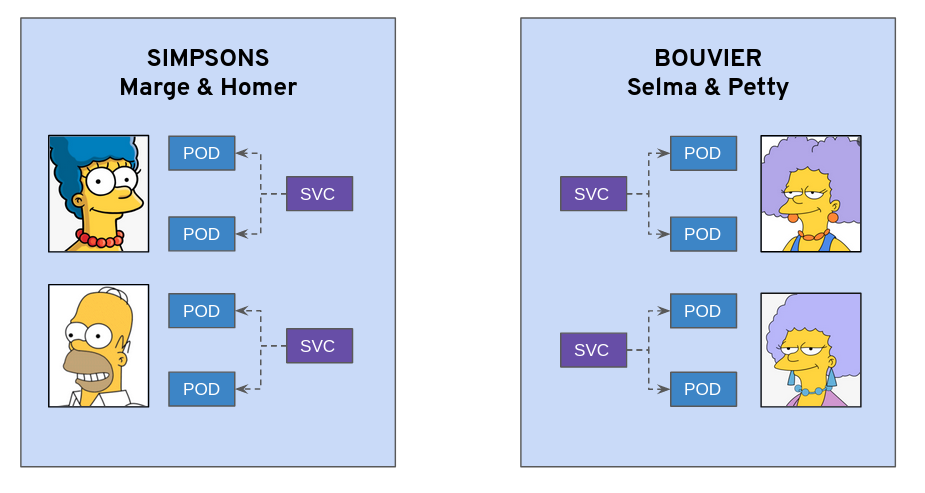
Marge and Homer microservices will be running in the Simpson namespace and Selma and Patty microservices will be running in the Bouvier namespace. Kudos to example.openshift.pub implementation!
- Provision Namespace and ArgoProjects for the demo:
kubectl apply -k argo-projects/
- Login to the ArgoCD Server:
echo https://$(kubectl get route openshift-gitops-server -n openshift-gitops -o jsonpath='{.spec.host}{"\n"}')
- Use admin user with the password:
kubectl get secret/openshift-gitops-cluster -n openshift-gitops -o jsonpath='\''{.data.admin\.password}'\'' | base64 -d
NOTE: You can also log in using the OpenShift SSO because it is enabled using Dex OIDC integration.
- Deploy the ApplicationSet containing the Applications to be secured:
kubectl apply -f argo-apps/dev-env-apps.yaml
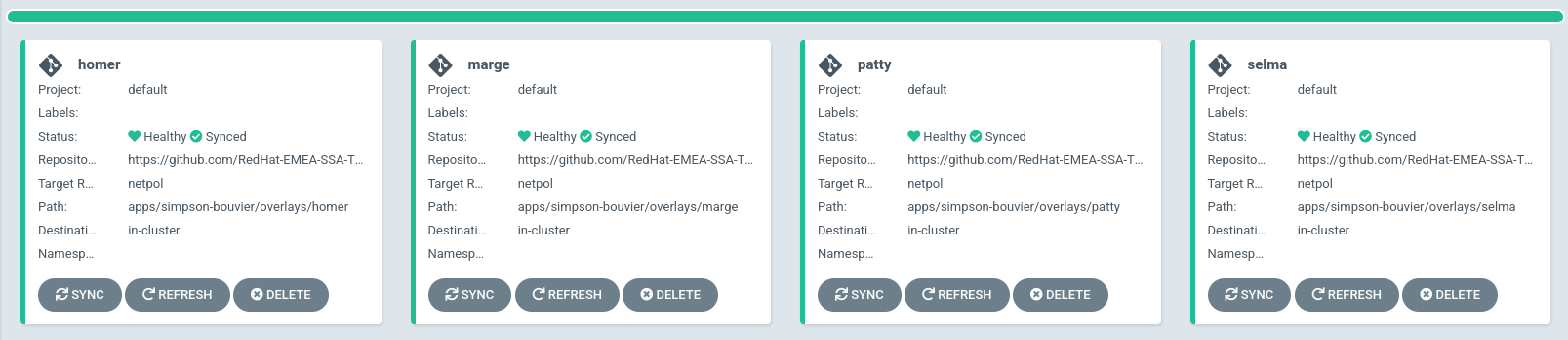
- Check that the applications are deployed properly in ArgoCD:
- Check the pods are up && running:
kubectl get pods -o wide -n simpson
kubectl get pods -o wide -n bouvier
- Check that the apps are working properly:
kubectl -n bouvier exec -ti deploy/patty-deployment -- ./container-helper check
kubectl -n bouvier exec -ti deploy/selma-deployment -- ./container-helper check
kubectl -n simpson exec -ti deploy/homer-deployment -- ./container-helper check
kubectl -n simpson exec -ti deploy/selma-deployment -- ./container-helper check
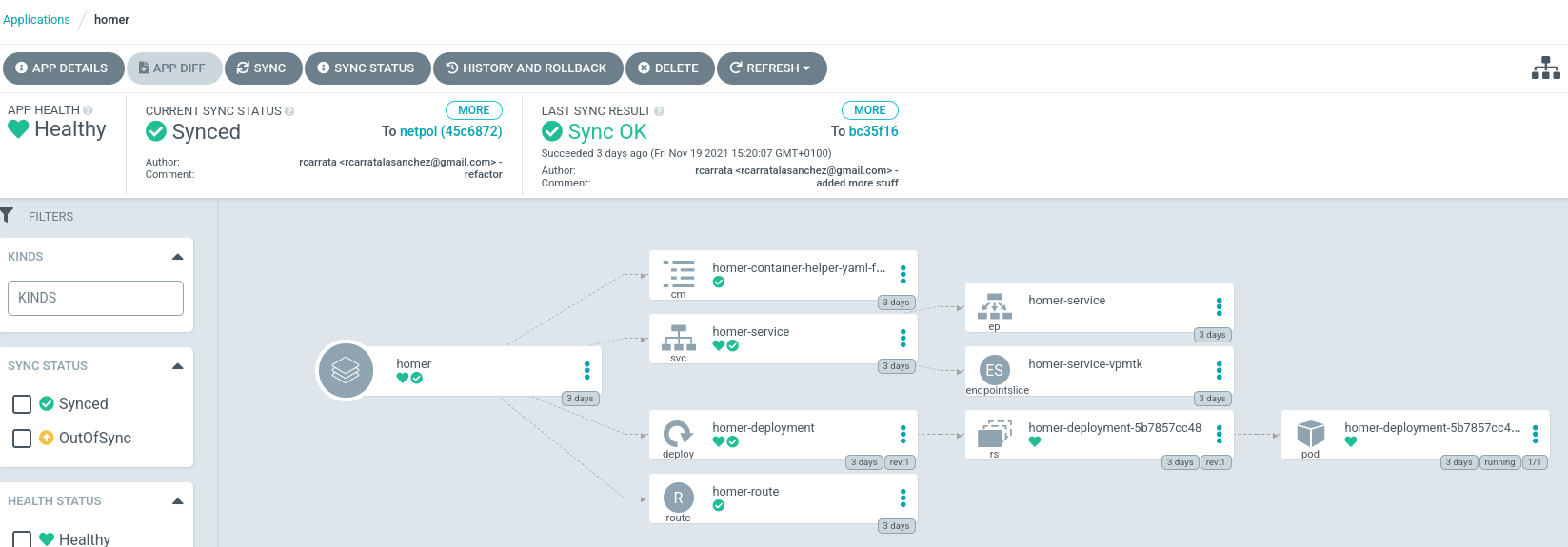
- You can check each Argo Application in ArgoCD:
3. EgressIP Prerequisites
Now that we have our microservices that will help us during this blog post, we need to check the default behavior and set up a scenario to debug and trace our workloads’ source IPs and the flow between the pods/containers of our workloads and the external resources outside of the cluster.
For tracing purposes and to simulate external resources being requested from the workloads inside the OpenShift cluster, we will set up a simple httpd web server and monitor the source IP in the access logs of the web server when we make requests from our workloads.
We can use a Bastion or an external VM to check the logs, simulating the Pod -> External Host connectivity. In this bastion we will install an Httpd Server:
bastion # sudo yum install -y httpd

# grep ^[^#] /etc/httpd/conf/httpd.conf | grep Listen
Listen 8080

bastion # cat > /var/www/html/index.html << EOF
<html>
<head/>
<body>OK</body>
</html>
EOF

bastion # sudo systemctl start httpd
As you noticed, we set up a minimal index.html page to check the response when we hit the httpd server from our different sets of pods.
Let’s open our firewall within the public zone using our specific port 8080:
bastion # sudo firewall-cmd --zone=public --permanent --add-port=8080/tcp
bastion # systemctl restart firewalld
bastion # IP=$(hostname -I | awk '{print $1}')
If we curl from the same host using the external IP to our brand new httpd server, we can verify that we can effectively trace the source IP:
bastion # curl $IP:8080
<html>
<head/>
<body>OK</body>
</html>

# tail /var/log/httpd/access_log
10.1.8.72 - - [25/Nov/2021:07:50:45 -0500] "GET / HTTP/1.1" 200 39 "-" "curl/7.61.1"
OK! All working as expected! From the logs of the httpd server we can check the source IP where the request originated (from the curl in this case).
- Check the different nodes and their HOST_IP, that are the IPs assigned to the master and workers that are part of the OpenShift cluster running RHCoreOS:
kubectl get nodes -o custom-columns=NAME:.metadata.name,HOST_IP:.status.addresses[0].address
NAME                       HOST_IP
ocp-8vr6j-master-0         192.168.126.11
ocp-8vr6j-master-1         192.168.126.12
ocp-8vr6j-master-2         192.168.126.13
ocp-8vr6j-worker-0-82t6f   192.168.126.53
ocp-8vr6j-worker-0-8b45f   192.168.126.54
ocp-8vr6j-worker-0-kvxr9   192.168.126.52
ocp-8vr6j-worker-0-sl79n   192.168.126.51
- As you noticed the host_IPs are within the CIDR range of 192.168.126.0/24, that is defined in the cluster_install.yaml used during the OCP installation:
# cat install-config.yaml | grep machineNetwork -A1
  machineNetwork:
  - cidr: 192.168.126.0/24
- On the other hand, in the Bouvier namespace the pods within are located in these specific workers with the following PodIPs:
kubectl get pod -n bouvier -o custom-columns=NAME:.spec.containers[0].name,NODE:.spec.nodeName,POD_IP:.status.podIP,HOST_IP:.status.hostIP
NAME               NODE                       POD_IP         HOST_IP
container-helper   ocp-8vr6j-worker-0-82t6f   10.128.3.139   192.168.126.53
container-helper   ocp-8vr6j-worker-0-82t6f   10.128.3.138   192.168.126.53
In this case the POD_IP is 10.128.3.139 and 138 (a pod IP inside the SDN) and the Host_IP is 192.168.126.53, which corresponds to worker0 of our cluster.
- Furthermore, in the simpson namespace the pods within are running in the following workers with these PodIPs:
kubectl get pod -n simpson -o custom-columns=NAME:.spec.containers[0].name,NODE:.spec.nodeName,POD_IP:.status.podIP,HOST_IP:.status.hostIP
NAME               NODE                       POD_IP         HOST_IP
container-helper   ocp-8vr6j-worker-0-sl79n   10.129.3.232   192.168.126.51
container-helper   ocp-8vr6j-worker-0-sl79n   10.129.3.233   192.168.126.51
This information is relevant because we will use this Host_IP to check from which source IP the requests are coming.
- Let’s execute a curl inside the OpenShift cluster, requesting the IP of our external resource (web server from before). We need to execute this request first from the Bouvier namespace pods:
for i in {1..4}; do kubectl exec -ti -n bouvier deploy/patty-deployment -- curl  -s -o /dev/null -I -w "%{http_code}" http://192.168.126.1:8080; echo "-> num $i" ; done
200-> num 1
200-> num 2
200-> num 3
200-> num 4
- Now if we check the logs of the httpd server we can see the requests and their source IP:
tail -n5 /var/log/httpd/access_log
10.1.8.72 - - [25/Nov/2021:07:50:45 -0500] "GET / HTTP/1.1" 200 39 "-" "curl/7.61.1"
192.168.126.53 - - [25/Nov/2021:08:04:35 -0500] "HEAD / HTTP/1.1" 200 - "-" "curl/7.61.1"
192.168.126.53 - - [25/Nov/2021:08:04:35 -0500] "HEAD / HTTP/1.1" 200 - "-" "curl/7.61.1"
192.168.126.53 - - [25/Nov/2021:08:04:35 -0500] "HEAD / HTTP/1.1" 200 - "-" "curl/7.61.1"
192.168.126.53 - - [25/Nov/2021:08:04:35 -0500] "HEAD / HTTP/1.1" 200 - "-" "curl/7.61.1"
We check that effectively the source IP used is the HOST_IP of the ocp-8vr6j-worker-0-82t6f worker, and not the POD_IP. Why? Because as we checked in the first diagram by default outbound traffic is NATed with the IP of the nodes, which are normally shared among projects.
- If we do the exact same request but this time within one pod of the Simpson namespace:
for i in {1..4}; do kubectl exec -ti -n simpson deploy/homer-deployment -- curl  -s -o /dev/null -I -w "%{http_code}" http://192.168.126.1:8080; echo "-> num $i" ; done
200-> num 1
200-> num 2
200-> num 3
200-> num 4
- And if we check the logs of the httpd server, we can see the exact same behavior as before: the source IP corresponds to the other worker where the pods of the Simpson namespace are running:
tail -n5 /var/log/httpd/access_log
192.168.126.51 - - [25/Nov/2021:08:33:12 -0500] "HEAD / HTTP/1.1" 200 - "-" "curl/7.61.1"
192.168.126.51 - - [25/Nov/2021:08:33:14 -0500] "HEAD / HTTP/1.1" 200 - "-" "curl/7.61.1"
192.168.126.51 - - [25/Nov/2021:08:33:14 -0500] "HEAD / HTTP/1.1" 200 - "-" "curl/7.61.1"
192.168.126.51 - - [25/Nov/2021:08:33:14 -0500] "HEAD / HTTP/1.1" 200 - "-" "curl/7.61.1"
192.168.126.51 - - [25/Nov/2021:08:33:15 -0500] "HEAD / HTTP/1.1" 200 - "-" "curl/7.61.1"
If we moved the workload to another node, we would receive a totally different source IP, and this is not friendly for traditional firewall systems that need to add whitelisting or firewall rules to identify and control our workloads’ requests / egress traffic.
4. Egress IP with OpenShift OVN Kubernetes
As described before, you can configure the OpenShift SDN default Container Network Interface (CNI) network provider to assign one or more egress IP addresses to a project. In this case we’re using the default CNI in OpenShift 4.6+ - OVN Kubernetes plugin.
The OpenShift Container Platform egress IP address functionality allows you to ensure that the traffic from one or more pods in one or more namespaces has a consistent source IP address for services outside the cluster network.
To assign one or more egress IPs to a namespace or specific pods in a namespace, the following conditions must be satisfied:
- At least one node in your cluster must have the k8s.ovn.org/egress-assignable: “” label.
- An EgressIP object exists that defines one or more egress IP addresses to use as the source IP address for traffic leaving the cluster from pods in a namespace.
NOTE: Check the platform supportability to be aware in which platforms are supported the EgressIP.
4.1 Assigning EgressIP to specific worker
Our purpose is to allow the pods running in the Simpson namespace to use the EgressIP so they always use the same IP from the specific assigned worker (and not use the worker where the pod is running, which can change if it is rescheduled or deleted).
As described in the step before, first of all we need to assign a worker with a specific label to allow the OVN Kubernetes plugin to “assign” this specific EgressIP to the worker node.
- Let’s identify which is the worker where the Homer pod is running:
WORKER_EGRESS=$(kubectl get pod -l app=homer -n simpson -o jsonpath='{.items[0].spec.nodeName}')

echo $WORKER_EGRESS
ocp-8vr6j-worker-0-sl79n
- As we commented, to assign one or more egress IPs to a namespace or specific pods in a namespace, we need to assign the following label:
kubectl label nodes $WORKER_EGRESS k8s.ovn.org/egress-assignable=""
node/ocp-8vr6j-worker-0-sl79n labeled
- The Simpson namespace is assigned with the label “house: simpson” to tag this specific namespace:
kubectl get namespace simpson -o jsonpath='{.metadata.labels}' | jq -r .
{
  "house": "simpson",
  "kubernetes.io/metadata.name": "simpson"
}
- We will use two specific EgressIP, that are in the same range of the machineNetwork / HOST_IP:
EGRESS_IP1="192.168.126.100"
This is important: the EgressIPs need to be in the same CIDR range as the rest of the worker nodes.
4.2 Apply the EgressIP with the namespaceSelector
- We will apply now the EgressIP object that will assign the egressIPs to the nodes assigned:
kubectl apply -f argo-apps/egressip-simpson.yaml
- This ArgoCD Application within the OpenShift GitOps will deploy using GitOps the EgressIP objects stored in the example GitHub repo and using kustomize will render and apply to the specific simpson namespace:
apiVersion: argoproj.io/v1alpha1
kind: Application
metadata:
  name: simpson-egressip
  namespace: openshift-gitops
spec:
  destination:
    namespace: simpson
    server: https://kubernetes.default.svc
  project: default
  source:
    path: egressip/overlays/egressip-simpson
    repoURL: https://github.com/RedHat-EMEA-SSA-Team/ns-apps
    targetRevision: egressip
  syncPolicy:
    automated:
      prune: true
      selfHeal: false
    syncOptions:
    - CreateNamespace=true
- If we check the ArgoCD application where the EgressIP object is managed by the EgressIP Demo ArgoCD application:
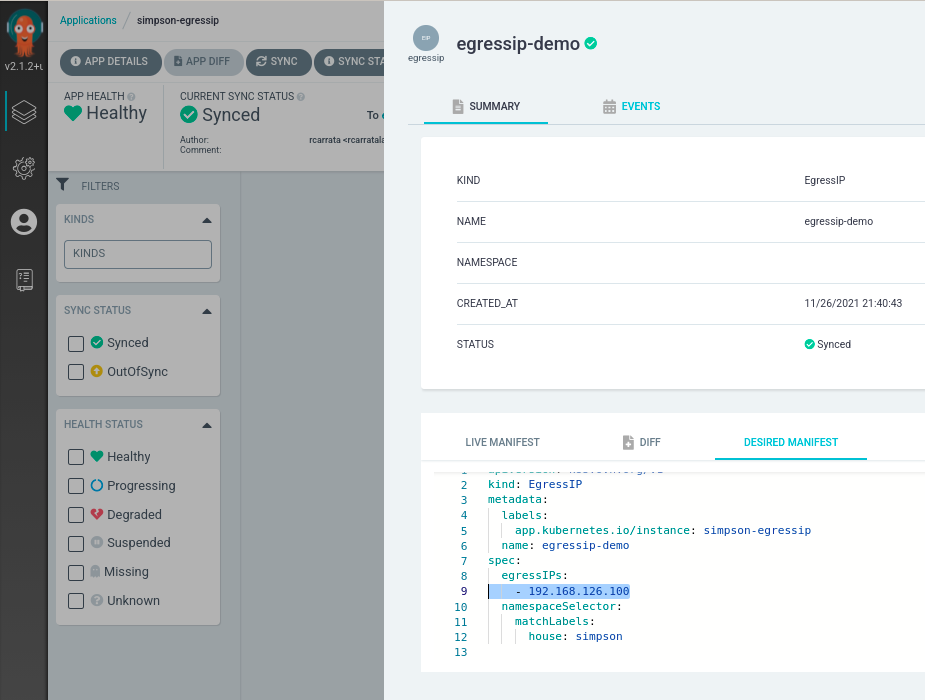
we can see the EgressIP applied using GitOps:
apiVersion: k8s.ovn.org/v1
kind: EgressIP
metadata:
  labels:
    app.kubernetes.io/instance: simpson-egressip
  name: egressip-demo
spec:
  egressIPs:
    - 192.168.126.100
  namespaceSelector:
    matchLabels:
      house: simpson
We can check several interesting things in the EgressIP definition. First, the apiVersion corresponds to k8s.ovn.org/v1, because as we said before we are using the OVN Kubernetes plugin. On the other hand, the egressIPs value is the one defined in the previous step, and finally the namespaceSelector is using a matchLabel that selects the Simpson project (house=simpson).
After a couple of seconds, if we check the object that we’ve created:
kubectl get egressip
NAME            EGRESSIPS         ASSIGNED NODE              ASSIGNED EGRESSIPS
egressip-demo   192.168.126.100   ocp-8vr6j-worker-0-sl79n   192.168.126.100
The egressIP1 is properly assigned to the worker node we labeled in the previous step.
If we check the egressip-demo object specifically, we can confirm that the status shows the egressIP is assigned to the node:
apiVersion: k8s.ovn.org/v1
kind: EgressIP
metadata:
  annotations:
    kubectl.kubernetes.io/last-applied-configuration: |
      {"apiVersion":"k8s.ovn.org/v1","kind":"EgressIP","metadata":{"annotations":{},"labels":{"app.kubernetes.io/instance":"simpson-egressip"},"name":"egressip-demo"},"spec":{"egressIPs":["192.168.126.100"],"namespaceSelector":{"matchLabels":{"house":"simpson"}}}}
  creationTimestamp: "2021-11-26T20:40:43Z"
  generation: 3
  labels:
    app.kubernetes.io/instance: simpson-egressip
  name: egressip-demo
  resourceVersion: "10348402"
  uid: ae1ccb00-70b6-4322-a538-f646cccd4ec4
spec:
  egressIPs:
  - 192.168.126.100
  namespaceSelector:
    matchLabels:
      house: simpson
  podSelector: {}
status:
  items:
  - egressIP: 192.168.126.100
    node: ocp-8vr6j-worker-0-82t6f
Let’s dig a bit deeper to check how OVN Kubernetes handles the EgressIP and how we can inspect it.
- Within the OVN Kube Master pod in the Northbound container, we can check an OVN Northbound overview of the database contents with the command ovn-nbctl:
kubectl -n openshift-ovn-kubernetes exec -ti ovnkube-master-7m58n  -c northd -- ovn-nbctl show | grep -B1 -A3 "192.168.126.100"
    nat 385dd68c-62a2-4394-a3ef-6b86afc3ed43
        external ip: "192.168.126.100"
        logical ip: "10.129.3.232"
        type: "snat"
    nat a211749e-e47a-4db2-bcf5-d4c8c73d87ce
        external ip: "192.168.126.100"
        logical ip: "10.129.3.233"
        type: "snat"
If we grep the output with our EgressIP, we can see several interesting things: two IPs are matching the external IP (EgressIP) as the logical IPs with the type SNAT (Source Network Address Translation).
- Let’s check to whom correspond these logical IPs:
kubectl get pod -n simpson -o wide | egrep -i '192.168.3.232|192.168.3.233'
NAME                                READY   STATUS    RESTARTS   AGE     IP             NODE                       NOMINATED NODE   READINESS GATES
homer-deployment-5b7857cc48-fs2w4   1/1     Running   0          6d23h   10.129.3.232   ocp-8vr6j-worker-0-sl79n   <none>           <none>
marge-deployment-75474c9ff-jpkkv    1/1     Running   0          6d23h   10.129.3.233   ocp-8vr6j-worker-0-sl79n   <none>           <none>
Aha! The IPs correspond to the two pods that are created within the Simpson namespace. That makes a lot of sense, because the EgressIP is assigned with a namespaceSelector to matching labels that select the Simpson namespace, and all of the pods inside this namespace will use the EgressIP.
If you want to dig further, check within the OVN GitHub source code the addNamespaceEgressIP function that adds the egressIP to the specific namespace and the createEgressReroutePolicy that uses logical router policies to force egress traffic to the egress node.
In a nutshell the addPodEgressIP function retrieves all the pods in the namespace that matches the namespaceSelector and will Add to Pod EgressIP and ReroutePolicy generating a NATRule for each pod and rerouting the traffic from the PodIP to the EgressIP in the worker Node.
- Let’s check if this is true, performing the same request as we checked in the previous steps (without the EgressIP assigned):
for i in {1..4}; do kubectl exec -ti -n simpson deploy/homer-deployment -- curl  -s -o /dev/null -I -w "%{http_code}" http://192.168.126.1:8080; echo "-> num $i" ; done
200-> num 1
200-> num 2
200-> num 3
200-> num 4

tail -n4 /var/log/httpd/access_log
192.168.126.100 - - [26/Nov/2021:12:53:13 -0500] "HEAD / HTTP/1.1" 200 - "-" "curl/7.61.1"
192.168.126.100 - - [26/Nov/2021:12:53:15 -0500] "HEAD / HTTP/1.1" 200 - "-" "curl/7.61.1"
192.168.126.100 - - [26/Nov/2021:12:53:16 -0500] "HEAD / HTTP/1.1" 200 - "-" "curl/7.61.1"
192.168.126.100 - - [26/Nov/2021:12:53:18 -0500] "HEAD / HTTP/1.1" 200 - "-" "curl/7.61.1"
As we can see, the source IP received by the httpd server is, as expected, the EgressIP (source IP). No matter where they are running, these pods will always use the same IP when reaching external services / hosts, increasing traceability and security. Cool, isn’t it?
- Let’s check again the pods of the Bouvier namespace, which do not have the labels that match the namespaceSelector in the EgressIP, and let’s execute the same request as before:
for i in {1..4}; do kubectl exec -ti -n bouvier deploy/patty-deployment -- curl  -s -o /dev/null -I -w "%{http_code}" http://192.168.126.1:8080; echo "-> num $i" ; done
200-> num 1
200-> num 2
200-> num 3
200-> num 4

tail -n4 /var/log/httpd/access_log
192.168.126.53 - - [26/Nov/2021:13:23:37 -0500] "HEAD / HTTP/1.1" 200 - "-" "curl/7.61.1"
192.168.126.53 - - [26/Nov/2021:13:23:38 -0500] "HEAD / HTTP/1.1" 200 - "-" "curl/7.61.1"
192.168.126.53 - - [26/Nov/2021:13:23:40 -0500] "HEAD / HTTP/1.1" 200 - "-" "curl/7.61.1"
192.168.126.53 - - [26/Nov/2021:13:23:42 -0500] "HEAD / HTTP/1.1" 200 - "-" "curl/7.61.1"
As we can see, the source IP received by the external server/host is the worker node where the pod of Patty-deployment within the Bouvier namespace is running.
Be aware that when creating an EgressIP object, the following conditions apply to nodes that are labeled with the k8s.ovn.org/egress-assignable: “” label:
- An egress IP address is never assigned to more than one node at a time.
- An egress IP address is equally balanced between available nodes that can host the egress IP address.
- If the spec.EgressIPs array in an EgressIP object specifies more than one IP address, no node will ever host more than one of the specified addresses.
4.3 Automatic Failover of EgressIP
What happens when a worker that handles the EgressIP becomes unavailable? Do we have a Single Point of Failure / SPOF?
As is specified in the official documentation if a node becomes unavailable, any egress IP addresses assigned to it are automatically reassigned, subject to the previously described conditions.
Let’s try it!
- First let’s label another worker node with the egress-assignable label, which will be our failover EgressIP worker node:
kubectl label nodes ocp-8vr6j-worker-0-82t6f k8s.ovn.org/egress-assignable=""
- Now let’s do a bit of chaos, shutting down our worker node where the egressIP is assigned:
kubectl debug node/$WORKER_EGRESS
Starting pod/ocp-8vr6j-worker-0-sl79n-debug ...
To use host binaries, run `chroot /host`
Pod IP: 192.168.126.51
If you don't see a command prompt, try pressing enter.
sh-4.4# chroot /host bash
[root@ocp-8vr6j-worker-0-sl79n /]#
[root@ocp-8vr6j-worker-0-sl79n /]# shutdown now
- Now we can check that the EgressIP worker node that was assigned with the EgressIP is in NotReady state as we expected:
kubectl get nodes -l k8s.ovn.org/egress-assignable=
NAME                       STATUS     ROLES    AGE   VERSION
ocp-8vr6j-worker-0-82t6f   Ready      worker   18d   v1.22.0-rc.0+a44d0f0
ocp-8vr6j-worker-0-sl79n   NotReady   worker   18d   v1.22.0-rc.0+a44d0f0
but we have our other node assigned with the specific label, in a Ready state.
- Let’s check the EgressIP object now:
kubectl get egressip
NAME            EGRESSIPS         ASSIGNED NODE              ASSIGNED EGRESSIPS
egressip-demo   192.168.126.100   ocp-8vr6j-worker-0-82t6f   192.168.126.100
It automatically rescheduled the EgressIP when it detected the failure of the node that was assigned the EgressIP!
- Let’s try to curl the external Host and check the source IP in that server:
for i in {1..4}; do kubectl exec -ti -n simpson deploy/homer-deployment -- curl  -s -o /dev/null -I -w "%{http_code}" http://192.168.126.1:8080; echo "-> num $i" ; done
200-> num 1
200-> num 2
200-> num 3
200-> num 4

tail -n4 /var/log/httpd/access_log
192.168.126.100 - - [26/Nov/2021:13:05:14 -0500] "HEAD / HTTP/1.1" 200 - "-" "curl/7.61.1"
192.168.126.100 - - [26/Nov/2021:13:05:15 -0500] "HEAD / HTTP/1.1" 200 - "-" "curl/7.61.1"
192.168.126.100 - - [26/Nov/2021:13:05:17 -0500] "HEAD / HTTP/1.1" 200 - "-" "curl/7.61.1"
192.168.126.100 - - [26/Nov/2021:13:05:19 -0500] "HEAD / HTTP/1.1" 200 - "-" "curl/7.61.1"
Amazing! OVN automatically handled the failure of the node, and now we have another node with the EgressIP handling the requests from the pods of the expected namespace.
And with that ends this blog post about EgressIP with OVN Kubernetes plugin in OpenShift.
Big thanks to Daniel Mellado, who helped me during this blog post with his wisdom and expertise. Kudos @dmellado++!
NOTE: Opinions expressed in this blog are my own and do not necessarily reflect that of the company I work for.
Happy Egressing!